Disclosure: Lights On HQ is reader-supported. If you buy through links on this page we may earn a commission, at no extra cost to you. Full disclosure.
Research-based guide. This page explains the math and uses example numbers. It doesn’t report hands-on testing. Model specs are from manufacturer pages, checked October 16, 2026. See our methodology.
📝 TL;DR
- You need two numbers: capacity (Wh) = how long things run, and output (W) = what you can run. Plus surge watts for motors.
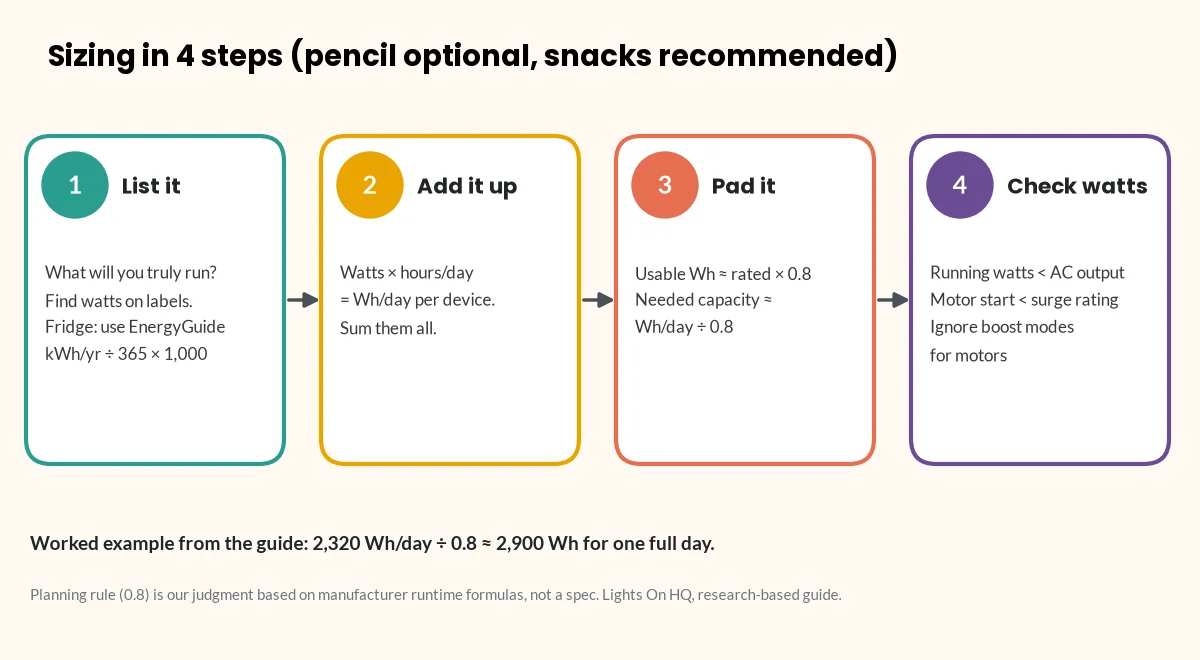
- Four steps: list your devices → add up Wh per day → divide by 0.8 for real-world losses → check running and surge watts.
- Our example household (fridge, Wi-Fi, lights, laptop, phones) uses about 2,320 Wh/day, so it needs about 2,900 Wh for one full day.
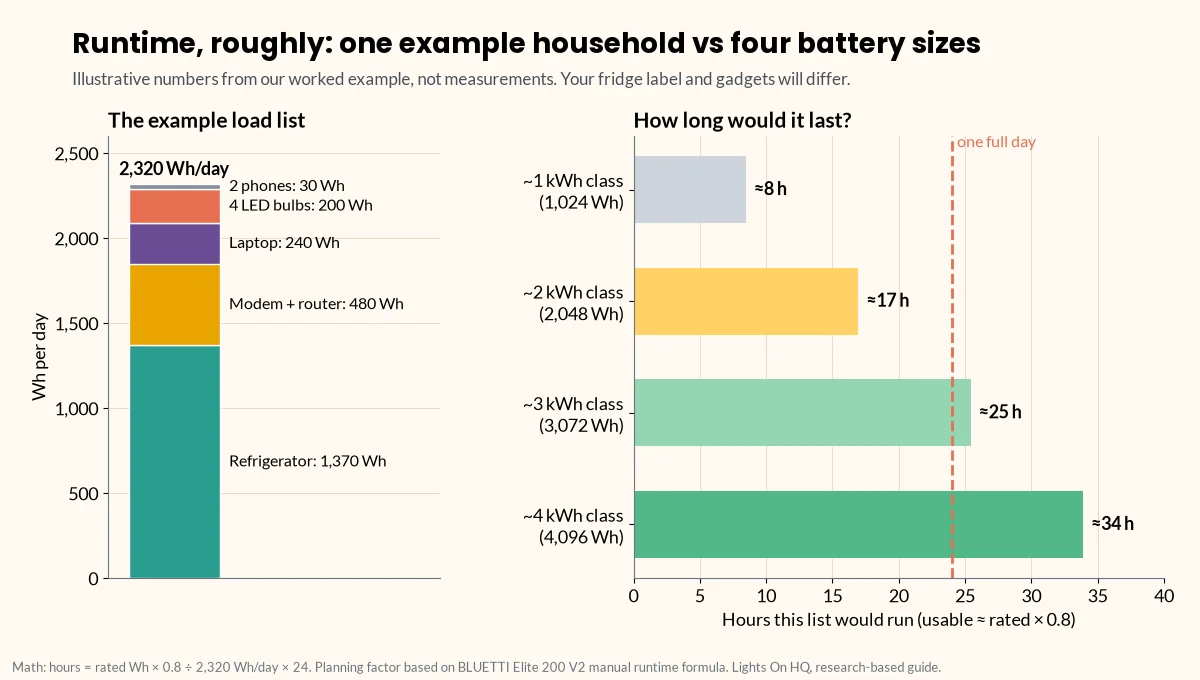
- A 2 kWh unit covers that list for roughly 17 hours; a 3 kWh-class unit covers the whole day.
Here’s how most of us discover we need a power station: the power goes out, the house goes quiet, and everyone gathers in the living room holding glowing phones at 14% battery like tiny campfires. Then comes the shopping, and the very reasonable question: how big do I actually need?
Power stations are sold by two numbers, and you need both:
- Capacity (watt-hours, Wh): how much energy is stored. This sets how long things run. Think: the size of the gas tank.
- Output (watts, W): how much power it can deliver at once. This sets what you can run. Think: the size of the engine. A third number, surge watts, covers the short spike when motors start.
Getting either one wrong is the most common sizing mistake. Here’s a four-step method you can do with a pencil, or with our runtime calculator, which uses the same math.
Step 1: List what you actually need to power
Be honest here. The espresso machine is not “essential.” (Okay, it’s a little essential.) Write down only what you’d truly run during an outage (or at camp). For each item, find its watts:
- Label or nameplate: most devices have wattage printed on the back, the bottom or the power brick.
- Only amps listed? Multiply amps × volts. Most US household devices are 120 V. This method is from Virginia Tech’s extension guide on estimating appliance energy use (Virginia Cooperative Extension).
- Refrigerators and freezers: use the yearly kWh on the yellow EnergyGuide label, not nameplate watts. The compressor cycles on and off, so nameplate watts overstate daily use. Daily Wh = (kWh per year ÷ 365) × 1,000.
- Most accurate: a plug-in watt meter shows real draw over a day.
Step 2: Add up watt-hours per day
For each device: watts × hours used per day = Wh per day. Add them all up. That’s it. That’s the math.
Worked example (illustrative numbers. Use your own labels.)
| Device | Watts (example) | Hours/day | Wh/day |
|---|---|---|---|
| Refrigerator (EnergyGuide label says 500 kWh/yr) | n/a (cycles) | 24 | 1,370 |
| Modem + Wi-Fi router | 20 | 24 | 480 |
| 4 LED bulbs | 4 × 10 = 40 | 5 | 200 |
| Laptop | 60 | 4 | 240 |
| 2 phones (about 15 Wh each per charge) | n/a | 1 charge each | 30 |
| Total | 2,320 Wh/day |
These are example figures to show the method. They’re not measurements. Your fridge label and device bricks will give different numbers.
⚡ Quick take
Notice who’s hogging the battery? The fridge is more than half the total. If your list includes a fridge, its EnergyGuide number is the single most important figure on your worksheet.
Step 3: Add an efficiency margin (you won’t get 100% of the rated Wh)
Bad news: a power station’s rated capacity isn’t all usable at the outlet. The inverter loses some energy turning battery DC into AC, and the battery isn’t run all the way to zero. For example, BLUETTI’s Elite 200 V2 user manual estimates runtime as:
Runtime = capacity × 90% (depth of discharge) × inverter efficiency (over 85%) ÷ (load + about 10 W self-consumption) (BLUETTI manual, PDF)
That works out to roughly 75–80% of rated Wh reaching your AC devices. Our planning rule (a judgment call, not a manufacturer spec) is:
Usable Wh ≈ rated Wh × 0.8. Use 0.75 if you want a safety margin.
So required capacity ≈ daily Wh ÷ 0.8.
For the example: 2,320 ÷ 0.8 = about 2,900 Wh for one full day.
What that means in practice:
- A 2 kWh unit (≈1,640 usable Wh) would cover this list for about 17 hours (1,640 ÷ 2,320 × 24). You’d get a full day by dropping the laptop and cutting router hours, or by adding solar.
- A 3 kWh-class unit (for example, Jackery’s 3,072 Wh HomePower 3000 or Anker’s 3,840 Wh F3800 Plus) would cover the whole day.
- An expandable unit (for example, the EcoFlow DELTA 2 Max, up to 6,144 Wh with extra batteries) lets you start at 2 kWh and grow.
Step 4: Check output watts and surge
Capacity tells you how long. Output tells you whether it will run at all. A giant tank with a tiny engine still won’t tow the boat.
- Running watts: add up the watts of everything that might run at the same time. In the example, that might be fridge + router + lights + laptop. Use the fridge’s actual running draw from a watt meter or the manual. Your total must be below the station’s continuous AC output.
- Surge watts: motors (fridges, freezers, pumps, some power tools) pull a short spike when they start. That spike can be several times their running draw. Check the appliance manual or ask the manufacturer. The station’s surge rating has to cover it.
- Beware “boost” modes: “X-Boost” (EcoFlow) and “Power Lifting” (BLUETTI) let heating appliances run above the rated output at reduced power. BLUETTI’s Elite 200 V2 manual says this mode isn’t for motor or compressor loads. Don’t count boost figures when you size for motors. See surge vs running watts explained.
- 240 V appliances (well pumps, some central AC) need a unit with 240 V output. In our database, that’s the EcoFlow DELTA Pro 3 and Anker SOLIX F3800 Plus. These, and any connection to house circuits, require a licensed electrician and a proper transfer switch or inlet. Transfer switch explainer
Quick size guide
A rough starting point (our judgment, based on the method above). Your own load list matters more.
| Your goal | Typical daily need | Capacity class to shortlist | Example models (Oct 16, 2026 store price) |
|---|---|---|---|
| Phones, Wi-Fi and lights for an evening; small UPS for a router or PC | 200–500 Wh | 250–500 Wh | EcoFlow RIVER 3 Plus (286 Wh, $299) |
| Overnight essentials, CPAP*, laptop work | 500–1,000 Wh | ~1 kWh | BLUETTI Elite 100 V2 ($499), Jackery Explorer 1000 v2 ($519), EcoFlow DELTA 3 ($629) |
| Fridge + essentials for most of a day | 1,500–2,500 Wh | ~2 kWh | BLUETTI Elite 200 V2 ($899), Anker SOLIX C2000 Gen 2 ($999.99), EcoFlow DELTA 2 Max ($1,049) |
| Fridge + essentials for a full day or more; some bigger loads | 2,500 Wh+ | 3–4 kWh or expandable | Jackery HomePower 3000 ($1,349), Anker SOLIX F3800 Plus ($2,599.99), EcoFlow DELTA Pro 3 ($2,799) |
⚠️ Safety note: medical devices
*For CPAP and other medical devices, confirm power needs and compatibility with your provider and the device manufacturer. Don’t rely on a power station as your only plan for life-sustaining equipment. CPAP sizing guide
Prices are brand-store prices on our check date. They change often and aren’t live. Full specs and sources are in the spec database.
Don’t forget recharging
For outages longer than one battery’s worth, recharge speed matters as much as size:
- Solar input ranges from 220 W (RIVER 3 Plus) to 3,200 W (F3800 Plus) in our database. More input means more energy back per sunny hour. See solar charging time calculator.
- Gas generator or car charging options vary by brand.
- Sometimes a smaller unit plus solar beats a bigger unit with no way to recharge.
⚡ Quick take
A battery you can refill beats a bigger battery you can’t. If outages in your area tend to last days, budget for solar input, not just watt-hours.
Printable worksheet
Copy this into a notes app or print it and stick it on the fridge (fitting, really):
Device | Watts | Hours/day | Wh/day | Runs at same time? (Y/N) | Motor? (Y/N)
-------|-------|-----------|--------|--------------------------|-------------
       |       |           |        |                          |
       |       |           |        |                          |
TOTAL Wh/day: ______   ÷ 0.8 = required capacity: ______ Wh
Max simultaneous running watts: ______  (must be < station AC output)
Largest motor starting watts: ______    (must be < station surge rating)
Next steps
- Plug your list into the runtime calculator.
- Compare brands: EcoFlow vs Jackery vs Bluetti vs Anker SOLIX.
- Weighing two 2 kWh units: DELTA 2 Max vs Explorer 2000 v2.
- Fridge-specific: How long will a 2,000 Wh power station run a fridge?
- Hub: Sizing & runtime guides
Last checked: October 16, 2026. Found a mistake in the math? Tell us.
Comments
One response to “What Size Power Station Do I Need? A Load-List Method”
[…] battery. Router, lights, phones: every extra watt comes out of the fridge’s share. Use the load-list method to plan the whole […]