Category: Sizing & Runtime

  • Can a Power Station Run a Space Heater or Window AC? (The Honest Answer)

    Can a Power Station Run a Space Heater or Window AC? (The Honest Answer)

    Disclosure: Lights On HQ is reader-supported. If you buy through links on this page we may earn a commission, at no extra cost to you. Full disclosure.

    Research-based, not hands-on tested. Specs come from manufacturer US product pages, checked October 16, 2026 (see our spec database). Runtimes are calculated estimates. See how we research.

    ⚡ Quick answer

    • Space heater: technically yes on units with at least ~1,500 W of AC output, but a 1,500 W heater on high drains a ~1 kWh unit in roughly 35 to 40 minutes and a ~2 kWh unit in about 70 minutes (estimates). Not a winter outage plan.
    • Window AC: more realistic than a heater, because many small units draw far less than 1,500 W and the compressor cycles. Check the watts on your AC’s label, then run the numbers in our calculator.
    • Smarter warmth: electric blankets and heated mattress pads use a small fraction of a space heater’s power.
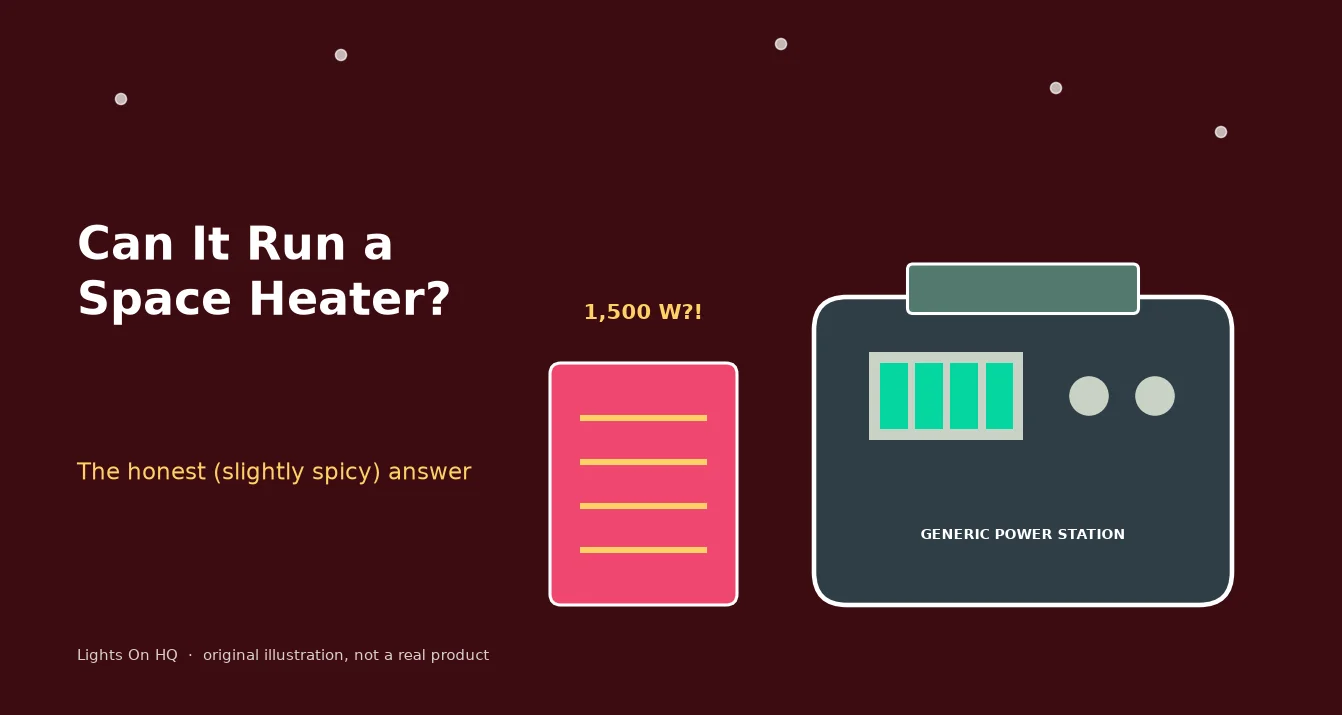
    Illustration of a red space heater labeled "1,500 W?!" next to a generic, unbranded power station.
    The honest, slightly spicy answer. (Original illustration; generic unit, not a real product.)

    It’s January, the power’s out, and you’re eyeing that space heater like it owes you money. You have a shiny power station. Surely it can handle a little heater?

    Let’s do the math, because the math is a bit of a buzzkill.

    Why space heaters are battery monsters

    Most plug-in space heaters top out at 1,500 W on high (that’s about the most a standard 120 V household outlet circuit is meant to supply continuously). Heaters turn electricity straight into heat, so there’s no clever efficiency trick. 1,500 W is 1,500 W.

    Runtime ≈ battery Wh × 0.85 ÷ heater watts

    So a 1,024 Wh unit: 1,024 × 0.85 ÷ 1,500 ≈ 0.58 hours, about 35 minutes.
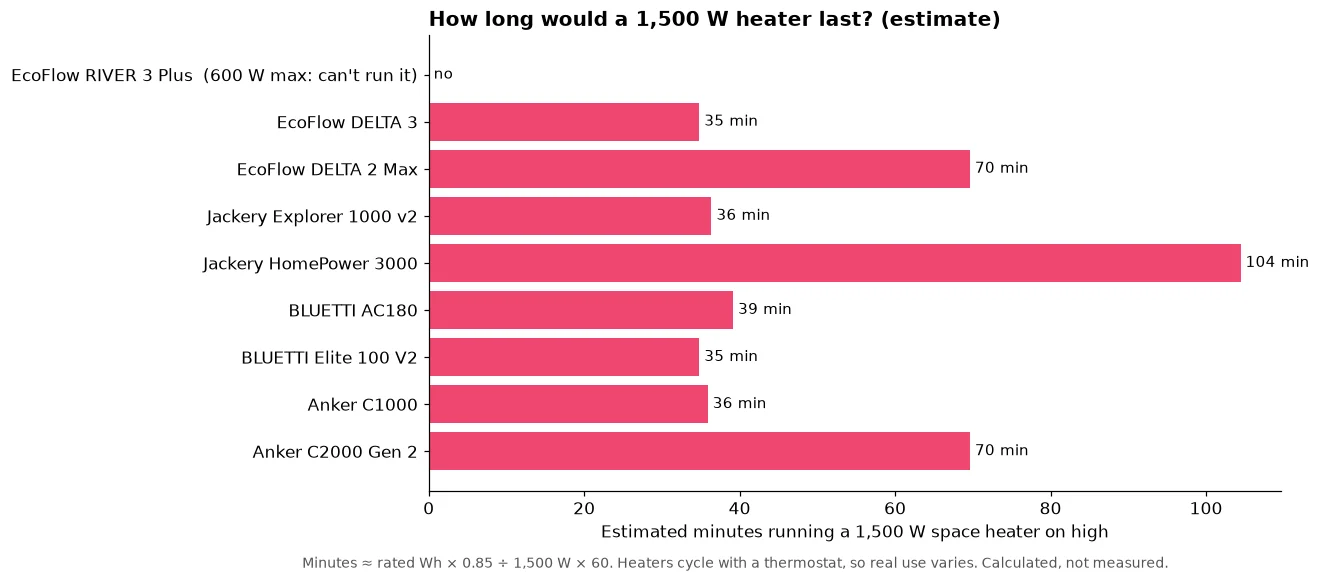
    Bar chart of estimated minutes a 1,500 W space heater on high would run on nine power stations: the RIVER 3 Plus cannot run it, about 35 to 39 minutes on 1 kWh units, about 70 on 2 kWh units and about 104 on the Jackery HomePower 3000.
    Space heaters drain batteries fast. Calculated estimates, not measurements.
    Model Capacity AC output Can it start a 1,500 W heater? Est. minutes on high
    EcoFlow RIVER 3 Plus 286 Wh 600 W No (output too low) n/a
    EcoFlow DELTA 3 1,024 Wh 1,800 W Yes ~35
    Jackery Explorer 1000 v2 1,070 Wh 1,500 W Right at the limit ~36
    BLUETTI AC180 1,152 Wh 1,800 W Yes ~39
    EcoFlow DELTA 2 Max 2,048 Wh 2,400 W Yes ~70
    Anker SOLIX C2000 Gen 2 2,048 Wh 2,400 W Yes ~70
    Jackery HomePower 3000 3,072 Wh 3,600 W Yes ~104
    EcoFlow DELTA Pro 3 4,096 Wh 4,000 W Yes ~139
    Anker SOLIX F3800 Plus 3,840 Wh 6,000 W Yes ~131

    Even the 4 kWh beasts last a couple of hours. A thermostat that cycles the heater on and off stretches this, and the low setting helps, but you’re still burning your fridge’s and phone’s power to heat air that leaks out the windows.

    About “boost” modes: features like EcoFlow X-Boost or BLUETTI Power Lifting let some heating devices run at reduced power on smaller units. That means the heater runs weaker, not that you get free heat.

    Window AC: actually doable (sometimes)

    Air conditioners are a different animal:

    • A small window unit often draws a few hundred watts while running, far less than a space heater. The exact number is on its label (look for watts or amps × 120).
    • The compressor cycles on and off, so average draw is lower than the running number.
    • Compressors have a startup surge. Your power station’s surge rating needs to handle it. Inverter-type (“variable speed”) ACs are typically gentler at startup.

    Example math, using a hypothetical 500 W small window AC running constantly (worst case): a 2,048 Wh unit gives about 2,048 × 0.85 ÷ 500 ≈ 3.5 hours. With cycling, real runtime is longer. With solar topping up in the daytime (when you need AC most anyway), even better. See our solar pairing guide.

    Central AC is a whole-house, usually 240 V load. That’s big-unit-plus-electrician territory, not a plug-in job.

    Better ways to stay warm in an outage

    • Electric blanket or heated mattress pad: typically a small fraction of a space heater’s draw. Check the label.
    • Layer up and close off rooms. Heat one small room, not the whole house.
    • Save battery for the essentials: furnace blower (gas furnaces need electricity for the fan and controls; connecting one to backup power is a job for an electrician with a proper transfer switch or inlet), fridge, medical devices.

    ⚠️ Safety, please

    • Never run a space heater on an extension cord daisy chain, and keep it 3 feet from anything that burns.
    • Never plug a power station into a wall outlet to feed the house (backfeeding). It can electrocute line workers. Use an electrician-installed transfer switch.
    • Never use a gas generator, grill or camp stove indoors for heat. Carbon monoxide kills.

    Bottom line

    Space heater on a power station: possible, painfully short. Window AC: workable with a big enough unit and some sun. Plug your real appliance watts into the runtime calculator, or try the Blackout Survival Challenge and watch what a heater does to your survival time (spoiler: nothing good).

  • How Long Will a 2,000Wh Power Station Run a Fridge?

    How Long Will a 2,000Wh Power Station Run a Fridge?

    Disclosure: Lights On HQ is reader-supported. If you buy through links on this page we may earn a commission, at no extra cost to you. Full disclosure.

    Research-based guide. This page shows the math with example numbers. It doesn’t report hands-on testing. Manufacturer formulas and specs were checked October 16, 2026. See our methodology.

    📝 TL;DR

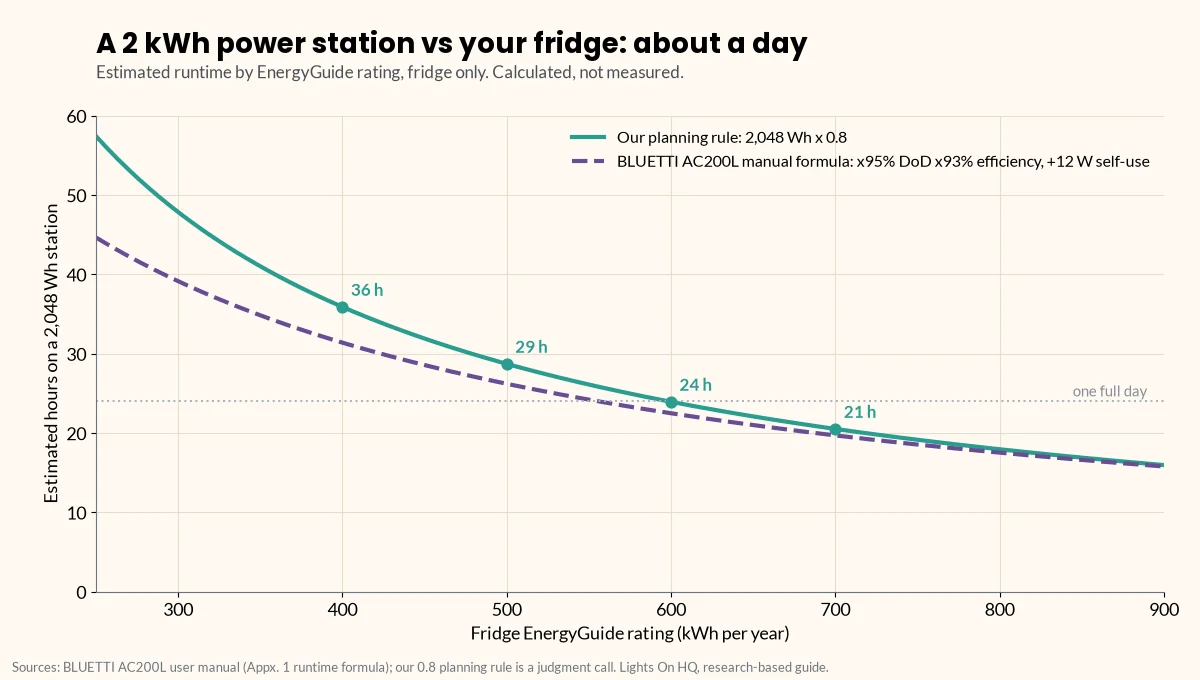
    • Short answer: a ~2,000 Wh (2,048 Wh) power station runs a fridge rated 400–700 kWh/year for roughly 20–36 hours, using our planning rule (usable ≈ 80% of rated).
    • The formula: hours ≈ (rated Wh × 0.8) ÷ (fridge’s kWh per year ÷ 8.76).
    • Example: a 500 kWh/yr fridge averages about 57 W, so 2,048 Wh lasts about 29 hours (or about 26 hours using BLUETTI’s AC200L manual formula with self-consumption).
    • Shorter in real life if: the kitchen is hot, the door keeps opening, the battery is cold, or other things are plugged in.

    You bought (or are eyeing) a 2 kWh power station. The storm forecast looks spicy. And there’s one question rattling around your brain at 2 a.m.: will the ice cream make it?

    Good news: this is just arithmetic, and you only need one number from your fridge. Let’s do it.

    The one number you need: kWh per year

    Find the yellow EnergyGuide label on your fridge (or the spec sheet for your model) and look for kWh per year. That’s the fridge’s estimated annual energy use, and it already accounts for the compressor cycling on and off.

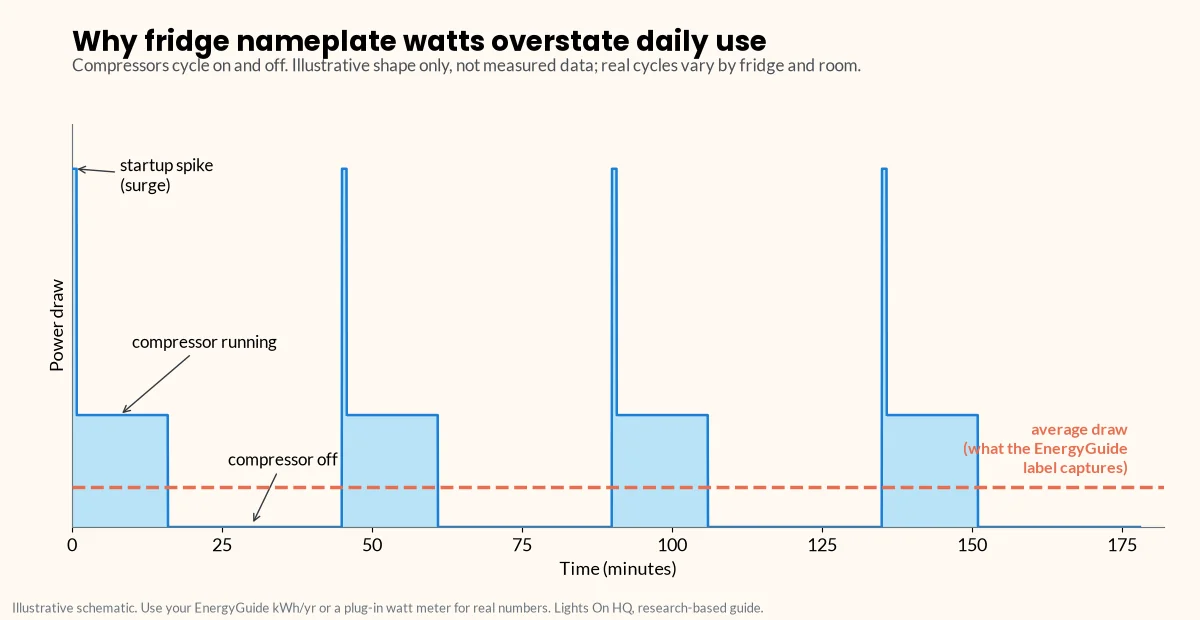
    Why not use the watts on the nameplate? Because a fridge doesn’t run its compressor constantly. It cycles: on for a while, off for a while. The nameplate tells you how hard it pulls when it’s on, not how much energy it uses over a day.

    Illustrative line chart of a refrigerator's power draw over three hours: short startup spikes, flat periods while the compressor runs, and stretches at zero while it is off, with a dashed line showing the much lower average draw that the EnergyGuide label captures.
    Compressors cycle on and off, so nameplate watts overstate daily use. Illustrative shape, not measured data.

    Convert the label number:

    • Daily Wh = kWh per year ÷ 365 × 1,000
    • Average watts = daily Wh ÷ 24 (or simply kWh per year ÷ 8.76)

    Example: 500 kWh/yr → about 1,370 Wh/day → about 57 W average.

    Two ways to estimate runtime

    Method 1: Our planning rule (simple)

    A power station can’t deliver all of its rated capacity at the AC outlet. Inverter losses and depth of discharge eat some of it. Our rule of thumb (a judgment call, not a manufacturer spec):

    Usable Wh ≈ rated Wh × 0.8

    So for a 2,048 Wh unit: about 1,640 usable Wh.

    Hours ≈ 1,640 ÷ average fridge watts. For the 500 kWh/yr fridge: 1,640 ÷ 57 ≈ 29 hours.

    Method 2: A manufacturer’s own formula (more detailed)

    BLUETTI’s AC200L user manual gives this formula (manual PDF):

    Operation time = capacity × DoD × η ÷ (load + self-consumption)

    …with 95% depth of discharge, inverter efficiency “typically over 93%” and about 12 W of self-consumption for the AC200L. BLUETTI’s own example: a 40 W fridge runs about 34.7 hours (2,048 × 95% × 93% ÷ 52 W).

    For our 500 kWh/yr fridge (57 W average): 2,048 × 0.95 × 0.93 ÷ (57 + 12) ≈ 26 hours.

    Notice that self-consumption matters for small loads like a fridge: those 12 W are a real chunk of a 57 W average. Other models have different efficiencies and idle draw; BLUETTI’s Elite 200 V2 manual, for example, uses 90% DoD, inverter efficiency over 85% and about 10 W self-consumption (manual PDF).

    ⚡ Quick take

    Both methods land in the same neighborhood: about a day for a typical fridge on 2 kWh. If you need certainty, use the watt meter and the more conservative number.

    The cheat sheet: 2,048 Wh vs EnergyGuide ratings

    These are calculated, not measured. Your fridge, room temperature and habits will change the result.

    EnergyGuide rating Avg. watts Wh per day Hours (0.8 rule) Hours (AC200L manual formula)
    300 kWh/yr 34 W 822 ~48 h ~39 h
    400 kWh/yr 46 W 1,096 ~36 h ~31 h
    500 kWh/yr 57 W 1,370 ~29 h ~26 h
    600 kWh/yr 68 W 1,644 ~24 h ~22 h
    700 kWh/yr 80 W 1,918 ~21 h ~20 h
    800 kWh/yr 91 W 2,192 ~18 h ~18 h
    Line chart of estimated hours a 2,048 Wh power station runs a fridge versus its EnergyGuide rating from 250 to 900 kWh per year, using two methods: our 0.8 planning rule (about 36, 29, 24 and 21 hours at 400, 500, 600 and 700 kWh per year) and the BLUETTI AC200L manual formula with 95% depth of discharge, 93% efficiency and 12 W self-consumption, which runs slightly lower.
    Two estimates, one answer: about a day for a typical fridge on 2 kWh. Calculated, not measured.

    What makes the real number shorter

    • Heat and door openings. A fridge in a hot kitchen, or one that gets opened every 20 minutes, works harder than its label assumes.
    • Cold batteries. BLUETTI’s manual notes that low temperatures and excessive loads can significantly reduce capacity and runtime.
    • Sharing the battery. Router, lights, phones: every extra watt comes out of the fridge’s share. Use the load-list method to plan the whole list.
    • The startup spike. Not a runtime issue, but a “will it start at all” issue. Your station’s surge rating must cover the compressor’s startup draw. See surge vs running watts.

    How to stretch it

    • Keep the doors closed. FoodSafety.gov says a closed fridge keeps food safe for up to 4 hours with no power at all, and a full freezer about 48 hours (24 if half full) (FoodSafety.gov).
    • Add solar. Even a few hundred watts of sun can cover a fridge’s daytime use. Solar charging calculator
    • Go expandable. Units like the EcoFlow DELTA 2 Max (to 6,144 Wh) or BLUETTI AC200L (to 8,192 Wh) can add battery later (EcoFlow, BLUETTI).

    ⚠️ Safety notes

    • Plug the fridge directly into the power station. Never connect a power station to a wall outlet or home wiring (“backfeeding”); the CPSC warns it endangers utility workers and neighbors (CPSC, PDF). Hard-wired circuits need a licensed electrician and a transfer switch or inlet.
    • Battery math doesn’t overrule food safety. If food sat above 40°F for more than 2 hours, follow FoodSafety.gov’s chart.

    Ready to pick a unit? See best power station to run a refrigerator.

    Related

    Last checked: October 16, 2026. Found a mistake in the math? Tell us.

  • Cost per Watt-Hour: Power Station Value Table (Updated Monthly)

    Cost per Watt-Hour: Power Station Value Table (Updated Monthly)

    Disclosure: Lights On HQ is reader-supported. If you buy through links on this page we may earn a commission, at no extra cost to you. Full disclosure.

    Research-based data page. We haven’t tested these units. Prices are each brand’s own US store price, checked October 16, 2026; capacities and cycle ratings are from manufacturer pages and manuals. We plan to refresh this table monthly. See our methodology.

    📝 TL;DR

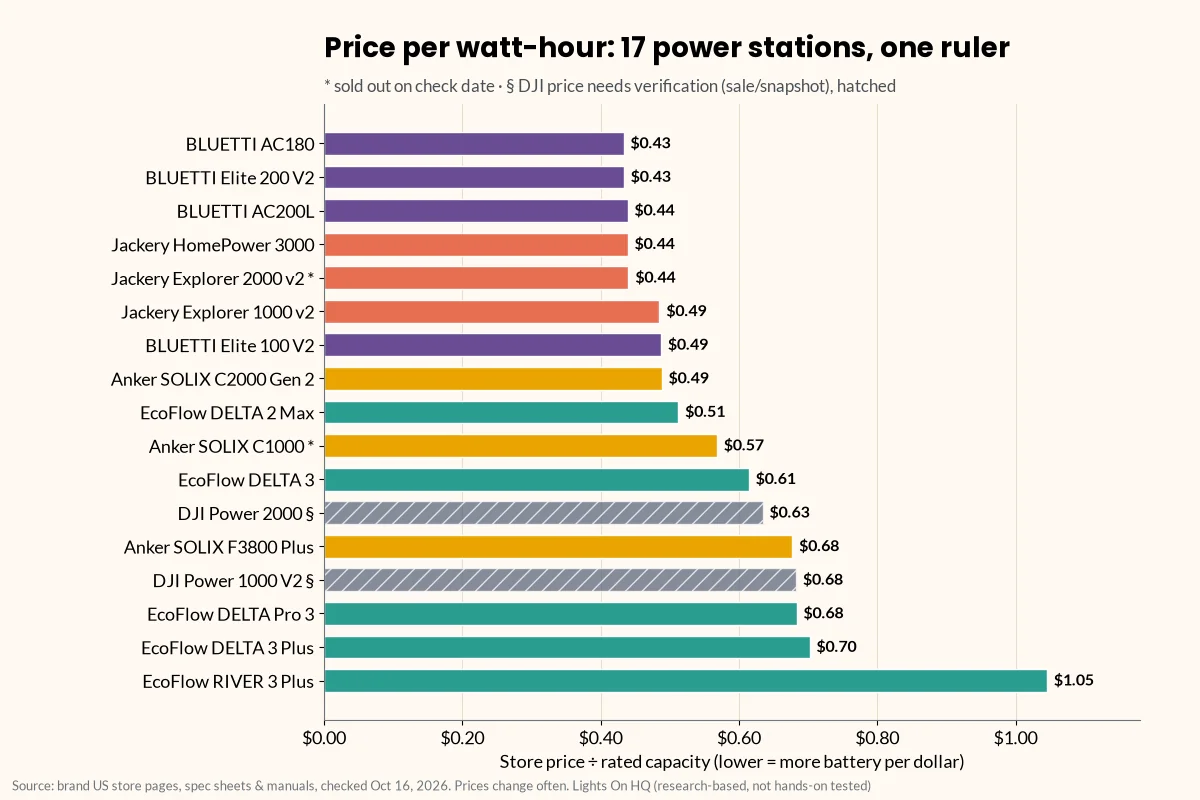
    • Cheapest per Wh on Oct 16, 2026: BLUETTI AC180 and Elite 200 V2 (about $0.43/Wh), then BLUETTI AC200L, Jackery HomePower 3000 and Explorer 2000 v2 (about $0.44/Wh; the Explorer 2000 v2 was sold out).
    • Small units always look pricey per Wh. The 286 Wh EcoFlow RIVER 3 Plus is $1.05/Wh. That’s normal.
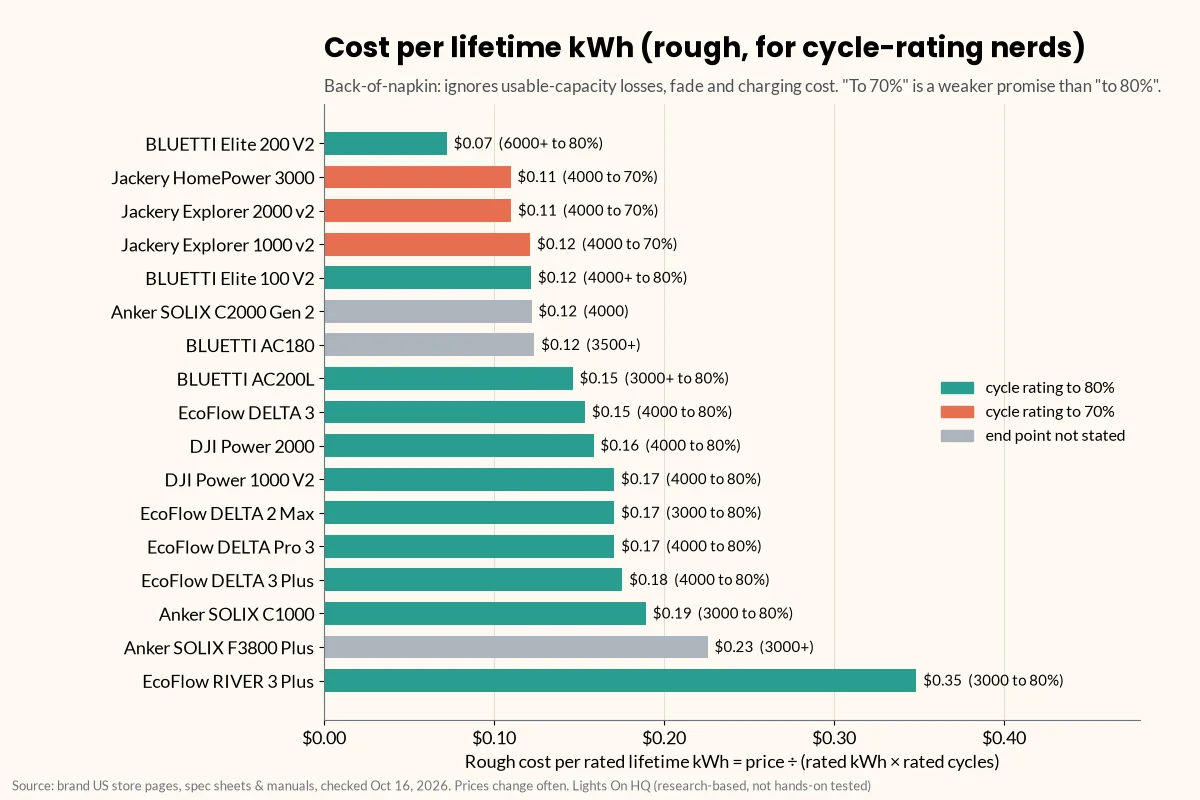
    • Best rough “lifetime” value: the Elite 200 V2 at about $0.07 per rated kWh over its rated cycles, thanks to its 6,000+ cycle rating.
    • $/Wh isn’t the whole story. Surge, UPS speed, solar input and weight can be worth paying for.

    Shopping for a power station is a bit like shopping for cereal. The big box looks like a deal, the tiny box costs a fortune per flake, and the “SALE!” sticker might be the regular price wearing a fake mustache.

    Price per watt-hour cuts through that. It’s simple: store price ÷ rated capacity. Lower means more battery per dollar. This page lists it for every model in our spec database, plus a rough cost per lifetime kWh for the cycle-rating nerds (hi, welcome).

    The value table

    Prices are brand-store prices on Oct 16, 2026. They aren’t live and change often. Confirm before you buy. Sorted by $/Wh, cheapest first.

    Brand Model Capacity (Wh) Store price $/Wh Rated cycles ~$ per lifetime kWh‡
    BLUETTI AC180 1,152 $499 $0.43 3,500+ $0.12
    BLUETTI Elite 200 V2 2,073.6 $899 $0.43 6,000+ to 80% $0.07
    BLUETTI AC200L 2,048 $899 $0.44 3,000+ to 80% $0.15
    Jackery HomePower 3000 3,072 $1,349 $0.44 4,000 to 70% $0.11
    Jackery Explorer 2000 v2 2,042 $899 (sold out) $0.44 4,000 to 70% $0.11
    Jackery Explorer 1000 v2 1,070 $519 $0.49 4,000 to 70% $0.12
    BLUETTI Elite 100 V2 1,024 $499 $0.49 4,000+ to 80% $0.12
    Anker SOLIX C2000 Gen 2 2,048 $999.99 $0.49 4,000 $0.12
    EcoFlow DELTA 2 Max 2,048 $1,049 $0.51 3,000 to 80% $0.17
    Anker SOLIX C1000 1,056 $599.99 (sold out) $0.57 3,000 to 80% $0.19
    EcoFlow DELTA 3 1,024 $629 $0.61 4,000 to 80% $0.15
    DJI Power 2000 2,048 $1,299§ $0.63 4,000 to 80% $0.16
    Anker SOLIX F3800 Plus 3,840 $2,599.99 $0.68 3,000+ $0.23
    DJI Power 1000 V2 1,024 $699§ $0.68 4,000 to 80% $0.17
    EcoFlow DELTA Pro 3 4,096 $2,799 $0.68 4,000 to 80% $0.17
    EcoFlow DELTA 3 Plus 1,024 $719 $0.70 4,000 to 80% $0.18
    EcoFlow RIVER 3 Plus 286 $299 $1.05 3,000 to 80% $0.35

    ‡ Rough cost per lifetime kWh = price ÷ (rated kWh × rated cycles). It’s a back-of-napkin battery-wear figure. It ignores usable-capacity losses, capacity fade, charging electricity and the different end points (70% vs 80%), so treat it as a ranking hint, not a promise. § DJI prices need a second look. djiusa.com showed the Power 1000 V2 on sale at $399.98 vs a regular $699 (about $0.39/Wh at the sale price). The Power 2000 price came from a search snapshot, not a live page, because DJI’s store renders prices in JavaScript. Some DJI specs in our database are from third-party listings.

    Not ranked: Jackery’s Explorer 2000 Plus page showed $2,499 against a $5,799 “compare at,” which looks like a bundle or default variant rather than the base unit. We’ll add it once we can confirm the base price.

    Sources for every row are in the spec database. Examples: BLUETTI Elite 200 V2, BLUETTI AC200L, Jackery HomePower 3000, Anker SOLIX C2000 Gen 2, EcoFlow DELTA 2 Max, DJI Power 2000.

    Horizontal bar chart ranking 17 power stations by price per watt-hour on October 16, 2026, from BLUETTI AC180 and Elite 200 V2 at $0.43 up to EcoFlow RIVER 3 Plus at $1.05. Jackery Explorer 2000 v2 and Anker SOLIX C1000 are marked sold out, and the two DJI models are hatched because their prices need verification.
    Price per rated watt-hour (store price ÷ capacity), brand-store prices checked Oct 16, 2026. Hatched DJI bars need price verification.

    Check Elite 200 V2 price at BLUETTI · Check HomePower 3000 price at Jackery

    Why small units cost more per Wh

    Every power station has fixed costs regardless of battery size: the inverter, the case, the screen, the outlets, the charger. On a small unit those costs are spread over fewer watt-hours. So a 286 Wh unit at $1.05/Wh isn’t a rip-off; it’s just the snack-size bag.

    ⚡ Quick take

    Compare $/Wh within the same size class. A 1 kWh unit at $0.49 and a 2 kWh unit at $0.44 are both good deals for their size.

    The “lifetime” angle: cost per rated kWh

    $/Wh tells you what you pay today. Cost per lifetime kWh hints at what you pay per unit of battery wear over the rated cycle life.

    Horizontal bar chart of rough cost per rated lifetime kWh (price divided by rated kWh times rated cycles), from BLUETTI Elite 200 V2 at about $0.07 to EcoFlow RIVER 3 Plus at about $0.35, with bars colored by cycle-rating end point: to 80%, to 70%, or not stated.
    Back-of-napkin battery-wear cost. It ignores usable-capacity losses, fade and charging cost, and “to 70%” ratings are a weaker promise than “to 80%.”

    The standout is the BLUETTI Elite 200 V2: a low $/Wh and a 6,000+ cycle rating (to 80%) gives it about $0.07 per rated kWh. Jackery’s units also look good here, but remember their cycle ratings are to 70% capacity, a weaker promise than “to 80%.” More on that in our four-brand comparison.

    For a backup unit used a few dozen times a year, you’ll likely never hit the rated cycles anyway. So for most home-backup buyers, today’s $/Wh matters more than lifetime math.

    When paying more per Wh is worth it

    Cheapest per Wh isn’t automatically best. Things worth paying for, depending on your needs:

    • Fast UPS switchover (10 ms or less) for routers, PCs and NAS boxes.
    • A published surge rating if you’ll start a fridge, freezer or pump. Boost modes like X-Boost and Power Lifting are for heating loads, not motors.
    • More solar input for multi-day outages.
    • 240 V output (EcoFlow DELTA Pro 3, Anker SOLIX F3800 Plus) for well pumps or some central AC, installed by a licensed electrician with a transfer switch or inlet.
    • Lower weight if you’ll carry it around.
    • Expandability, so you can add capacity instead of buying a second unit. Expansion batteries explained

    ⚠️ Safety note

    A great price per Wh doesn’t change the safety rules. Never connect a power station to a wall outlet or home wiring (“backfeeding”); the CPSC warns it endangers utility workers and neighbors (CPSC, PDF). For CPAP or other medical devices, confirm with your provider and the device maker.

    How we keep this table honest

    • Brand-store prices only, each stamped with the date we checked. We don’t show Amazon prices in this table.
    • Monthly refresh. Prices and stock change constantly; sales are frequent.
    • Flags, not guesses. If a price looks like a bundle, came from a snapshot or a sale, we say so.

    Related

    Prices last checked: October 16, 2026. Found an error? Tell us.

  • What Size Power Station Do I Need? A Load-List Method

    What Size Power Station Do I Need? A Load-List Method

    Disclosure: Lights On HQ is reader-supported. If you buy through links on this page we may earn a commission, at no extra cost to you. Full disclosure.

    Research-based guide. This page explains the math and uses example numbers. It doesn’t report hands-on testing. Model specs are from manufacturer pages, checked October 16, 2026. See our methodology.

    📝 TL;DR

    • You need two numbers: capacity (Wh) = how long things run, and output (W) = what you can run. Plus surge watts for motors.
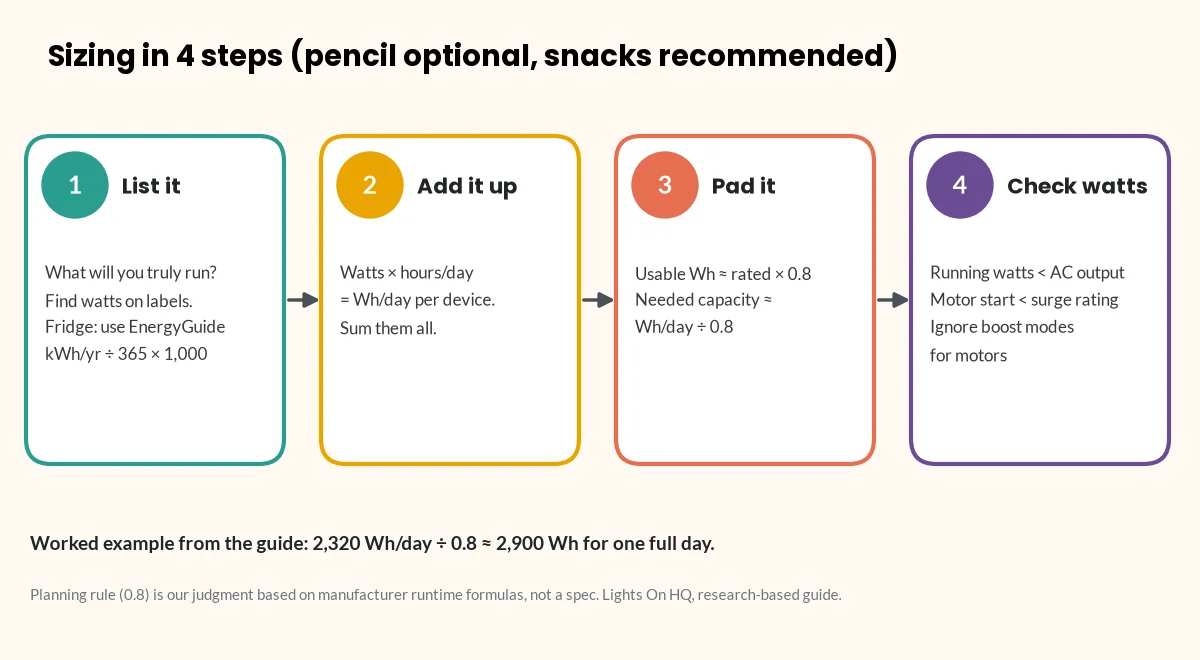
    • Four steps: list your devices → add up Wh per day → divide by 0.8 for real-world losses → check running and surge watts.
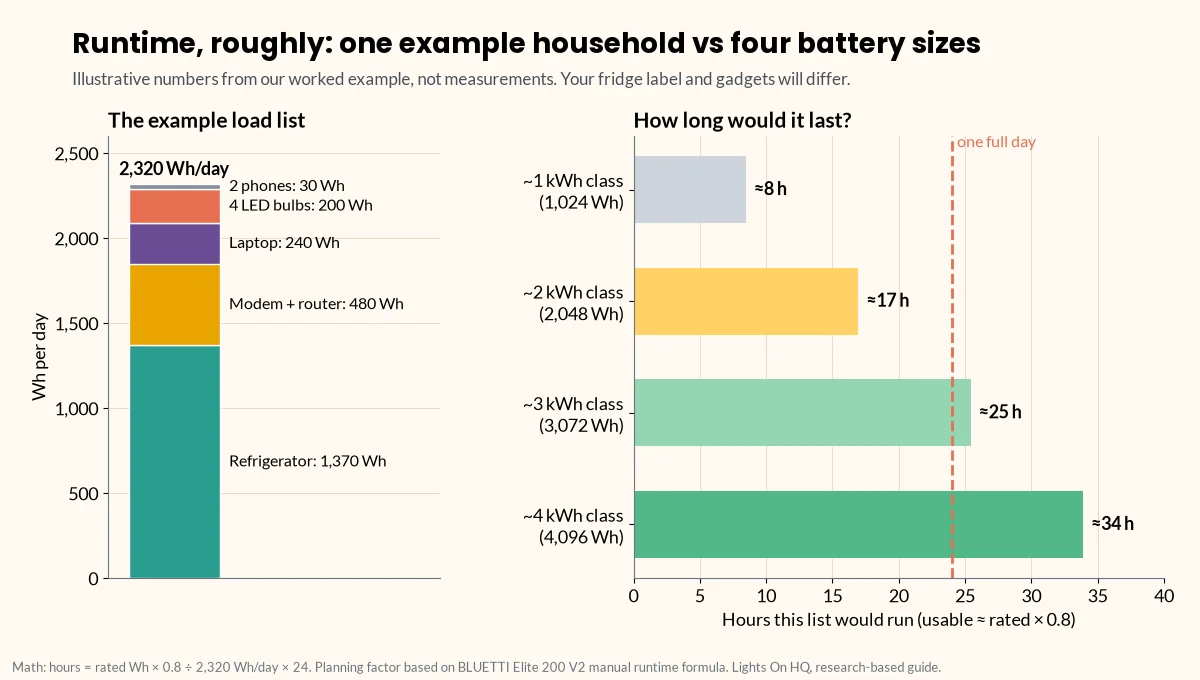
    • Our example household (fridge, Wi-Fi, lights, laptop, phones) uses about 2,320 Wh/day, so it needs about 2,900 Wh for one full day.
    • A 2 kWh unit covers that list for roughly 17 hours; a 3 kWh-class unit covers the whole day.

    Here’s how most of us discover we need a power station: the power goes out, the house goes quiet, and everyone gathers in the living room holding glowing phones at 14% battery like tiny campfires. Then comes the shopping, and the very reasonable question: how big do I actually need?

    Power stations are sold by two numbers, and you need both:

    1. Capacity (watt-hours, Wh): how much energy is stored. This sets how long things run. Think: the size of the gas tank.
    2. Output (watts, W): how much power it can deliver at once. This sets what you can run. Think: the size of the engine. A third number, surge watts, covers the short spike when motors start.

    Getting either one wrong is the most common sizing mistake. Here’s a four-step method you can do with a pencil, or with our runtime calculator, which uses the same math.

    Four-step diagram for sizing a power station: 1, list devices and their watts; 2, multiply watts by hours and add up watt-hours per day; 3, divide by 0.8 to allow for losses; 4, check that running watts are below the AC output and motor starting watts are below the surge rating.
    The whole method on one card. Worked example: 2,320 Wh/day ÷ 0.8 ≈ 2,900 Wh for one full day.

    Step 1: List what you actually need to power

    Be honest here. The espresso machine is not “essential.” (Okay, it’s a little essential.) Write down only what you’d truly run during an outage (or at camp). For each item, find its watts:

    • Label or nameplate: most devices have wattage printed on the back, the bottom or the power brick.
    • Only amps listed? Multiply amps × volts. Most US household devices are 120 V. This method is from Virginia Tech’s extension guide on estimating appliance energy use (Virginia Cooperative Extension).
    • Refrigerators and freezers: use the yearly kWh on the yellow EnergyGuide label, not nameplate watts. The compressor cycles on and off, so nameplate watts overstate daily use. Daily Wh = (kWh per year ÷ 365) × 1,000.
    • Most accurate: a plug-in watt meter shows real draw over a day.

    Step 2: Add up watt-hours per day

    For each device: watts × hours used per day = Wh per day. Add them all up. That’s it. That’s the math.

    Worked example (illustrative numbers. Use your own labels.)

    Device Watts (example) Hours/day Wh/day
    Refrigerator (EnergyGuide label says 500 kWh/yr) n/a (cycles) 24 1,370
    Modem + Wi-Fi router 20 24 480
    4 LED bulbs 4 × 10 = 40 5 200
    Laptop 60 4 240
    2 phones (about 15 Wh each per charge) n/a 1 charge each 30
    Total 2,320 Wh/day

    These are example figures to show the method. They’re not measurements. Your fridge label and device bricks will give different numbers.

    ⚡ Quick take

    Notice who’s hogging the battery? The fridge is more than half the total. If your list includes a fridge, its EnergyGuide number is the single most important figure on your worksheet.

    Step 3: Add an efficiency margin (you won’t get 100% of the rated Wh)

    Bad news: a power station’s rated capacity isn’t all usable at the outlet. The inverter loses some energy turning battery DC into AC, and the battery isn’t run all the way to zero. For example, BLUETTI’s Elite 200 V2 user manual estimates runtime as:

    Runtime = capacity × 90% (depth of discharge) × inverter efficiency (over 85%) ÷ (load + about 10 W self-consumption) (BLUETTI manual, PDF)

    That works out to roughly 75–80% of rated Wh reaching your AC devices. Our planning rule (a judgment call, not a manufacturer spec) is:

    Usable Wh ≈ rated Wh × 0.8. Use 0.75 if you want a safety margin.

    So required capacity ≈ daily Wh ÷ 0.8.

    For the example: 2,320 ÷ 0.8 = about 2,900 Wh for one full day.

    Two-part chart. A stacked bar shows the example household's 2,320 Wh per day: refrigerator 1,370, modem and router 480, laptop 240, LED bulbs 200 and phones 30. Horizontal bars show that load lasting about 8, 17, 25 and 34 hours on 1,024, 2,048, 3,072 and 4,096 Wh units at 80% usable capacity.
    Illustrative math, not measurements: hours ≈ rated Wh × 0.8 ÷ 2,320 Wh/day × 24.

    What that means in practice:

    • A 2 kWh unit (≈1,640 usable Wh) would cover this list for about 17 hours (1,640 ÷ 2,320 × 24). You’d get a full day by dropping the laptop and cutting router hours, or by adding solar.
    • A 3 kWh-class unit (for example, Jackery’s 3,072 Wh HomePower 3000 or Anker’s 3,840 Wh F3800 Plus) would cover the whole day.
    • An expandable unit (for example, the EcoFlow DELTA 2 Max, up to 6,144 Wh with extra batteries) lets you start at 2 kWh and grow.

    Step 4: Check output watts and surge

    Capacity tells you how long. Output tells you whether it will run at all. A giant tank with a tiny engine still won’t tow the boat.

    1. Running watts: add up the watts of everything that might run at the same time. In the example, that might be fridge + router + lights + laptop. Use the fridge’s actual running draw from a watt meter or the manual. Your total must be below the station’s continuous AC output.
    2. Surge watts: motors (fridges, freezers, pumps, some power tools) pull a short spike when they start. That spike can be several times their running draw. Check the appliance manual or ask the manufacturer. The station’s surge rating has to cover it.
    3. Beware “boost” modes: “X-Boost” (EcoFlow) and “Power Lifting” (BLUETTI) let heating appliances run above the rated output at reduced power. BLUETTI’s Elite 200 V2 manual says this mode isn’t for motor or compressor loads. Don’t count boost figures when you size for motors. See surge vs running watts explained.
    4. 240 V appliances (well pumps, some central AC) need a unit with 240 V output. In our database, that’s the EcoFlow DELTA Pro 3 and Anker SOLIX F3800 Plus. These, and any connection to house circuits, require a licensed electrician and a proper transfer switch or inlet. Transfer switch explainer

    Quick size guide

    A rough starting point (our judgment, based on the method above). Your own load list matters more.

    Your goal Typical daily need Capacity class to shortlist Example models (Oct 16, 2026 store price)
    Phones, Wi-Fi and lights for an evening; small UPS for a router or PC 200–500 Wh 250–500 Wh EcoFlow RIVER 3 Plus (286 Wh, $299)
    Overnight essentials, CPAP*, laptop work 500–1,000 Wh ~1 kWh BLUETTI Elite 100 V2 ($499), Jackery Explorer 1000 v2 ($519), EcoFlow DELTA 3 ($629)
    Fridge + essentials for most of a day 1,500–2,500 Wh ~2 kWh BLUETTI Elite 200 V2 ($899), Anker SOLIX C2000 Gen 2 ($999.99), EcoFlow DELTA 2 Max ($1,049)
    Fridge + essentials for a full day or more; some bigger loads 2,500 Wh+ 3–4 kWh or expandable Jackery HomePower 3000 ($1,349), Anker SOLIX F3800 Plus ($2,599.99), EcoFlow DELTA Pro 3 ($2,799)

    ⚠️ Safety note: medical devices

    *For CPAP and other medical devices, confirm power needs and compatibility with your provider and the device manufacturer. Don’t rely on a power station as your only plan for life-sustaining equipment. CPAP sizing guide

    Prices are brand-store prices on our check date. They change often and aren’t live. Full specs and sources are in the spec database.

    Don’t forget recharging

    For outages longer than one battery’s worth, recharge speed matters as much as size:

    • Solar input ranges from 220 W (RIVER 3 Plus) to 3,200 W (F3800 Plus) in our database. More input means more energy back per sunny hour. See solar charging time calculator.
    • Gas generator or car charging options vary by brand.
    • Sometimes a smaller unit plus solar beats a bigger unit with no way to recharge.

    ⚡ Quick take

    A battery you can refill beats a bigger battery you can’t. If outages in your area tend to last days, budget for solar input, not just watt-hours.

    Printable worksheet

    Copy this into a notes app or print it and stick it on the fridge (fitting, really):

    Device | Watts | Hours/day | Wh/day | Runs at same time? (Y/N) | Motor? (Y/N) -------|-------|-----------|--------|--------------------------|------------- | | | | | | | | | | TOTAL Wh/day: ______ ÷ 0.8 = required capacity: ______ Wh Max simultaneous running watts: ______ (must be < station AC output) Largest motor starting watts: ______ (must be < station surge rating)

    Next steps

    Last checked: October 16, 2026. Found a mistake in the math? Tell us.