Author: Josh

  • How Long to Charge a Power Station With Solar (Simple Math + Charts)

    How Long to Charge a Power Station With Solar (Simple Math + Charts)

    Disclosure: Lights On HQ is reader-supported. If you buy through links on this page we may earn a commission, at no extra cost to you. Full disclosure.

    Research-based, not hands-on tested. Specs come from official brand US product pages, checked October 16, 2026 (see our spec database). Charge times are calculated estimates, not measurements. See how we research.

    ⚡ Quick answer

    • Formula: hours of strong sun ≈ battery Wh ÷ (panel watts × 0.7), with panel watts capped at your unit’s max solar input.
    • Example: a 1,024 Wh unit with 400 W of panels: 1,024 ÷ 280 ≈ 3.7 hours of strong sun.
    • Real days: many places get only a handful of strong-sun hours a day, and clouds can cut output dramatically. A “4-hour” charge can easily become a 2-day charge.
    • Try it: our Solar Charge Time Calculator does the math with weather.
    Illustration of a clock and a bright sun next to a generic, unbranded power station.
    Sun math, minus the headache. (Original illustration; generic unit, not a real product.)

    Brands love to print things like “0 to 100% in as fast as 1.5 hours” for solar. That’s usually the best possible case: maximum panel watts, perfect sun, perfect angle. Your backyard in November may have other plans. Let’s work out a realistic number.

    The one-line formula

    Hours ≈ Wh ÷ (min(panel W, max solar input) × 0.7)

    • Wh is your battery capacity (on the spec sheet).
    • Panel W is the total rated watts of your panels. If it’s more than your unit accepts, use the unit’s max instead.
    • 0.7 is our planning factor. Panels rarely deliver their full rated watts because of heat, angle, dust and conversion losses. Some days you’ll beat it, some days you won’t.

    Estimated hours for popular models
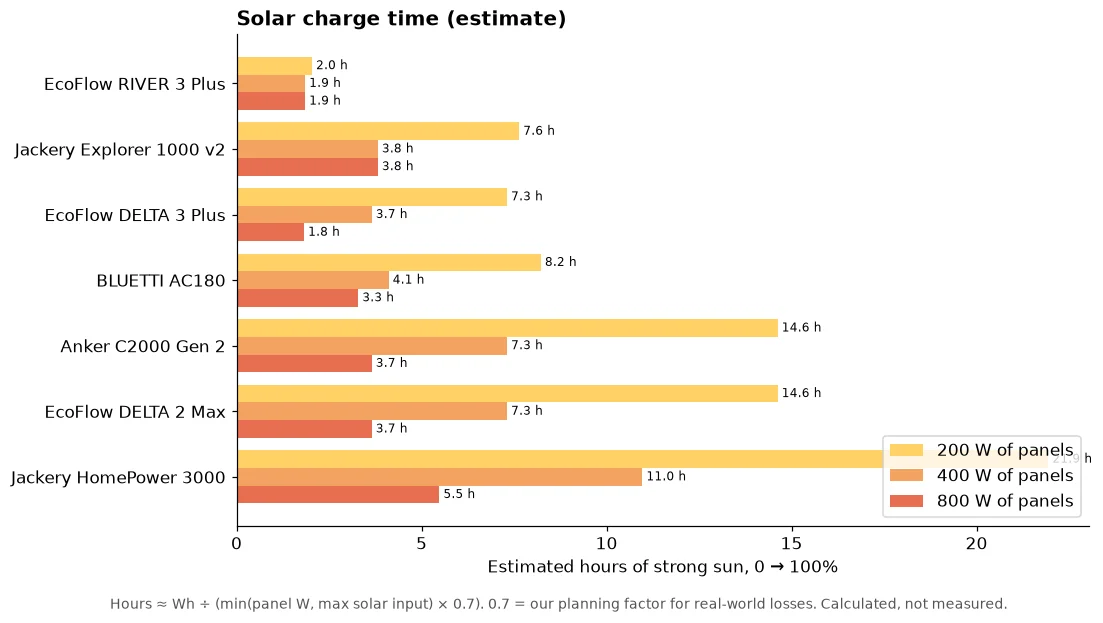
    Grouped bar chart of estimated hours of strong sun to charge seven power stations from empty to full with 200, 400 and 800 W of panels, capped at each unit's max solar input.
    Hours ≈ Wh ÷ (capped panel W × 0.7). Calculated, not measured.
    Model Capacity Max solar 100 W 200 W 400 W 800 W At max input
    EcoFlow RIVER 3 Plus 286 Wh 220 W 4.1 h 2.0 h 1.9 h 1.9 h 1.9 h
    Jackery Explorer 1000 v2 1,070 Wh 400 W 15.3 h 7.6 h 3.8 h 3.8 h 3.8 h
    EcoFlow DELTA 3 Plus 1,024 Wh 1,000 W 14.6 h 7.3 h 3.7 h 1.8 h 1.5 h
    BLUETTI AC180 1,152 Wh 500 W 16.5 h 8.2 h 4.1 h 3.3 h 3.3 h
    Anker SOLIX C2000 Gen 2 2,048 Wh 800 W 29.3 h 14.6 h 7.3 h 3.7 h 3.7 h
    EcoFlow DELTA 2 Max 2,048 Wh 1,000 W 29.3 h 14.6 h 7.3 h 3.7 h 2.9 h
    Jackery HomePower 3000 3,072 Wh 1,000 W 43.9 h 21.9 h 11.0 h 5.5 h 4.4 h

    Hours of strong sun, empty to full, calculated. Units with two solar ports (DELTA 3 Plus, DELTA 2 Max) need the panels split across both ports to go past 500 W. Every unit also has voltage and current limits; see the panel pairing guide.

    From “hours” to “days”

    Divide by the strong-sun hours you get per day. If you get about 5:

    • Explorer 1000 v2 with 200 W: 7.6 ÷ 5 ≈ 1.5 days.
    • DELTA 2 Max with 400 W: 7.3 ÷ 5 ≈ 1.5 days.
    • HomePower 3000 with 800 W: 5.5 ÷ 5 ≈ about a day.

    Strong-sun hours vary a lot by location and season. Winter days are shorter and the sun sits lower. For your area, NREL’s free PVWatts tool can estimate solar output.

    Weather: the big wildcard

    Clouds can cut panel output sharply, and heavy overcast can drop it to a small fraction of the rated watts. Our calculator uses simple weather multipliers so you can see the swing. They’re rough planning guesses, not measurements.

    Charging while using power

    If the fridge is drawing power while the sun shines, your solar covers the fridge first and only the leftover goes into the battery. For example, 400 W of panels × 0.7 ≈ 280 W, minus a fridge averaging about 60 W, leaves about 220 W for charging. This is why solar makes a big difference in the Blackout Survival Challenge: flip on the solar option and watch your survival time jump.

    Tips for faster solar charging

    1. Aim at the sun and re-angle a couple of times a day.
    2. No shade. Even partial shade can tank a panel’s output.
    3. Keep the power station cool and out of direct sun. Batteries often charge more slowly when hot.
    4. Match the input. Panels that add up close to your unit’s max solar watts (and stay within its voltage limits) give the fastest charging.

    ⚠️ Safety note

    Portable panels plus a portable power station is plug-and-play. Anything wired into your home’s electrical system needs a licensed electrician and a proper transfer switch or inlet. Never backfeed through a wall outlet.

    Bottom line

    Use Wh ÷ (panel W × 0.7), then divide by your daily sun hours, and add a cushion for clouds. Do it in two taps with the Solar Charge Time Calculator, see bundle deals in best solar generator kits, and plan your loads with the runtime calculator.
  • Best Solar Panels for Each Power Station: EcoFlow, Jackery, BLUETTI and Anker SOLIX

    Best Solar Panels for Each Power Station: EcoFlow, Jackery, BLUETTI and Anker SOLIX

    Disclosure: Lights On HQ is reader-supported. If you buy through links on this page we may earn a commission, at no extra cost to you. Full disclosure.

    Research-based, not hands-on tested. Specs and prices come from official brand US product pages, checked October 16, 2026. Blank cells mean we could not confirm the number on an official page. Charge times are calculated estimates. See how we research.

    ⚡ Quick answer

    • Easiest path: buy the same brand’s panels. Connectors match and the brand has already checked the voltages.
    • Three numbers to match: your unit’s max solar watts, its voltage window, and its max amps.
    • Plug types: EcoFlow and Anker SOLIX use XT60/XT60i inputs, Jackery uses DC8020 ports, and BLUETTI panels ship with MC4 leads plus adapters.
    • Want the generic how-to first? Read our solar pairing basics.
    Illustration of two solar panels under a bright sun cabled to a generic, unbranded power station.
    Find the panels that fit your power station. (Original illustration; generic unit, not a real product.)

    Panels and power stations are like phone chargers: almost everything looks like it should fit, but the right match charges fast and the wrong one does nothing (or worse). Here’s a brand-by-brand cheat sheet.

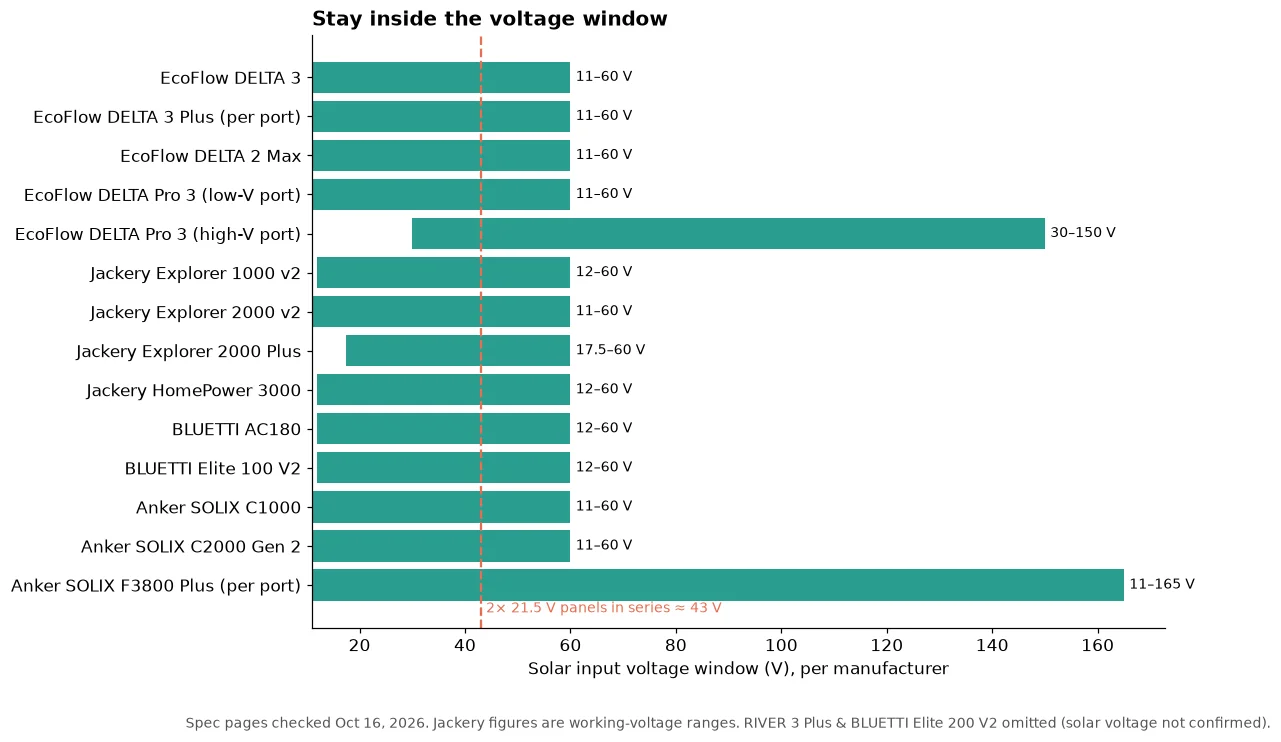
    Bar chart of manufacturer-listed solar input voltage windows for 14 power station inputs, mostly 11 or 12 to 60 V, with the EcoFlow DELTA Pro 3 high-voltage port at 30 to 150 V and the Anker SOLIX F3800 Plus at 11 to 165 V, and a dashed line at 43 V for two 21.5 V panels in series.
    Stay inside the window. Spec pages checked Oct 16, 2026.

    The series-wiring sanity check

    Panels in series add their voltages. Two EcoFlow NextGen 220W panels (21.5 V open-circuit each, per EcoFlow) come to about 43 V. That’s safely inside an 11 to 60 V window. Three would be about 64.5 V, which is over 60 V. Open-circuit voltage also rises in cold weather, so leave some headroom.

    EcoFlow

    Power station Max solar Voltage / current (per EcoFlow)
    RIVER 3 Plus 220 W
    DELTA 3 500 W 11 to 60 V
    DELTA 3 Plus 1,000 W (2 × 500 W ports) 11 to 60 V per port
    DELTA 2 Max 1,000 W (500 W per port) 11 to 60 V, 15 A
    DELTA Pro 3 2,600 W High-V port 30 to 150 V, 15 A, 1,600 W; low-V port 11 to 60 V, 20 A, 1,000 W

    Official EcoFlow panels (connector: XT60/XT60i input cable):

    Panel Price (Oct 16) Open-circuit voltage
    100W Rigid $139 20.3 V
    NextGen 220W Bifacial $399 21.5 V
    400W Portable $599

    Match-ups: a single 220W panel suits the RIVER 3 Plus (its 220 W cap) or a DELTA 3. One 400W panel per port is a nice fit on a DELTA 3 Plus or DELTA 2 Max (each port caps at 500 W). On the RIVER 3 Plus our database’s notes didn’t confirm a solar voltage window, so check the manual first.

    Jackery

    Power station Max solar Working voltage / current (per Jackery)
    Explorer 1000 v2 400 W 2 × DC8020: 12 to 16 V at 8 A; 16 to 60 V at 10.5 A (21 A / 400 W combined)
    Explorer 2000 v2 400 W 11 to 16 V at 8 A; 16 to 60 V at 12 A (21 A / 400 W combined)
    Explorer 2000 Plus 1,400 W 17.5 to 60 V at 12 A per port (24 A / 1,400 W combined)
    HomePower 3000 1,000 W 12 to 16 V at 8 A; 16 to 60 V at 12 A (24 A / 1,000 W combined)

    Official Jackery panels (connector: DC8020; some models need a DC8020-to-DC7909 adapter, which Jackery includes with certain panels):

    Panel Price (Oct 16) Open-circuit voltage
    SolarSaga 100 Prime $199
    SolarSaga 200W $379 22 V
    SolarSaga 500 X $799

    Match-ups: the Explorer 1000 v2 and 2000 v2 both cap at 400 W, so two SolarSaga 200W panels max them out. A 500 X on those units won’t charge faster than 400 W. The HomePower 3000 (1,000 W) and Explorer 2000 Plus (1,400 W) are where the 500 X makes sense.

    BLUETTI

    Power station Max solar Voltage / current (per BLUETTI)
    AC180 500 W 12 to 60 V open-circuit, 10 A
    Elite 100 V2 1,000 W 12 to 60 V, 20 A
    Elite 200 V2 1,000 W

    Official BLUETTI panels (MC4 leads; BLUETTI lists MC4 and Anderson/XT60 adapters by model):

    Panel Price (Oct 16) Open-circuit voltage
    SP100L 100W $249 24.62 V
    200W Portable $399 24.6 V
    350W $649 44 V
    500W (SORA 500) $849 49.1 V

    Match-ups: an AC180 tops out at 500 W and 60 V. One 350W panel (44 V) fits; two 350W panels in series (about 88 V) would not. Two 200W panels in series come to about 49 V, which fits. On an Elite 100 V2, two 200W panels in series plus the 20 A limit leave lots of room; check BLUETTI’s manual for parallel setups.

    Anker SOLIX

    Power station Max solar Voltage / current (per Anker)
    C1000 600 W 11 to 60 V, 12.5 A (XT-60)
    C2000 Gen 2 800 W 11 to 60 V, 17 A (XT-60i)
    F3800 Plus 3,200 W (2 × 1,600 W) 11 to 165 V, 17 A per input

    Official Anker SOLIX panels (XT-60i connector):

    Panel Price shown (Oct 16) Open-circuit voltage
    PS100 Bifacial $249.99
    PS200 Bifacial $499.99
    PS400 Bifacial $699.99

    Match-ups: a PS400 is a natural single-panel match for the C1000 (600 W cap) or C2000 Gen 2 (800 W cap; two PS400s max it on paper). The F3800 Plus’s wide 11 to 165 V window allows longer series strings, but follow Anker’s manual for exact configurations.

    ⚠️ Safety, the short version

    • Stay inside your power station’s solar voltage and current limits. Over-voltage can damage it, and warranty terms may not cover it.
    • Portable panels charging a portable power station is plug-and-play. Wiring solar or batteries into your home electrical system needs a licensed electrician, permits and a proper transfer switch or inlet.
    • Never plug a power station into a wall outlet to power the house (backfeeding). It can kill utility workers.

    Bottom line

    Same brand = least drama. Third-party = check watts, volts, amps and the plug. For charge-time math, try our Solar Charge Time Calculator, read how long it takes to charge with solar, or see bundled deals in best solar generator kits. All base specs live in the spec database.

  • Best Solar Generator Kits: Power Station + Panel Bundles Worth a Look

    Best Solar Generator Kits: Power Station + Panel Bundles Worth a Look

    Disclosure: Lights On HQ is reader-supported. If you buy through links on this page we may earn a commission, at no extra cost to you. Full disclosure.

    Research-based, not hands-on tested. Specs and prices come from official brand US product pages, checked October 16, 2026. Blank cells mean we could not confirm the number on an official page. Charge times are calculated estimates. See how we research.

    ⚡ Quick answer

    • “Solar generator” is just marketing for power station + solar panels, sold together. Often cheaper than buying them separately.
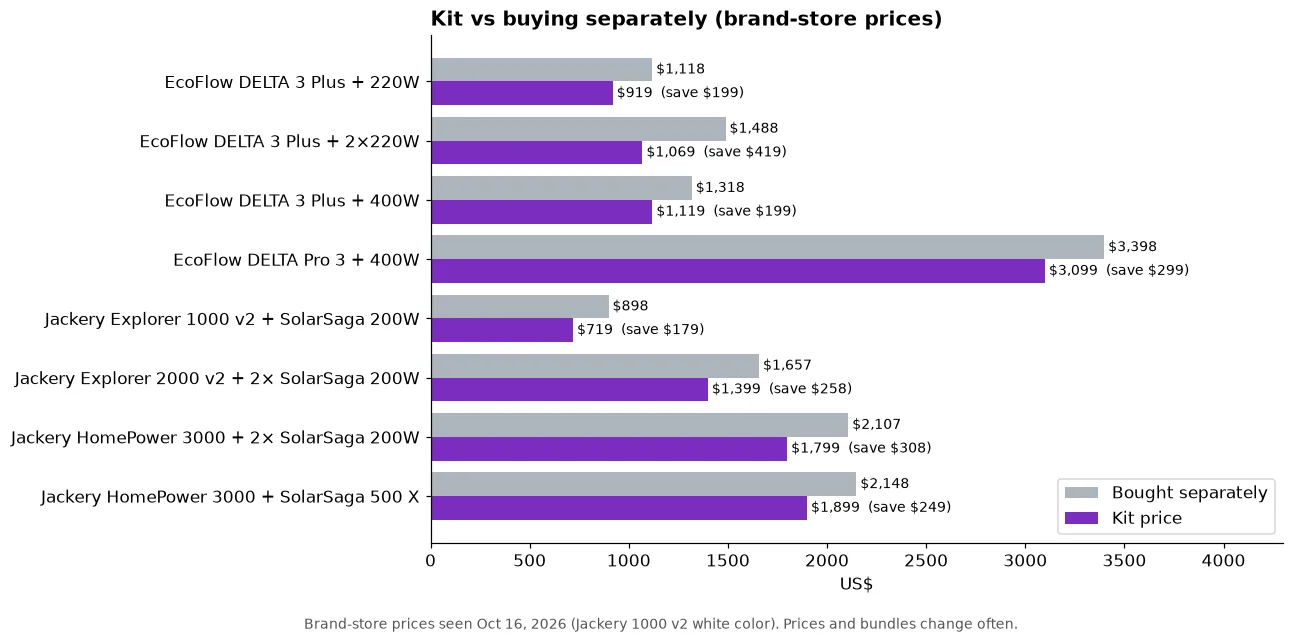
    • Best value starter: Jackery Explorer 1000 v2 + SolarSaga 200W, $719 on our check date ($898 bought separately).
    • Best fast-charging mid-size: EcoFlow DELTA 3 Plus + 2 × 220W, $1,069 ($1,488 separately); the DELTA 3 Plus takes up to 1,000 W of solar.
    • Big home backup: Jackery HomePower 3000 + 2 × SolarSaga 200W, $1,799, or EcoFlow DELTA Pro 3 + 400W, $3,099.
    • Watch out: a bigger panel than the unit can accept doesn’t charge faster.
    Illustration of two solar panels with a red BUNDLE! banner next to a generic, unbranded power station.
    Battery plus panels in one box. (Original illustration; generic unit, not a real product.)

    Buying a power station and panels separately is like buying a burger and fries separately. Totally allowed. Usually more expensive than the combo. Here are the combos.

    Bar chart comparing kit prices with buying the power station and panels separately for eight EcoFlow and Jackery bundles, with savings from $179 to $419.
    Brand-store prices seen Oct 16, 2026. Prices change often.

    The kits at a glance

    Kit Kit price Separately Battery Panel watts vs unit’s max solar Est. hours of strong sun, 0 to 100%*
    Jackery Explorer 1000 v2 + SolarSaga 200W $719 $898 1,070 Wh 200 W of 400 W ~7.6
    EcoFlow DELTA 3 Plus + 220W $919 $1,118 1,024 Wh 220 W of 1,000 W ~6.6
    EcoFlow DELTA 3 Plus + 2 × 220W $1,069 $1,488 1,024 Wh 440 W of 1,000 W ~3.3
    EcoFlow DELTA 3 Plus + 400W $1,119 $1,318 1,024 Wh 400 W of 1,000 W ~3.7
    Jackery Explorer 2000 v2 + 2 × SolarSaga 200W $1,399 $1,657 2,042 Wh 400 W of 400 W ~7.3
    Jackery HomePower 3000 + 2 × SolarSaga 200W $1,799 $2,107 3,072 Wh 400 W of 1,000 W ~11.0
    Jackery HomePower 3000 + SolarSaga 500 X $1,899 $2,148 3,072 Wh 500 W of 1,000 W ~8.8
    EcoFlow DELTA Pro 3 + 400W $3,099 $3,398 4,096 Wh 400 W of 2,600 W ~14.6

    *Hours ≈ Wh ÷ (panel watts, capped at the unit’s max, × 0.7). The 0.7 is our planning factor for real-world losses. At ~5 strong-sun hours a day, divide by 5 to get days. “Separately” = standalone station price + standalone panel price on each brand’s store, Oct 16, 2026 (Jackery 1000 v2 in Dune White; the black version was $20 cheaper). One oddity: EcoFlow’s DELTA 3 Plus kit page showed a “compare at” price below the sale price; we used the listed sale price.

    Our picks

    Best starter: Jackery Explorer 1000 v2 + SolarSaga 200W

    At 23.8 lb, the Explorer 1000 v2 is the lightest ~1 kWh unit in our database, and the kit saves about $179. One 200W panel only uses half of the 400 W solar input, so budget for a second panel if you want faster refills.

    Best mid-size: EcoFlow DELTA 3 Plus + 2 × 220W

    The DELTA 3 Plus takes up to 1,000 W of solar over two 500 W ports, so it has lots of room to grow. Two 220W bifacial panels make for a fast, roughly half-day recharge on a good day (estimate).

    Best for big home backup: Jackery HomePower 3000 kits

    3,072 Wh with 1,000 W of solar input. The 2 × 200W kit is the better deal, while the 500 X kit uses one big panel instead of two. Either way you’re using half the input or less, so there’s room to add panels later.

    Go big: EcoFlow DELTA Pro 3 + 400W

    4,096 Wh and a whopping 2,600 W of solar input. One 400W panel barely scratches that input, so think of it as a starter panel.

    The match-up trap (Jackery Explorer 2000 v2 + 500W)

    Jackery also sells the Explorer 2000 v2 with a “SolarSaga 500W” option ($1,499). Since the 2000 v2’s solar input caps at 400 W, a 500W panel won’t charge it any faster than 400 W. It can help on hazy days, but don’t pay extra expecting speed.

    What about BLUETTI and Anker SOLIX kits?

    Both brands sell bundles too. Anker SOLIX lists combos like C1000 + PS400 and C2000 Gen 2 with 400W panels, and BLUETTI sells its own solar generator bundles. We couldn’t confirm stable bundle prices on their official stores on our check date, so they’re not in the table. To build your own, see the panel lists in our panel pairing guide.

    ⚠️ Safety, the short version

    • Stay inside your power station’s solar voltage and current limits. Over-voltage can damage it, and warranty terms may not cover it.
    • Portable panels charging a portable power station is plug-and-play. Wiring solar or batteries into your home electrical system needs a licensed electrician, permits and a proper transfer switch or inlet.
    • Never plug a power station into a wall outlet to power the house (backfeeding). It can kill utility workers.

    Bottom line

    A kit is usually the cheapest way in, as long as the panels fit the unit’s solar limits. Plug any combo into the Solar Charge Time Calculator, check daily needs with the runtime calculator, and compare units in the spec database.

  • Can a Power Station Run a Space Heater or Window AC? (The Honest Answer)

    Can a Power Station Run a Space Heater or Window AC? (The Honest Answer)

    Disclosure: Lights On HQ is reader-supported. If you buy through links on this page we may earn a commission, at no extra cost to you. Full disclosure.

    Research-based, not hands-on tested. Specs come from manufacturer US product pages, checked October 16, 2026 (see our spec database). Runtimes are calculated estimates. See how we research.

    ⚡ Quick answer

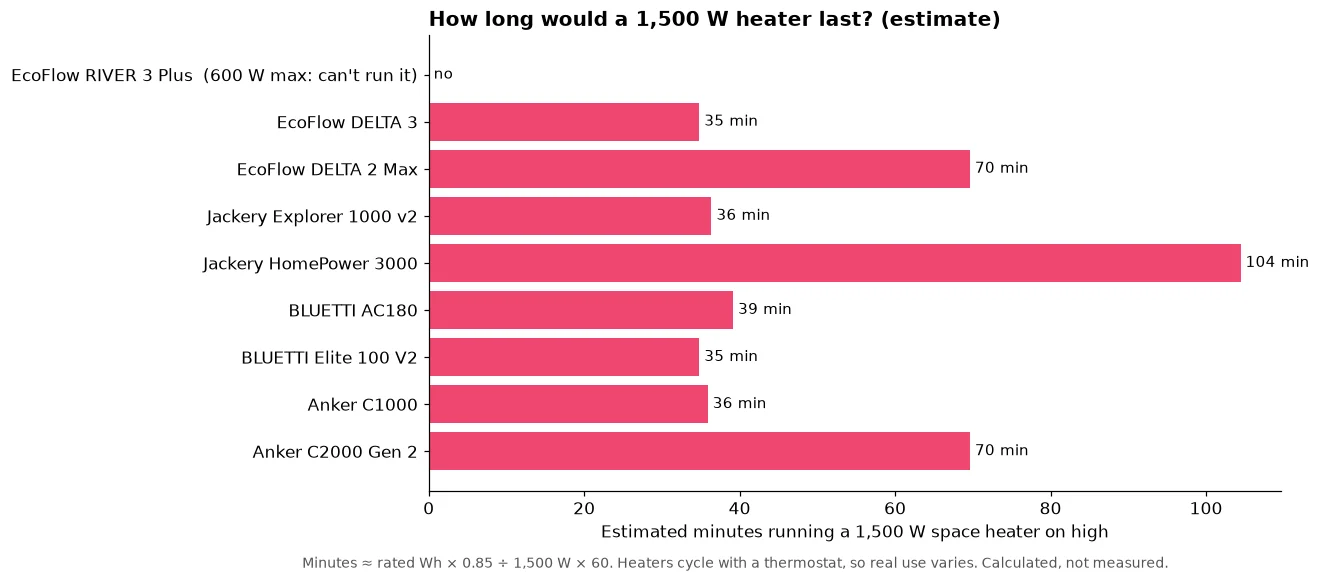
    • Space heater: technically yes on units with at least ~1,500 W of AC output, but a 1,500 W heater on high drains a ~1 kWh unit in roughly 35 to 40 minutes and a ~2 kWh unit in about 70 minutes (estimates). Not a winter outage plan.
    • Window AC: more realistic than a heater, because many small units draw far less than 1,500 W and the compressor cycles. Check the watts on your AC’s label, then run the numbers in our calculator.
    • Smarter warmth: electric blankets and heated mattress pads use a small fraction of a space heater’s power.
    Illustration of a red space heater labeled "1,500 W?!" next to a generic, unbranded power station.
    The honest, slightly spicy answer. (Original illustration; generic unit, not a real product.)

    It’s January, the power’s out, and you’re eyeing that space heater like it owes you money. You have a shiny power station. Surely it can handle a little heater?

    Let’s do the math, because the math is a bit of a buzzkill.

    Why space heaters are battery monsters

    Most plug-in space heaters top out at 1,500 W on high (that’s about the most a standard 120 V household outlet circuit is meant to supply continuously). Heaters turn electricity straight into heat, so there’s no clever efficiency trick. 1,500 W is 1,500 W.

    Runtime ≈ battery Wh × 0.85 ÷ heater watts

    So a 1,024 Wh unit: 1,024 × 0.85 ÷ 1,500 ≈ 0.58 hours, about 35 minutes.

    Bar chart of estimated minutes a 1,500 W space heater on high would run on nine power stations: the RIVER 3 Plus cannot run it, about 35 to 39 minutes on 1 kWh units, about 70 on 2 kWh units and about 104 on the Jackery HomePower 3000.
    Space heaters drain batteries fast. Calculated estimates, not measurements.
    Model Capacity AC output Can it start a 1,500 W heater? Est. minutes on high
    EcoFlow RIVER 3 Plus 286 Wh 600 W No (output too low) n/a
    EcoFlow DELTA 3 1,024 Wh 1,800 W Yes ~35
    Jackery Explorer 1000 v2 1,070 Wh 1,500 W Right at the limit ~36
    BLUETTI AC180 1,152 Wh 1,800 W Yes ~39
    EcoFlow DELTA 2 Max 2,048 Wh 2,400 W Yes ~70
    Anker SOLIX C2000 Gen 2 2,048 Wh 2,400 W Yes ~70
    Jackery HomePower 3000 3,072 Wh 3,600 W Yes ~104
    EcoFlow DELTA Pro 3 4,096 Wh 4,000 W Yes ~139
    Anker SOLIX F3800 Plus 3,840 Wh 6,000 W Yes ~131

    Even the 4 kWh beasts last a couple of hours. A thermostat that cycles the heater on and off stretches this, and the low setting helps, but you’re still burning your fridge’s and phone’s power to heat air that leaks out the windows.

    About “boost” modes: features like EcoFlow X-Boost or BLUETTI Power Lifting let some heating devices run at reduced power on smaller units. That means the heater runs weaker, not that you get free heat.

    Window AC: actually doable (sometimes)

    Air conditioners are a different animal:

    • A small window unit often draws a few hundred watts while running, far less than a space heater. The exact number is on its label (look for watts or amps × 120).
    • The compressor cycles on and off, so average draw is lower than the running number.
    • Compressors have a startup surge. Your power station’s surge rating needs to handle it. Inverter-type (“variable speed”) ACs are typically gentler at startup.

    Example math, using a hypothetical 500 W small window AC running constantly (worst case): a 2,048 Wh unit gives about 2,048 × 0.85 ÷ 500 ≈ 3.5 hours. With cycling, real runtime is longer. With solar topping up in the daytime (when you need AC most anyway), even better. See our solar pairing guide.

    Central AC is a whole-house, usually 240 V load. That’s big-unit-plus-electrician territory, not a plug-in job.

    Better ways to stay warm in an outage

    • Electric blanket or heated mattress pad: typically a small fraction of a space heater’s draw. Check the label.
    • Layer up and close off rooms. Heat one small room, not the whole house.
    • Save battery for the essentials: furnace blower (gas furnaces need electricity for the fan and controls; connecting one to backup power is a job for an electrician with a proper transfer switch or inlet), fridge, medical devices.

    ⚠️ Safety, please

    • Never run a space heater on an extension cord daisy chain, and keep it 3 feet from anything that burns.
    • Never plug a power station into a wall outlet to feed the house (backfeeding). It can electrocute line workers. Use an electrician-installed transfer switch.
    • Never use a gas generator, grill or camp stove indoors for heat. Carbon monoxide kills.

    Bottom line

    Space heater on a power station: possible, painfully short. Window AC: workable with a big enough unit and some sun. Plug your real appliance watts into the runtime calculator, or try the Blackout Survival Challenge and watch what a heater does to your survival time (spoiler: nothing good).

  • Solar Panels for a Power Station: The Easy Pairing Guide

    Solar Panels for a Power Station: The Easy Pairing Guide

    Disclosure: Lights On HQ is reader-supported. If you buy through links on this page we may earn a commission, at no extra cost to you. Full disclosure.

    Research-based, not hands-on tested. Specs come from manufacturer US product pages, checked October 16, 2026 (see our spec database). Runtimes are calculated estimates. See how we research.

    ⚡ Quick answer

    • Check 3 limits on your power station: max solar watts, the allowed voltage range, and max amps. All three are in the manual or spec page.
    • Match panel watts to the watt limit. Extra panel watts above the limit don’t charge faster (the unit caps it), though a little extra helps on cloudy days if voltage stays in range.
    • Rough charge time: battery Wh ÷ (panel watts × ~0.7) ≈ hours of good sun. Real life varies a lot with weather, angle and season.
    • Biggest mistake: wiring too many panels in series and going over the voltage limit.
    Illustration of a solar panel under a bright sun next to a generic, unbranded power station.
    Match the panels, let the sun work. (Original illustration; generic unit, not a real product.)

    Solar is where a power station goes from “nice battery” to “tiny power plant.” The sun shows up for free every morning, and with the right panels, so does your power. Let’s get your pairing right the first time.

    The three numbers that matter

    Think of it like a garden hose:

    • Watts = how much water flows. Your power station has a maximum solar input in watts.
    • Volts = water pressure. Too much pressure bursts the hose. Every unit has a solar voltage range, and exceeding the top end can damage it.
    • Amps = the width of the hose. There’s a current limit too.

    Panels wired in series add their voltages. Panels wired in parallel add their amps. Your unit’s manual tells you which combos are allowed.

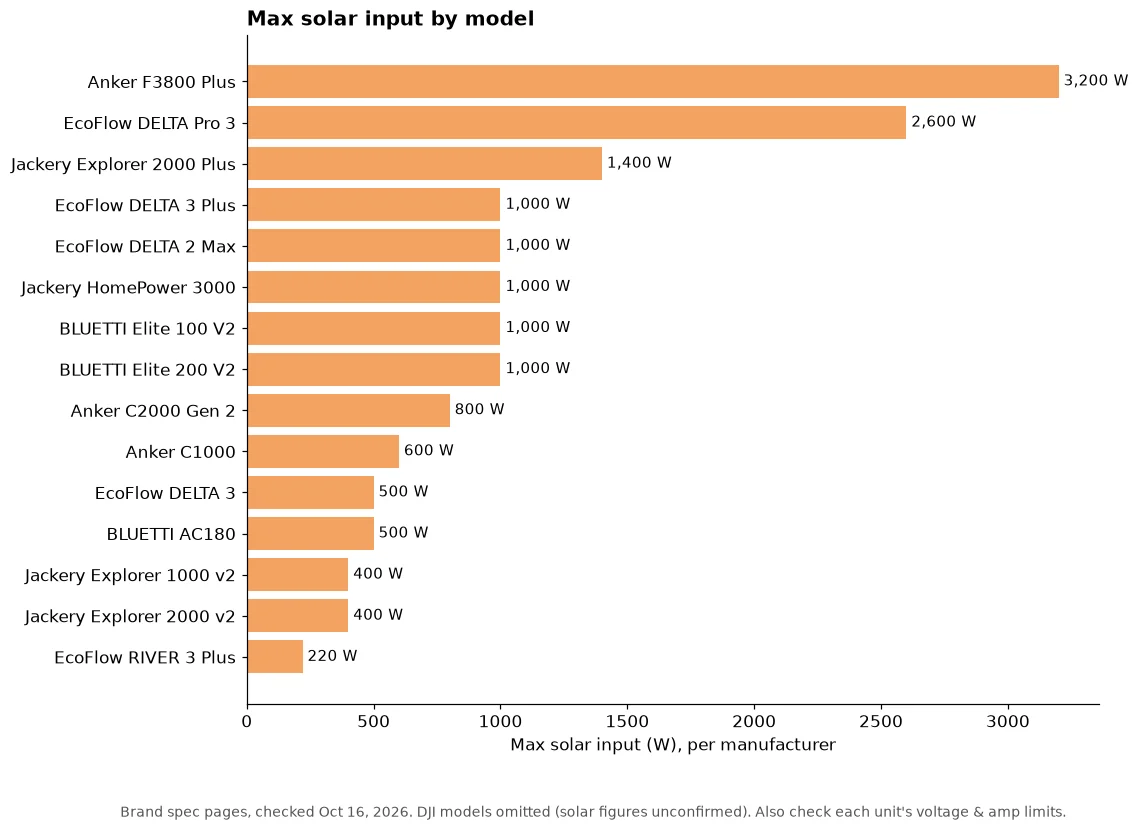
    Bar chart of manufacturer-listed maximum solar input for 15 power stations, from 3,200 W on the Anker SOLIX F3800 Plus to 220 W on the EcoFlow RIVER 3 Plus.
    Max solar input per brand spec pages, checked Oct 16, 2026.

    Max solar input by model (watts)

    Model Capacity Max solar input Rough “good sun” hours at max input*
    Anker SOLIX F3800 Plus 3,840 Wh 3,200 W ~1.7
    EcoFlow DELTA Pro 3 4,096 Wh 2,600 W ~2.3
    Jackery Explorer 2000 Plus 2,042.8 Wh 1,400 W ~2.1
    EcoFlow DELTA 3 Plus 1,024 Wh 1,000 W ~1.5
    EcoFlow DELTA 2 Max 2,048 Wh 1,000 W ~2.9
    Jackery HomePower 3000 3,072 Wh 1,000 W ~4.4
    BLUETTI Elite 100 V2 1,024 Wh 1,000 W ~1.5
    BLUETTI Elite 200 V2 2,073.6 Wh 1,000 W ~3.0
    Anker SOLIX C2000 Gen 2 2,048 Wh 800 W ~3.7
    Anker SOLIX C1000 1,056 Wh 600 W ~2.5
    EcoFlow DELTA 3 1,024 Wh 500 W ~2.9
    BLUETTI AC180 1,152 Wh 500 W ~3.3
    Jackery Explorer 1000 v2 1,070 Wh 400 W ~3.8
    Jackery Explorer 2000 v2 2,042 Wh 400 W ~7.3
    EcoFlow RIVER 3 Plus 286 Wh 220 W ~1.9

    *Very rough: capacity ÷ (max input × 0.7), assuming you own enough panels to hit the max and the sun cooperates. Panels rarely deliver their full rated watts; heat, angle, clouds and shade all cut output. Our 0.7 factor is a planning assumption, not a measurement. DJI models are left out because their solar figures in our database aren’t confirmed.

    How many panel watts should you buy?

    • Weekend camper: 100 to 200 W of portable panels keeps phones, lights and a fan going on a small or ~1 kWh unit.
    • Outage backup: aim for 400 W or more on a ~1 to 2 kWh unit so a sunny day can make a real dent in your fridge’s daily use. See how long a power station runs a fridge.
    • Off-grid-ish: max out your unit’s input. That’s where the 1,000 W+ models shine.

    Same-brand or third-party panels?

    Same-brand panels are the “it just works” option: matching connectors, known voltages. Third-party panels can save money, but you must check open-circuit voltage (Voc), connector type and whether you need an adapter. When in doubt, follow the power station manual’s solar section to the letter.

    Common oopsies

    1. Too many panels in series → voltage over the limit. Check Voc, and remember Voc rises in cold weather.
    2. Shading one panel → in series, it can drag down the whole string.
    3. Laying panels flat → tilting toward the sun usually helps a lot.
    4. Panels behind a window → glass cuts output. Put them outside.

    ⚠️ Quick safety note

    Portable solar charging a power station is plug-and-play. Wiring solar or batteries into your home’s electrical system is not: that needs a licensed electrician, permits and a proper transfer switch or inlet. Never backfeed through a wall outlet.

    Bottom line

    Match the watts, respect the volts, don’t forget the amps. Then let the sun do the work. Compare every unit’s solar input in the spec database and size your daily needs with the runtime calculator.
    ☀️ More solar guides: best solar panels for each power station, best solar generator kits, how long to charge with solar and the Solar Charge Time Calculator.

  • Power Station vs Gas Generator: Which One Should You Buy?

    Power Station vs Gas Generator: Which One Should You Buy?

    Disclosure: Lights On HQ is reader-supported. If you buy through links on this page we may earn a commission, at no extra cost to you. Full disclosure.

    Research-based, not hands-on tested. Specs come from manufacturer US product pages, checked October 16, 2026 (see our spec database). Runtimes are calculated estimates. See how we research.

    ⚡ Quick answer

    • Pick a power station if you want indoor-safe, silent, low-maintenance power for essentials: fridge, CPAP, Wi-Fi, lights, phones. Best for short and medium outages, apartments and camping.
    • Pick a gas generator if you need to run big loads for days (well pump, central AC, electric range) and you’re fine with fuel storage, noise and outdoor-only use.
    • Can’t decide? Lots of people use both: battery inside for quiet nights, generator outside to recharge during the day.
    Illustration of a generic, unbranded power station facing a red gas generator puffing exhaust, with "vs" between them.
    Quiet battery or loud workhorse? (Original illustration; generic unit, not a real product.)

    It’s the classic outage showdown. In one corner: the quiet, polite battery that lives in your closet. In the other: the loud, gas-guzzling workhorse that can run forever (as long as you keep feeding it). Who wins? Depends entirely on what you need to power and for how long.

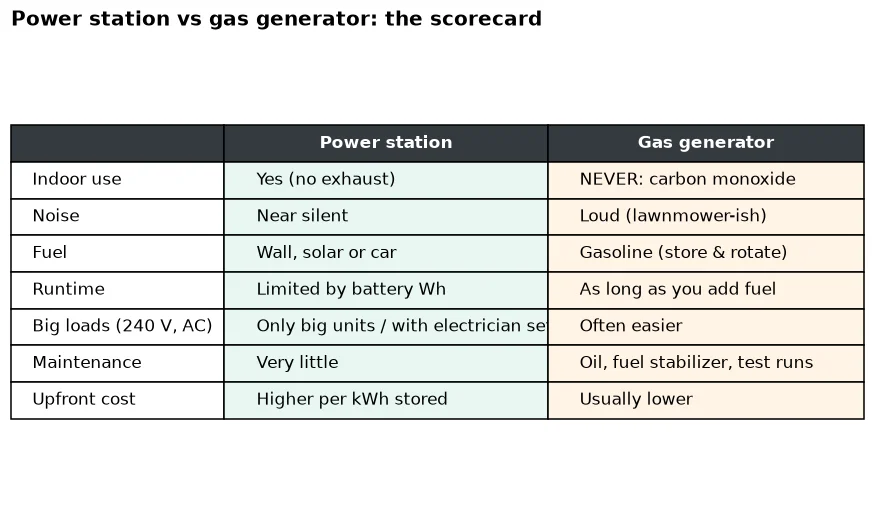
    Table comparing power stations and gas generators on indoor use, noise, fuel, runtime, big loads, maintenance and upfront cost.
    The scorecard at a glance.

    Round 1: Safety

    Power station wins, easily. No exhaust, so you can use it indoors (with normal ventilation and away from water). Gas generators produce carbon monoxide, an odorless gas that can kill. The CDC says to run generators outside, at least 20 feet from doors and windows, never in a garage, basement or porch, and to install CO alarms.

    Round 2: Noise

    Power station. Batteries are near silent; at most you’ll hear a cooling fan. Generators are loud enough that some campgrounds restrict their hours.

    Round 3: Runtime

    Generator. A power station holds a fixed amount of energy: 1,024 Wh for an EcoFlow DELTA 3, 2,048 Wh for an Anker SOLIX C2000 Gen 2, 3,072 Wh for a Jackery HomePower 3000. When it’s empty, you need the grid, solar or a car to refill. A generator runs as long as you have fuel (and can safely refuel).

    Solar narrows the gap: units that take 1,000 W or more of solar can refill a lot on a sunny day. See the solar pairing guide.

    Round 4: Big loads

    Usually generator, with an asterisk. Large power stations are catching up: the Anker SOLIX F3800 Plus lists 6,000 W of AC output and the EcoFlow DELTA Pro 3 lists 4,000 W. But energy is still finite, and 240 V whole-house use requires an electrician-installed transfer switch or inlet either way.

    Round 5: Maintenance and storage

    Power station. Charge it every few months and you’re mostly done. Generators need oil changes, fuel stabilizer, regular test runs, and a safe place to store gasoline (which goes stale).

    Round 6: Upfront cost

    Usually generator. Per unit of energy, batteries cost more upfront. On our Oct 16, 2026 price check, LiFePO4 units ranged from about $0.43 to $1.05 per Wh of capacity. See price per Wh for 17 models. A battery has no fuel cost, though, and solar recharging is free.

    The scorecard

    Category Winner
    Indoor safety Power station
    Noise Power station
    Runtime for days Gas generator
    Huge loads Gas generator (big batteries closing in)
    Maintenance Power station
    Upfront cost Gas generator
    Apartment-friendly Power station

    Who should buy what

    • Apartment or condo dweller: power station, no contest. Start with what size do I need.
    • CPAP user: power station; see our CPAP guide.
    • Rural home with a well pump and long outages: a generator (or a very large battery system) with a transfer switch installed by a licensed electrician.
    • Camper: power station for quiet campsites; see best power station for camping.

    ⚠️ Two rules that apply to both

    1. Never backfeed. Don’t plug a generator or power station into a wall outlet to power your house. It can kill utility workers and damage equipment. Use an electrician-installed transfer switch or inlet.
    2. Generators outdoors only, far from windows and doors, with CO alarms inside.

    Bottom line

    For most households riding out a typical outage, a power station handles the essentials safely and silently. For multi-day, whole-house needs, a generator (or a hybrid) still earns its spot. Browse the best power stations for home backup, or see how you’d fare in our Blackout Survival Challenge.

  • Best Power Station for CPAP: How Many Nights Will You Get?

    Best Power Station for CPAP: How Many Nights Will You Get?

    Disclosure: Lights On HQ is reader-supported. If you buy through links on this page we may earn a commission, at no extra cost to you. Full disclosure.

    Research-based, not hands-on tested. Specs come from manufacturer US product pages, checked October 16, 2026 (see our spec database). Runtimes are calculated estimates. See how we research.

    ⚡ Quick answer

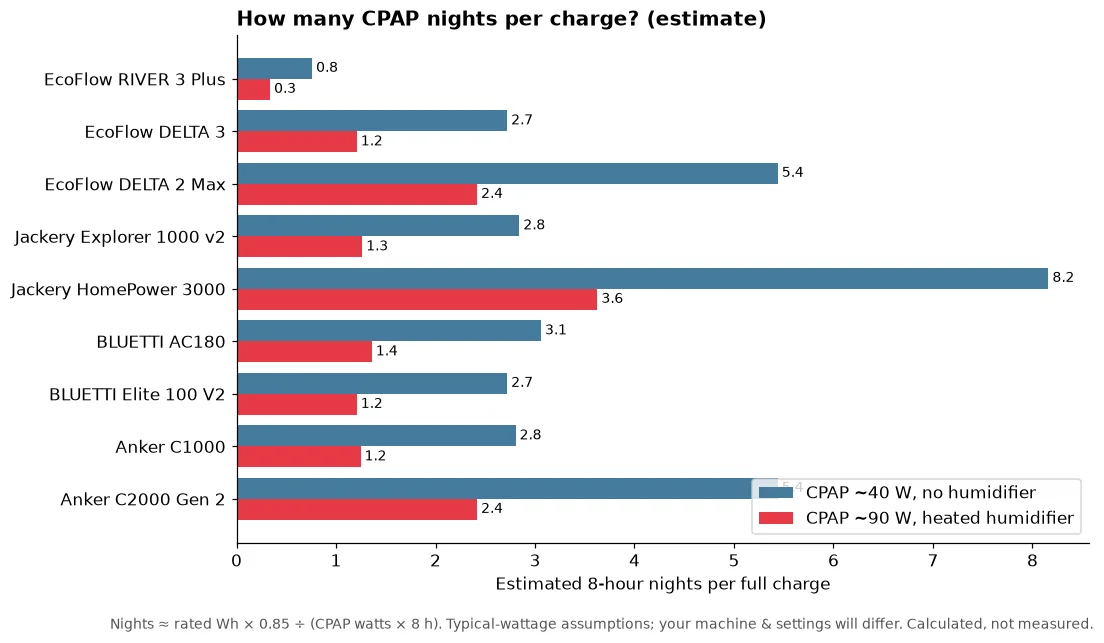
    • A CPAP without the heated humidifier often draws somewhere around 30 to 60 W; with heat it can be 90 W or more. Check your machine’s power supply label or manual for real numbers.
    • At ~40 W for 8 hours, a ~1,000 Wh unit (EcoFlow DELTA 3, Jackery Explorer 1000 v2, BLUETTI AC180, Anker SOLIX C1000) works out to roughly 2.5 to 3 nights per charge.
    • The biggest runtime trick: turn off the heated humidifier (ask your doctor or equipment provider first) or use a DC power cord made for your machine.
    • Medical note: talk to your doctor or CPAP supplier before relying on battery power for therapy.
    Illustration of a CPAP machine plugged into a generic, unbranded power station at night with "z z z" above it.
    Sleep through the blackout. (Original illustration; generic unit, not a real product.)

    Power goes out. The fridge can wait a few hours. Your sleep can’t. If you use a CPAP, a blackout isn’t just a nuisance, it’s a rough night (or several). The good news: CPAPs are one of the easiest things to keep running on a portable power station.

    Step 1: Find your CPAP’s real wattage

    Flip over the power brick. You’ll see an output rating (volts × amps). That’s the maximum it can draw, not what it uses all night. Real use is usually lower, and the heated humidifier and heated tube are the big energy hogs.

    Your machine’s manual or manufacturer support page often lists typical power use with and without humidification. That’s the number you want.

    Step 2: Do the 10-second math

    Here’s the formula we use in our runtime calculator:

    Nights ≈ battery Wh × 0.85 ÷ (CPAP watts × hours of sleep)

    The 0.85 covers inverter losses (turning battery DC into wall-style AC). Example: a 1,024 Wh unit running a 40 W CPAP for 8 hours: 1,024 × 0.85 ÷ 320 ≈ 2.7 nights.

    Bar chart of estimated 8-hour CPAP nights per full charge for nine power stations at about 40 W (no humidifier) and 90 W (heated humidifier), from about 0.8 night on the 286 Wh RIVER 3 Plus to about 8.2 nights on the 3,072 Wh Jackery HomePower 3000.
    Estimated nights per charge. Calculated from rated capacity, not measured.

    Estimated CPAP nights per charge

    Model Capacity ~40 W (no humidifier) ~90 W (heated humidifier) Weight Store price (Oct 16)
    EcoFlow RIVER 3 Plus 286 Wh ~0.8 night ~0.3 night 10.4 lb $299
    EcoFlow DELTA 3 1,024 Wh ~2.7 ~1.2 27.6 lb $629
    BLUETTI Elite 100 V2 1,024 Wh ~2.7 ~1.2 25.3 lb $499
    Jackery Explorer 1000 v2 1,070 Wh ~2.8 ~1.3 23.8 lb $519
    Anker SOLIX C1000 1,056 Wh ~2.8 ~1.2 28.4 lb $599.99
    BLUETTI AC180 1,152 Wh ~3.1 ~1.4 35.3 lb $499
    EcoFlow DELTA 2 Max 2,048 Wh ~5.4 ~2.4 50 lb $1,049
    Anker SOLIX C2000 Gen 2 2,048 Wh ~5.4 ~2.4 41.7 lb $999.99
    Jackery HomePower 3000 3,072 Wh ~8.2 ~3.6 59.5 lb $1,349

    Calculated estimates with typical wattages, not measurements. Prices change often; click through for current pricing.

    Our picks by situation

    • “I just need one night, maybe two”: a ~1 kWh unit is the sweet spot. The Jackery Explorer 1000 v2 is the lightest here at 23.8 lb; the BLUETTI AC180 squeezes in a bit more capacity (1,152 Wh) at $499 on our check date.
    • “Outages here last days”: step up to ~2 kWh, like the Anker SOLIX C2000 Gen 2 or EcoFlow DELTA 2 Max. Add solar and you can top up during the day (see our solar pairing guide).
    • “Also want the fridge running”: a fridge changes everything. Read how long a power station runs a fridge first.

    Sneaky ways to stretch runtime

    1. Humidifier off (if your provider says that’s OK). It’s the biggest single saver.
    2. Go DC. Many CPAP makers sell a DC cord. Skipping the inverter avoids the conversion losses. Use only the cord your manufacturer approves.
    3. Keep the unit plugged in to the wall every night. Many units can pass power through, so you start every outage with a full battery. Some list a UPS-style switchover time (for example, EcoFlow lists <10 ms for the DELTA 3), but check whether your specific model and CPAP are a good match.
    4. Charge phones elsewhere if you’re tight on capacity.

    ⚠️ Safety stuff, short version

    • Ask your doctor or CPAP supplier before relying on battery power for therapy.
    • Keep the power station on a hard, dry surface with airflow, not under blankets.
    • Never plug a power station into a wall outlet to “power the house.” That’s backfeeding and it can kill utility workers. Whole-home setups need a transfer switch installed by a licensed electrician.

    Bottom line

    A CPAP is a featherweight load. A ~1 kWh LiFePO4 unit covers a couple of nights for most people, and a 2 kWh unit gives you breathing room (pun fully intended). Plug your real numbers into the runtime calculator, compare models in the spec database, or try our Blackout Survival Challenge to see how long you’d last.

  • Best Power Station for Camping and RV Trips (Without Breaking Your Back)

    Best Power Station for Camping and RV Trips (Without Breaking Your Back)

    Disclosure: Lights On HQ is reader-supported. If you buy through links on this page we may earn a commission, at no extra cost to you. Full disclosure.

    Research-based, not hands-on tested. Specs come from manufacturer US product pages, checked October 16, 2026 (see our spec database). Runtimes are calculated estimates. See how we research.

    ⚡ Quick answer

    • Weekend tent camping (phones, lights, fan, CPAP): a small or ~1 kWh unit. The EcoFlow RIVER 3 Plus (286 Wh, 10.4 lb) is the grab-and-go option; the Jackery Explorer 1000 v2 (1,070 Wh, 23.8 lb) is the do-it-all one.
    • Car camping with a 12 V fridge or coffee maker: go ~1 kWh with 1,800 W output, like the BLUETTI AC180 or EcoFlow DELTA 3.
    • RV / van life: ~2 kWh plus lots of solar. The BLUETTI Elite 200 V2 (2,073.6 Wh, 1,000 W solar) or Anker SOLIX C2000 Gen 2 (2,048 Wh, 41.7 lb).
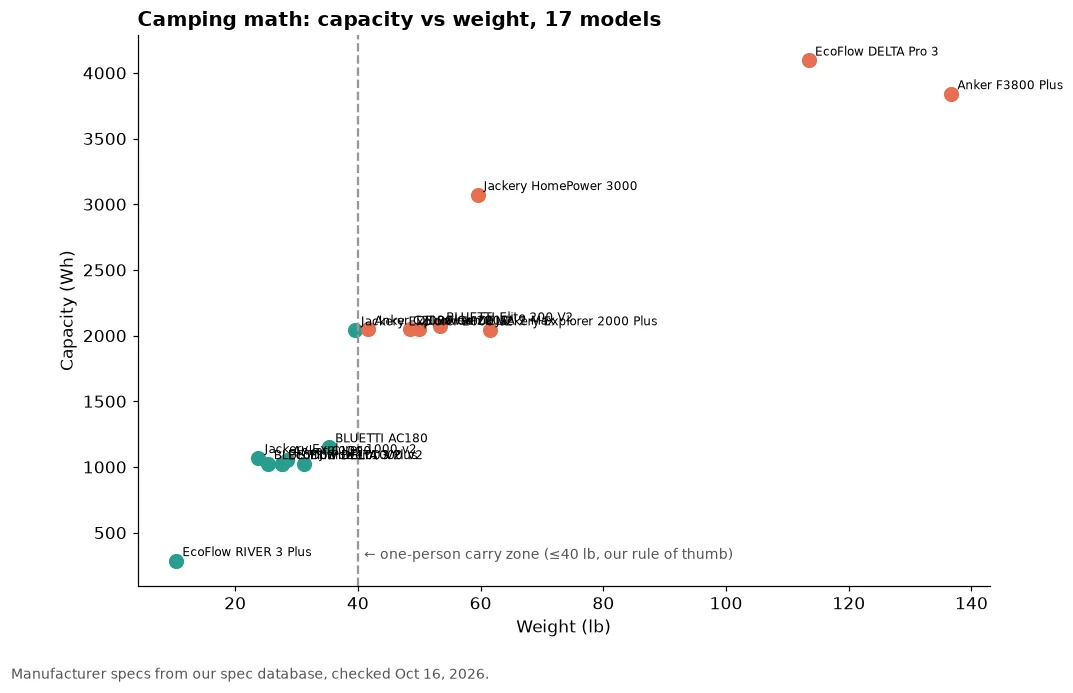
    • Rule of thumb: above ~40 lb, it’s a two-person or wheels situation.
    Illustration of an orange tent under a sun next to a generic, unbranded power station.
    Cold drinks, charged phones, happy campers. (Original illustration; generic unit, not a real product.)

    Camping used to mean dead phones by day two and warm drinks by noon. Now? A battery the size of a cooler keeps the string lights glowing and the speaker playing. The trick is buying enough battery without buying something you’ll curse every time you lift it out of the trunk.

    The camping trade-off: capacity vs weight

    More watt-hours means more weight. LiFePO4 batteries (which all 17 models in our database use) last for thousands of cycles, but they’re not light.

    Scatter plot of capacity in watt-hours versus weight in pounds for 17 power stations, with a dashed line at 40 lb marking a one-person carry zone.
    Bigger battery, heavier box. Manufacturer specs, checked Oct 16, 2026.
    Model Capacity Weight AC output Max solar Price (Oct 16)
    EcoFlow RIVER 3 Plus 286 Wh 10.4 lb 600 W 220 W $299
    Jackery Explorer 1000 v2 1,070 Wh 23.8 lb 1,500 W 400 W $519
    BLUETTI Elite 100 V2 1,024 Wh 25.3 lb 1,800 W 1,000 W $499
    EcoFlow DELTA 3 1,024 Wh 27.6 lb 1,800 W 500 W $629
    BLUETTI AC180 1,152 Wh 35.3 lb 1,800 W 500 W $499
    Anker SOLIX C2000 Gen 2 2,048 Wh 41.7 lb 2,400 W 800 W $999.99
    BLUETTI Elite 200 V2 2,073.6 Wh 53.4 lb 2,600 W 1,000 W $899

    What can you actually run at camp?

    Using typical wattages (always check your device labels) and our 0.85 efficiency rule:

    • Phone charge (~10 W for 3 h): trivial. Even the RIVER 3 Plus handles a whole group’s phones.
    • LED string lights (~10 W): all night on anything here.
    • Box fan (~60 W): about 4 hours on the RIVER 3 Plus, about 14 hours on a ~1 kWh unit.
    • CPAP (~40 W): see our CPAP guide for nights per charge.
    • Coffee maker (~900 W): needs a unit with more than 900 W output, so the 600 W RIVER 3 Plus is out. A ~1 kWh unit can brew a pot and barely notice.
    • Electric griddle or kettle: big resistive loads. Fine for short bursts on 1,800 W+ units; they eat battery fast.

    RV and van life: think “recharge,” not just “capacity”

    On the road, you’re recharging daily, so solar input matters as much as battery size. A unit that takes 1,000 W of solar (BLUETTI Elite 100 V2 and Elite 200 V2, EcoFlow DELTA 3 Plus, DELTA 2 Max) can refill much faster on a sunny day than one capped at 400 W. Our solar pairing guide explains how to match panels without tripping the input limits.

    Note: plugging into an RV’s power inlet is an RV-specific setup. Follow your RV and power station manuals, and get a qualified RV tech involved for anything beyond plugging in a cord.

    Campsite etiquette and safety

    • Batteries are silent, which your campground neighbors will love (way more than a generator; see power station vs gas generator).
    • Keep it shaded and dry. Heat and rain are no friends of electronics.
    • Strap it down in the car or RV so it doesn’t become a 40 lb projectile.

    Bottom line

    For most campers, a ~1 kWh LiFePO4 unit under 30 lb is the sweet spot. Go tiny for grab-and-go, go ~2 kWh plus solar for RVs. Plan your exact load in the runtime calculator and sort every model by weight in the spec database.

  • How Long Will a 2,000Wh Power Station Run a Fridge?

    How Long Will a 2,000Wh Power Station Run a Fridge?

    Disclosure: Lights On HQ is reader-supported. If you buy through links on this page we may earn a commission, at no extra cost to you. Full disclosure.

    Research-based guide. This page shows the math with example numbers. It doesn’t report hands-on testing. Manufacturer formulas and specs were checked October 16, 2026. See our methodology.

    📝 TL;DR

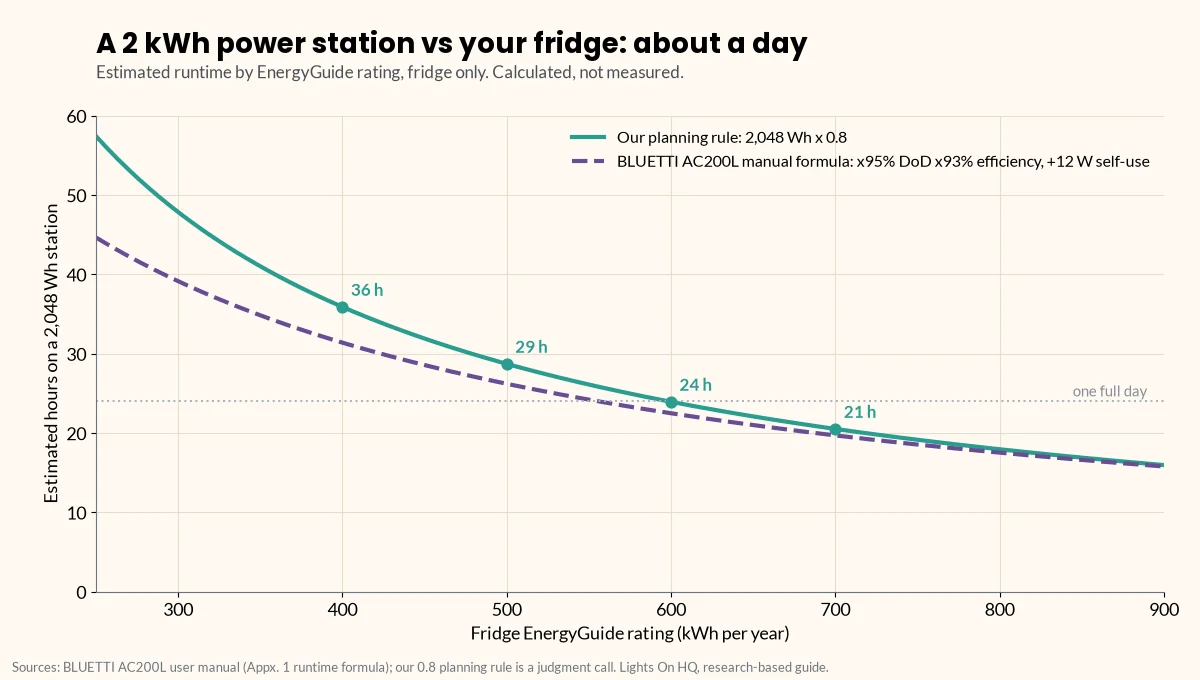
    • Short answer: a ~2,000 Wh (2,048 Wh) power station runs a fridge rated 400–700 kWh/year for roughly 20–36 hours, using our planning rule (usable ≈ 80% of rated).
    • The formula: hours ≈ (rated Wh × 0.8) ÷ (fridge’s kWh per year ÷ 8.76).
    • Example: a 500 kWh/yr fridge averages about 57 W, so 2,048 Wh lasts about 29 hours (or about 26 hours using BLUETTI’s AC200L manual formula with self-consumption).
    • Shorter in real life if: the kitchen is hot, the door keeps opening, the battery is cold, or other things are plugged in.

    You bought (or are eyeing) a 2 kWh power station. The storm forecast looks spicy. And there’s one question rattling around your brain at 2 a.m.: will the ice cream make it?

    Good news: this is just arithmetic, and you only need one number from your fridge. Let’s do it.

    The one number you need: kWh per year

    Find the yellow EnergyGuide label on your fridge (or the spec sheet for your model) and look for kWh per year. That’s the fridge’s estimated annual energy use, and it already accounts for the compressor cycling on and off.

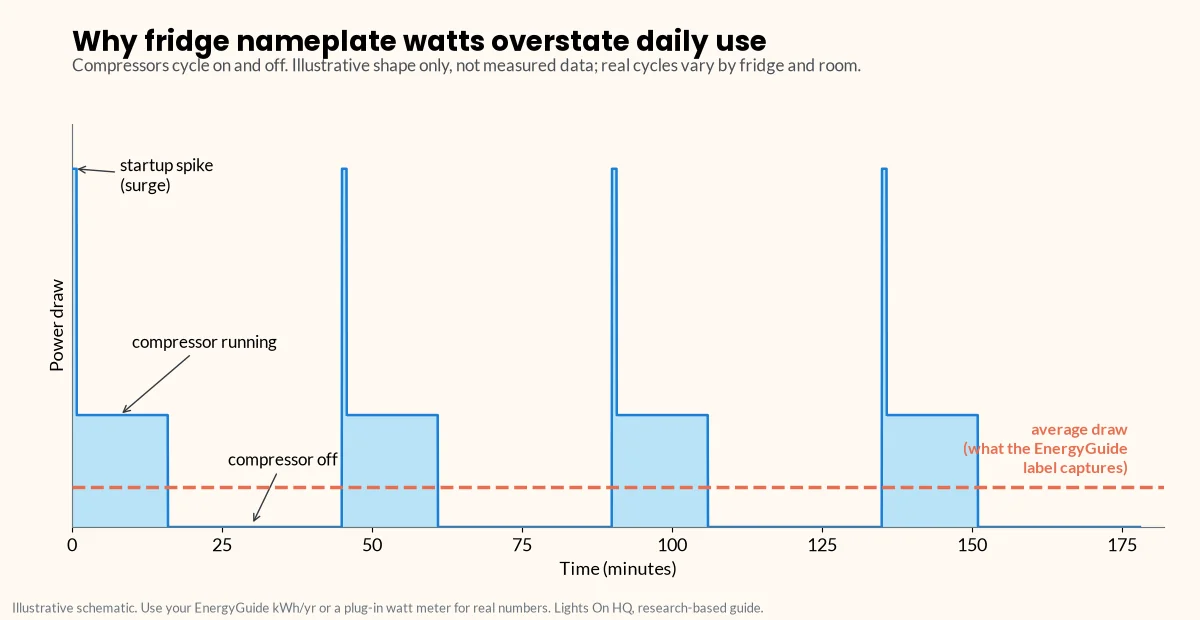
    Why not use the watts on the nameplate? Because a fridge doesn’t run its compressor constantly. It cycles: on for a while, off for a while. The nameplate tells you how hard it pulls when it’s on, not how much energy it uses over a day.

    Illustrative line chart of a refrigerator's power draw over three hours: short startup spikes, flat periods while the compressor runs, and stretches at zero while it is off, with a dashed line showing the much lower average draw that the EnergyGuide label captures.
    Compressors cycle on and off, so nameplate watts overstate daily use. Illustrative shape, not measured data.

    Convert the label number:

    • Daily Wh = kWh per year ÷ 365 × 1,000
    • Average watts = daily Wh ÷ 24 (or simply kWh per year ÷ 8.76)

    Example: 500 kWh/yr → about 1,370 Wh/day → about 57 W average.

    Two ways to estimate runtime

    Method 1: Our planning rule (simple)

    A power station can’t deliver all of its rated capacity at the AC outlet. Inverter losses and depth of discharge eat some of it. Our rule of thumb (a judgment call, not a manufacturer spec):

    Usable Wh ≈ rated Wh × 0.8

    So for a 2,048 Wh unit: about 1,640 usable Wh.

    Hours ≈ 1,640 ÷ average fridge watts. For the 500 kWh/yr fridge: 1,640 ÷ 57 ≈ 29 hours.

    Method 2: A manufacturer’s own formula (more detailed)

    BLUETTI’s AC200L user manual gives this formula (manual PDF):

    Operation time = capacity × DoD × η ÷ (load + self-consumption)

    …with 95% depth of discharge, inverter efficiency “typically over 93%” and about 12 W of self-consumption for the AC200L. BLUETTI’s own example: a 40 W fridge runs about 34.7 hours (2,048 × 95% × 93% ÷ 52 W).

    For our 500 kWh/yr fridge (57 W average): 2,048 × 0.95 × 0.93 ÷ (57 + 12) ≈ 26 hours.

    Notice that self-consumption matters for small loads like a fridge: those 12 W are a real chunk of a 57 W average. Other models have different efficiencies and idle draw; BLUETTI’s Elite 200 V2 manual, for example, uses 90% DoD, inverter efficiency over 85% and about 10 W self-consumption (manual PDF).

    ⚡ Quick take

    Both methods land in the same neighborhood: about a day for a typical fridge on 2 kWh. If you need certainty, use the watt meter and the more conservative number.

    The cheat sheet: 2,048 Wh vs EnergyGuide ratings

    These are calculated, not measured. Your fridge, room temperature and habits will change the result.

    EnergyGuide rating Avg. watts Wh per day Hours (0.8 rule) Hours (AC200L manual formula)
    300 kWh/yr 34 W 822 ~48 h ~39 h
    400 kWh/yr 46 W 1,096 ~36 h ~31 h
    500 kWh/yr 57 W 1,370 ~29 h ~26 h
    600 kWh/yr 68 W 1,644 ~24 h ~22 h
    700 kWh/yr 80 W 1,918 ~21 h ~20 h
    800 kWh/yr 91 W 2,192 ~18 h ~18 h
    Line chart of estimated hours a 2,048 Wh power station runs a fridge versus its EnergyGuide rating from 250 to 900 kWh per year, using two methods: our 0.8 planning rule (about 36, 29, 24 and 21 hours at 400, 500, 600 and 700 kWh per year) and the BLUETTI AC200L manual formula with 95% depth of discharge, 93% efficiency and 12 W self-consumption, which runs slightly lower.
    Two estimates, one answer: about a day for a typical fridge on 2 kWh. Calculated, not measured.

    What makes the real number shorter

    • Heat and door openings. A fridge in a hot kitchen, or one that gets opened every 20 minutes, works harder than its label assumes.
    • Cold batteries. BLUETTI’s manual notes that low temperatures and excessive loads can significantly reduce capacity and runtime.
    • Sharing the battery. Router, lights, phones: every extra watt comes out of the fridge’s share. Use the load-list method to plan the whole list.
    • The startup spike. Not a runtime issue, but a “will it start at all” issue. Your station’s surge rating must cover the compressor’s startup draw. See surge vs running watts.

    How to stretch it

    • Keep the doors closed. FoodSafety.gov says a closed fridge keeps food safe for up to 4 hours with no power at all, and a full freezer about 48 hours (24 if half full) (FoodSafety.gov).
    • Add solar. Even a few hundred watts of sun can cover a fridge’s daytime use. Solar charging calculator
    • Go expandable. Units like the EcoFlow DELTA 2 Max (to 6,144 Wh) or BLUETTI AC200L (to 8,192 Wh) can add battery later (EcoFlow, BLUETTI).

    ⚠️ Safety notes

    • Plug the fridge directly into the power station. Never connect a power station to a wall outlet or home wiring (“backfeeding”); the CPSC warns it endangers utility workers and neighbors (CPSC, PDF). Hard-wired circuits need a licensed electrician and a transfer switch or inlet.
    • Battery math doesn’t overrule food safety. If food sat above 40°F for more than 2 hours, follow FoodSafety.gov’s chart.

    Ready to pick a unit? See best power station to run a refrigerator.

    Related

    Last checked: October 16, 2026. Found a mistake in the math? Tell us.

  • Cost per Watt-Hour: Power Station Value Table (Updated Monthly)

    Cost per Watt-Hour: Power Station Value Table (Updated Monthly)

    Disclosure: Lights On HQ is reader-supported. If you buy through links on this page we may earn a commission, at no extra cost to you. Full disclosure.

    Research-based data page. We haven’t tested these units. Prices are each brand’s own US store price, checked October 16, 2026; capacities and cycle ratings are from manufacturer pages and manuals. We plan to refresh this table monthly. See our methodology.

    📝 TL;DR

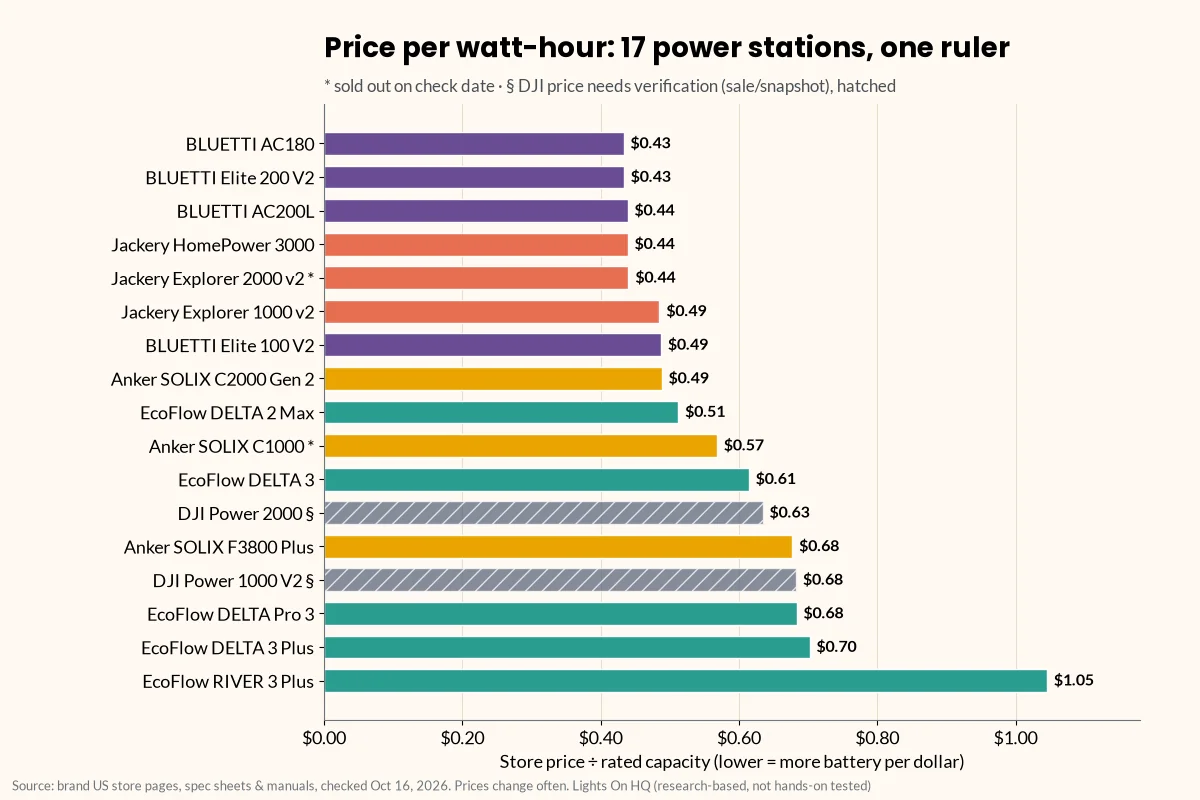
    • Cheapest per Wh on Oct 16, 2026: BLUETTI AC180 and Elite 200 V2 (about $0.43/Wh), then BLUETTI AC200L, Jackery HomePower 3000 and Explorer 2000 v2 (about $0.44/Wh; the Explorer 2000 v2 was sold out).
    • Small units always look pricey per Wh. The 286 Wh EcoFlow RIVER 3 Plus is $1.05/Wh. That’s normal.
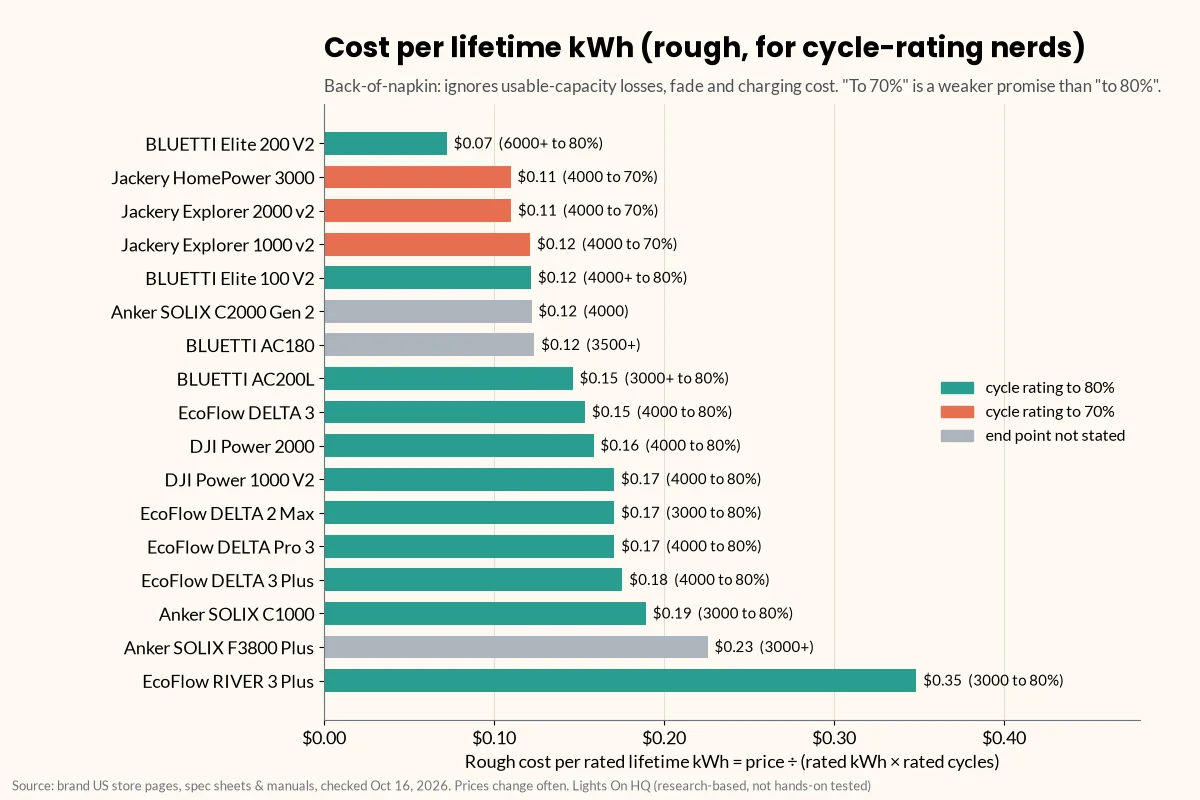
    • Best rough “lifetime” value: the Elite 200 V2 at about $0.07 per rated kWh over its rated cycles, thanks to its 6,000+ cycle rating.
    • $/Wh isn’t the whole story. Surge, UPS speed, solar input and weight can be worth paying for.

    Shopping for a power station is a bit like shopping for cereal. The big box looks like a deal, the tiny box costs a fortune per flake, and the “SALE!” sticker might be the regular price wearing a fake mustache.

    Price per watt-hour cuts through that. It’s simple: store price ÷ rated capacity. Lower means more battery per dollar. This page lists it for every model in our spec database, plus a rough cost per lifetime kWh for the cycle-rating nerds (hi, welcome).

    The value table

    Prices are brand-store prices on Oct 16, 2026. They aren’t live and change often. Confirm before you buy. Sorted by $/Wh, cheapest first.

    Brand Model Capacity (Wh) Store price $/Wh Rated cycles ~$ per lifetime kWh‡
    BLUETTI AC180 1,152 $499 $0.43 3,500+ $0.12
    BLUETTI Elite 200 V2 2,073.6 $899 $0.43 6,000+ to 80% $0.07
    BLUETTI AC200L 2,048 $899 $0.44 3,000+ to 80% $0.15
    Jackery HomePower 3000 3,072 $1,349 $0.44 4,000 to 70% $0.11
    Jackery Explorer 2000 v2 2,042 $899 (sold out) $0.44 4,000 to 70% $0.11
    Jackery Explorer 1000 v2 1,070 $519 $0.49 4,000 to 70% $0.12
    BLUETTI Elite 100 V2 1,024 $499 $0.49 4,000+ to 80% $0.12
    Anker SOLIX C2000 Gen 2 2,048 $999.99 $0.49 4,000 $0.12
    EcoFlow DELTA 2 Max 2,048 $1,049 $0.51 3,000 to 80% $0.17
    Anker SOLIX C1000 1,056 $599.99 (sold out) $0.57 3,000 to 80% $0.19
    EcoFlow DELTA 3 1,024 $629 $0.61 4,000 to 80% $0.15
    DJI Power 2000 2,048 $1,299§ $0.63 4,000 to 80% $0.16
    Anker SOLIX F3800 Plus 3,840 $2,599.99 $0.68 3,000+ $0.23
    DJI Power 1000 V2 1,024 $699§ $0.68 4,000 to 80% $0.17
    EcoFlow DELTA Pro 3 4,096 $2,799 $0.68 4,000 to 80% $0.17
    EcoFlow DELTA 3 Plus 1,024 $719 $0.70 4,000 to 80% $0.18
    EcoFlow RIVER 3 Plus 286 $299 $1.05 3,000 to 80% $0.35

    ‡ Rough cost per lifetime kWh = price ÷ (rated kWh × rated cycles). It’s a back-of-napkin battery-wear figure. It ignores usable-capacity losses, capacity fade, charging electricity and the different end points (70% vs 80%), so treat it as a ranking hint, not a promise. § DJI prices need a second look. djiusa.com showed the Power 1000 V2 on sale at $399.98 vs a regular $699 (about $0.39/Wh at the sale price). The Power 2000 price came from a search snapshot, not a live page, because DJI’s store renders prices in JavaScript. Some DJI specs in our database are from third-party listings.

    Not ranked: Jackery’s Explorer 2000 Plus page showed $2,499 against a $5,799 “compare at,” which looks like a bundle or default variant rather than the base unit. We’ll add it once we can confirm the base price.

    Sources for every row are in the spec database. Examples: BLUETTI Elite 200 V2, BLUETTI AC200L, Jackery HomePower 3000, Anker SOLIX C2000 Gen 2, EcoFlow DELTA 2 Max, DJI Power 2000.

    Horizontal bar chart ranking 17 power stations by price per watt-hour on October 16, 2026, from BLUETTI AC180 and Elite 200 V2 at $0.43 up to EcoFlow RIVER 3 Plus at $1.05. Jackery Explorer 2000 v2 and Anker SOLIX C1000 are marked sold out, and the two DJI models are hatched because their prices need verification.
    Price per rated watt-hour (store price ÷ capacity), brand-store prices checked Oct 16, 2026. Hatched DJI bars need price verification.

    Check Elite 200 V2 price at BLUETTI · Check HomePower 3000 price at Jackery

    Why small units cost more per Wh

    Every power station has fixed costs regardless of battery size: the inverter, the case, the screen, the outlets, the charger. On a small unit those costs are spread over fewer watt-hours. So a 286 Wh unit at $1.05/Wh isn’t a rip-off; it’s just the snack-size bag.

    ⚡ Quick take

    Compare $/Wh within the same size class. A 1 kWh unit at $0.49 and a 2 kWh unit at $0.44 are both good deals for their size.

    The “lifetime” angle: cost per rated kWh

    $/Wh tells you what you pay today. Cost per lifetime kWh hints at what you pay per unit of battery wear over the rated cycle life.

    Horizontal bar chart of rough cost per rated lifetime kWh (price divided by rated kWh times rated cycles), from BLUETTI Elite 200 V2 at about $0.07 to EcoFlow RIVER 3 Plus at about $0.35, with bars colored by cycle-rating end point: to 80%, to 70%, or not stated.
    Back-of-napkin battery-wear cost. It ignores usable-capacity losses, fade and charging cost, and “to 70%” ratings are a weaker promise than “to 80%.”

    The standout is the BLUETTI Elite 200 V2: a low $/Wh and a 6,000+ cycle rating (to 80%) gives it about $0.07 per rated kWh. Jackery’s units also look good here, but remember their cycle ratings are to 70% capacity, a weaker promise than “to 80%.” More on that in our four-brand comparison.

    For a backup unit used a few dozen times a year, you’ll likely never hit the rated cycles anyway. So for most home-backup buyers, today’s $/Wh matters more than lifetime math.

    When paying more per Wh is worth it

    Cheapest per Wh isn’t automatically best. Things worth paying for, depending on your needs:

    • Fast UPS switchover (10 ms or less) for routers, PCs and NAS boxes.
    • A published surge rating if you’ll start a fridge, freezer or pump. Boost modes like X-Boost and Power Lifting are for heating loads, not motors.
    • More solar input for multi-day outages.
    • 240 V output (EcoFlow DELTA Pro 3, Anker SOLIX F3800 Plus) for well pumps or some central AC, installed by a licensed electrician with a transfer switch or inlet.
    • Lower weight if you’ll carry it around.
    • Expandability, so you can add capacity instead of buying a second unit. Expansion batteries explained

    ⚠️ Safety note

    A great price per Wh doesn’t change the safety rules. Never connect a power station to a wall outlet or home wiring (“backfeeding”); the CPSC warns it endangers utility workers and neighbors (CPSC, PDF). For CPAP or other medical devices, confirm with your provider and the device maker.

    How we keep this table honest

    • Brand-store prices only, each stamped with the date we checked. We don’t show Amazon prices in this table.
    • Monthly refresh. Prices and stock change constantly; sales are frequent.
    • Flags, not guesses. If a price looks like a bundle, came from a snapshot or a sale, we say so.

    Related

    Prices last checked: October 16, 2026. Found an error? Tell us.