Author: Josh

  • EcoFlow vs Jackery vs Bluetti vs Anker SOLIX: 2026 Spec Comparison

    EcoFlow vs Jackery vs Bluetti vs Anker SOLIX: 2026 Spec Comparison

    Disclosure: Lights On HQ is reader-supported. If you buy through links on this page we may earn a commission, at no extra cost to you. This doesn’t change which products we include or how we rank them. Read our full disclosure.

    How this page was made: This is a research-based comparison. We did not test these units by hand. Every number comes from the manufacturer’s own product page or user manual, checked on October 16, 2026, and linked below. Our process is described in our methodology.

    📝 TL;DR (for the "just tell me" crowd)

    • No brand wins every spec. Pick the model, not the logo.
    • Cheapest per Wh at 2 kWh (Oct 16, 2026): BLUETTI Elite 200 V2 and Jackery Explorer 2000 v2, both $899, about $0.43–$0.44 per Wh. (The Jackery was sold out.)
    • Most solar for the money: EcoFlow DELTA 3 Plus and DELTA 2 Max, plus BLUETTI Elite 100 V2 and Elite 200 V2, all take up to 1,000 W.
    • Fastest published UPS switchover: EcoFlow, BLUETTI Elite 100 V2 and Anker C2000 Gen 2 list 10 ms or less. Jackery lists about 20 ms.
    • “4,000 cycles” isn’t always “4,000 cycles.” Jackery rates cycles to 70% remaining capacity. EcoFlow, BLUETTI (Elite line) and Anker mostly rate to 80%. More on this below.

    Picture it: the lights blink, the fridge sighs, the Wi-Fi dies mid-episode, and someone in your house says, “Didn’t we mean to buy one of those battery things?” Then you go shopping and meet the same four names over and over: EcoFlow, Jackery, BLUETTI and Anker SOLIX. (DJI is newer here but growing fast. It’s in our full spec database.)

    Every brand says it’s the best. Naturally. So we did the nerdy thing: we gathered the spec sheets for 14 current models from these four brands and put them all on the same ruler.

    Not sure how many watt-hours you need yet? Start with the sizing guide and come back. We’ll keep your seat warm.

    The big table: 14 current models, one ruler

    Prices are each brand’s own US store price on Oct 16, 2026. They change often, and sales are basically a hobby for these companies. Check the current price before you buy.

    Brand Model Capacity (Wh) AC output (W) Surge (W) Rated cycles Weight (lb) Max solar (W) UPS switchover Store price* $/Wh*
    EcoFlow RIVER 3 Plus 286 600 1,200 3,000 to 80% 10.4 220 <10 ms $299 $1.05
    EcoFlow DELTA 3 1,024 1,800 3,600 4,000 to 80% 27.6 500 <10 ms $629 $0.61
    EcoFlow DELTA 3 Plus 1,024 1,800 3,600 4,000 to 80% 27.6 1,000 <10 ms $719 $0.70
    EcoFlow DELTA 2 Max 2,048 2,400 4,800 3,000 to 80% 50 1,000 not listed $1,049 $0.51
    EcoFlow DELTA Pro 3 4,096 4,000 (120/240V) 8,000 4,000 to 80% 113.5 2,600 10 ms $2,799 $0.68
    Jackery Explorer 1000 v2 1,070 1,500 3,000 4,000 to 70% 23.8 400 not listed $519 $0.49
    Jackery Explorer 2000 v2 2,042 2,200 4,400 4,000 to 70% 39.5 400 <20 ms $899 (sold out) $0.44
    Jackery HomePower 3000 3,072 3,600 7,200 4,000 to 70% 59.5 1,000 ~20 ms $1,349 $0.44
    BLUETTI AC180 1,152 1,800 2,700† 3,500+ 35.3 500 ≤20 ms $499 $0.43
    BLUETTI Elite 100 V2 1,024 1,800 not stated 4,000+ to 80% 25.3 1,000 ≤10 ms $499 $0.49
    BLUETTI Elite 200 V2 2,073.6 2,600 3,900† 6,000+ to 80% 53.4 1,000 ≤15 ms $899 $0.43
    Anker SOLIX C1000 1,056 1,800 2,400 3,000 to 80% 28.4 600 not listed $599.99 (sold out) $0.57
    Anker SOLIX C2000 Gen 2 2,048 2,400 4,000 (peak) 4,000 41.7 800 10 ms $999.99 $0.49
    Anker SOLIX F3800 Plus 3,840 6,000 (120/240V) not listed 3,000+ 136.7 3,200 20 ms $2,599.99 $0.68

    * Brand-store price on Oct 16, 2026; $/Wh = price ÷ rated capacity, rounded. Prices aren’t live. They’re checked monthly, so the current price may differ. † BLUETTI’s “Power Lifting” figure is for resistive loads such as kettles and heaters. BLUETTI’s Elite 200 V2 manual says this mode isn’t for motor or compressor loads, so don’t read it as motor-starting surge.

    Sources for every row are in the spec database (each row links to the manufacturer’s page). Examples: EcoFlow DELTA 2 Max, Jackery Explorer 2000 v2, BLUETTI Elite 200 V2, Anker SOLIX F3800 Plus.

    The one that got away: we left Jackery’s Explorer 2000 Plus out of the table. Its page showed a price ($2,499 against a $5,799 “compare at”) that looked like a bundle, not the base unit. We’ll add it once we can confirm the base price.

    Same data, prettier: two charts

    Tables are great until your eyes glaze over. Here’s the same info as pictures.
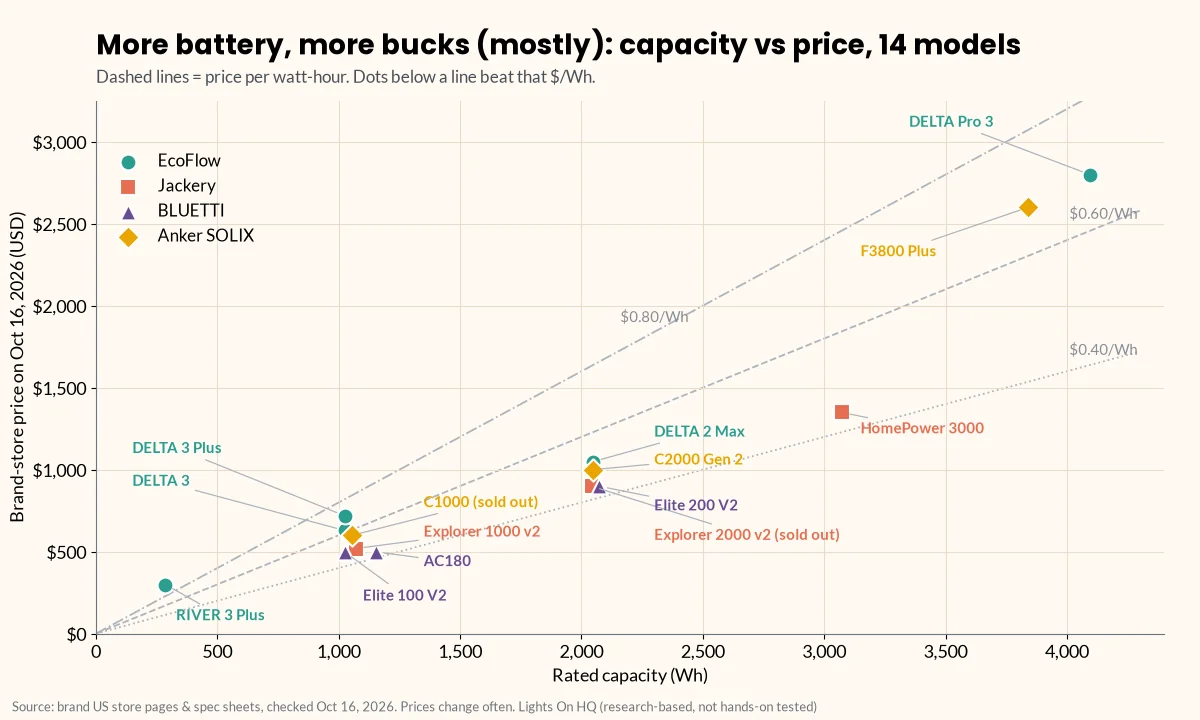
    Scatter chart of rated capacity in watt-hours versus brand-store price on October 16, 2026 for 14 EcoFlow, Jackery, BLUETTI and Anker SOLIX power stations, with reference lines at $0.40, $0.60 and $0.80 per Wh. Prices run from $299 for the 286 Wh RIVER 3 Plus to $2,799 for the 4,096 Wh DELTA Pro 3.
    Capacity vs price for all 14 models in the table. Brand-store prices checked Oct 16, 2026; source links are in our spec database.
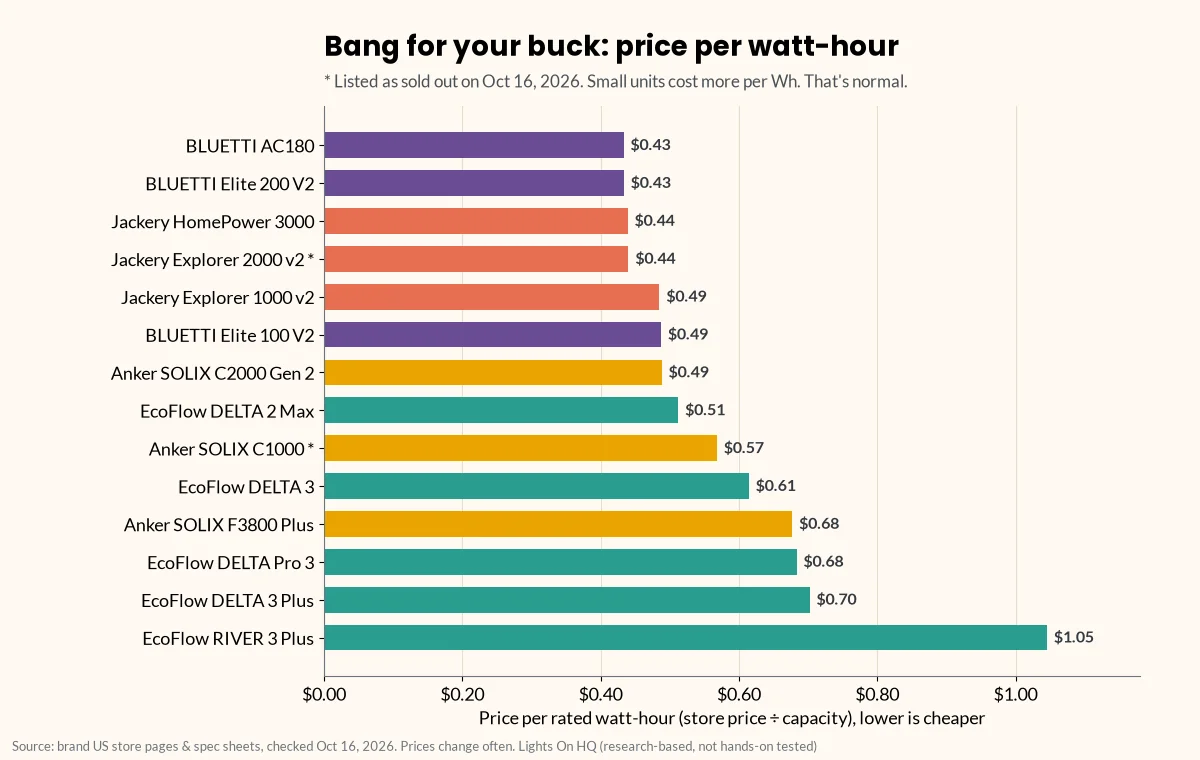
    Horizontal bar chart ranking 14 power stations by price per watt-hour, from the BLUETTI AC180 and Elite 200 V2 at $0.43 to the EcoFlow RIVER 3 Plus at $1.05. The Jackery Explorer 2000 v2 and Anker SOLIX C1000 are marked as sold out.
    Price per rated watt-hour (store price ÷ capacity) on Oct 16, 2026. Lower is cheaper; * = listed as sold out that day.

    ⚡ Quick take

    Small units cost more per watt-hour. That’s normal, like how the snack-size chips cost more per chip. At the 1–3 kWh sizes, several models land in the $0.43–$0.51 range on our check date, so specs like solar input, weight and UPS speed can be the real tiebreakers.

    Brand by brand: what the spec sheets tell you

    EcoFlow: the “something for everyone” lineup

    • Range: the widest of the four, from the 286 Wh RIVER 3 Plus to the 4 kWh DELTA Pro 3. The DELTA Pro 3 offers 120 V and 240 V output and can expand to 12 kWh as a single unit (EcoFlow).
    • Strengths on paper:
    • high solar input (1,000 W on the DELTA 3 Plus and DELTA 2 Max);
    • <10 ms UPS listed on the DELTA 3 series and RIVER 3 Plus;
    • 4,000-cycle ratings to 80% on the newer DELTA 3 family.
    • Watch for: “X-Boost” figures (for example, 2,200 W on the DELTA 3) are a mode for resistive loads, not the continuous rating. Use the plain AC output number for sizing.

    Jackery: the “easy on your back” lineup

    • Range: compact 1 kWh units up to the 3 kWh HomePower 3000. The URL that used to carry the Explorer 3000 v2 now shows that name.
    • Strengths on paper:
    • light weight for the capacity. The Explorer 1000 v2 is listed at about 23.8 lb for 1,070 Wh (Jackery), the lightest 1 kWh-class unit in our table;
    • competitive price per Wh at 2–3 kWh.
    • Watch for:
    • lower solar input on the 1000 v2 and 2000 v2 (400 W);
    • about 20 ms UPS switchover, which is slower than the 10 ms class;
    • cycle ratings to 70% rather than 80%.

    BLUETTI: the “marathon runner” lineup

    • Range: the Elite V2 line (100 and 200) plus the older AC series.
    • Strengths on paper:
    • the longest cycle rating we found: 6,000+ to 80% on the Elite 200 V2 (BLUETTI);
    • 1,000 W solar input on both Elite V2 models;
    • the Elite 100 V2 is 25.3 lb with ≤10 ms UPS (user manual).
    • Watch for:
    • “Power Lifting” numbers, which are for heating appliances only;
    • the AC180’s slower UPS (≤20 ms per its manual);
    • the Elite 100 V2 has no published surge figure.

    Anker SOLIX: the “go big at home” lineup

    • Range: the C-series (portable) and F-series (home backup). Anker’s F2000 page now shows the C2000 Gen 2 instead.
    • Strengths on paper:
    • the F3800 Plus has the highest AC output (6,000 W at 120/240 V) and solar input (3,200 W) in this group, with 3,840 Wh of capacity. Only EcoFlow’s DELTA Pro 3 (4,096 Wh) holds more (Anker);
    • the C2000 Gen 2 lists a 10 ms UPS.
    • Watch for:
    • the F3800 Plus weighs 136.7 lb (with wheels), so it rolls around the house but isn’t really “grab and go”;
    • the C1000 spec table leaves UPS switchover blank;
    • the C1000 was sold out on our check date.

    Why “4,000 cycles” doesn’t always mean the same thing

    A cycle rating has two parts: how many cycles, and how much capacity is left at the finish line. Same race length, different finish lines.

    • Jackery’s 1000 v2, 2000 v2, 2000 Plus and HomePower 3000 pages say “4,000 cycles to 70%+ capacity.”
    • EcoFlow’s DELTA 3, BLUETTI’s Elite V2 models and DJI say “to 80%.”

    “4,000 cycles to 70%” is a weaker promise than “4,000 cycles to 80%.” Manufacturers also test under their own lab conditions (DJI, for example, specifies 25 °C), so treat every cycle figure as a claim, not a guarantee.

    ⚡ Quick take

    For most home-backup buyers, this matters less than it seems. Even 3,000 cycles is more than eight years of daily full cycles. Backup units get cycled far less often than that. So no need to lose sleep over the decimal points.

    Which brand fits which buyer?

    These are research-based suggestions from published specs. They are not test results.

    • Apartment or light backup (Wi-Fi, phones, CPAP*, lights): a 1 kWh unit is usually enough. On weight and UPS, the BLUETTI Elite 100 V2 (25.3 lb, ≤10 ms) and EcoFlow DELTA 3 / 3 Plus (27.6 lb, <10 ms) stand out. The Jackery Explorer 1000 v2 is the lightest. Apartment guide
    • Fridge plus essentials for a day (a.k.a. “save the ice cream”): look at 2 kWh-class units. Compare the Elite 200 V2, DELTA 2 Max, Explorer 2000 v2 and C2000 Gen 2. DELTA 2 Max vs Explorer 2000 v2 · Fridge guide
    • Whole-room or 240 V needs (well pump, some central AC): only the EcoFlow DELTA Pro 3 and Anker SOLIX F3800 Plus in this group offer 240 V. Connecting either one to house circuits needs a licensed electrician and a proper transfer switch or inlet. No DIY heroics here. Transfer switch explainer
    • Solar-heavy users: check max solar input against your panels’ voltage. See solar compatibility and solar charging calculator.

    ⚠️ Safety note: medical devices

    *For CPAP and other medical devices, confirm compatibility with your provider and the device maker. DJI’s Power 2000 manual, for example, warns against using its UPS for devices that need 0 ms switchover, such as medical equipment (DJI manual). A sub-20 ms switchover isn’t the same as a true online UPS.

    What we can’t tell you from spec sheets (and won’t pretend to)

    • Real usable capacity. This is usually below rated Wh, because of inverter losses and the battery’s usable depth of discharge. For example, BLUETTI’s Elite 200 V2 manual assumes 90% depth of discharge and inverter efficiency over 85% in its runtime formula (manual PDF).
    • Fan noise, app reliability and customer service. These need hands-on use or a large set of owner reports. We don’t have either, and we won’t invent them.
    • Long-term reliability. Cycle ratings are lab claims.

    When we cite independent test data in the future, we’ll name the tester and link to it.

    Related

    Last checked: October 16, 2026. Found an error? Tell us and we’ll fix it and note the change.
  • EcoFlow DELTA 2 Max vs Jackery Explorer 2000 v2: Which 2 kWh Unit Fits You?

    EcoFlow DELTA 2 Max vs Jackery Explorer 2000 v2: Which 2 kWh Unit Fits You?

    Disclosure: Lights On HQ is reader-supported. If you buy through links on this page we may earn a commission, at no extra cost to you. Full disclosure.

    Research-based, not hands-on tested. Specs come from EcoFlow’s and Jackery’s US product pages, checked October 16, 2026 (DELTA 2 Max, Explorer 2000 v2). See how we research.

    📝 TL;DR

    • Same-ish tank: 2,048 Wh (DELTA 2 Max) vs 2,042 Wh (Explorer 2000 v2).
    • Pick the DELTA 2 Max for more solar (1,000 W vs 400 W), more AC outlets (6 vs 3), more output (2,400 W vs 2,200 W) and expansion batteries (up to 6,144 Wh).
    • Pick the Explorer 2000 v2 for lighter weight (39.5 lb vs 50 lb), lower price per Wh, mostly wall charging, and a published <20 ms UPS switchover (the DELTA 2 Max spec table doesn’t list one).
    • Heads up: the Explorer 2000 v2 showed “Sold Out” on Jackery’s US store on our check date.

    It’s 7 p.m., a storm just knocked out the power, and the only things you truly care about are: the fridge (ice cream), the Wi-Fi (sanity) and a couple of lamps (so nobody steps on the cat). That’s exactly the job a 2 kWh power station is built for.

    Both of these units store about 2 kWh: 2,048 Wh for the DELTA 2 Max and 2,042 Wh for the Explorer 2000 v2. That’s the size many people look at to keep a fridge, Wi-Fi and lights going through an outage. Past that, though, they’re built for different priorities. Think “expandable solar workhorse” vs “lighter, cheaper-per-Wh wall charger.”

    Side-by-side specs

    Spec EcoFlow DELTA 2 Max Jackery Explorer 2000 v2 Edge
    Capacity 2,048 Wh 2,042 Wh Tie
    Battery chemistry LFP (LiFePO4) LFP (LiFePO4) Tie
    Rated cycles 3,000 to 80% 4,000 to 70% Not directly comparable (why)
    AC continuous output 2,400 W (X-Boost 3,400 W) 2,200 W DELTA 2 Max
    Surge 4,800 W 4,400 W DELTA 2 Max
    AC outlets 6 3 (120 V, 18.3 A total) DELTA 2 Max
    Max solar input 1,000 W (2 × 500 W, 11–60 V) 400 W (2 × 8 mm DC) DELTA 2 Max
    Wall charging 1,800 W “X-Stream” ~1.75 h full charge (listed) Similar on paper
    UPS / switchover Not listed in spec table <20 ms Explorer 2000 v2 (published figure)
    Expansion batteries Up to 2 (6,144 Wh total) None listed in spec table DELTA 2 Max
    Weight 50 lb (23 kg) ~39.5 lb (17.9 kg) Explorer 2000 v2
    Warranty 5 years 3 + 2 years (on Jackery.com) Similar
    Store price, Oct 16, 2026* $1,049 (list $1,299) $899 (list $999), sold out Explorer 2000 v2
    Price per Wh* ~$0.51 ~$0.44 Explorer 2000 v2

    * Brand-store prices on our check date. Prices change often and aren’t live here. Confirm the current price at the retailer.

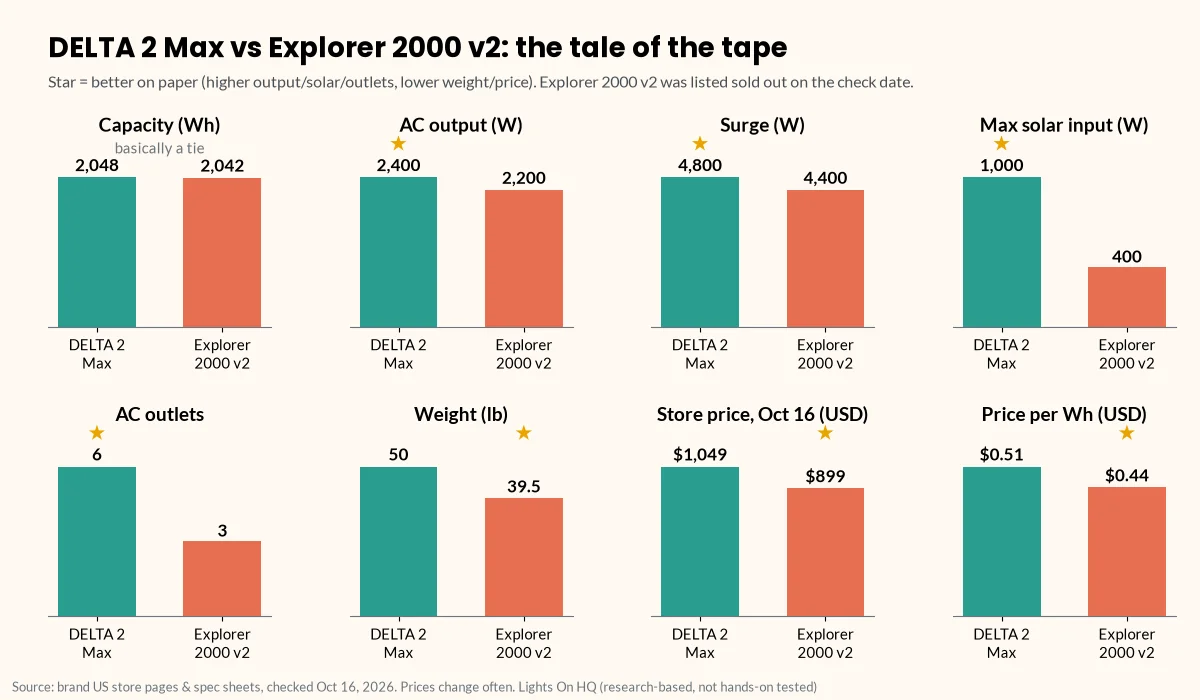
    Eight small bar charts comparing the EcoFlow DELTA 2 Max and Jackery Explorer 2000 v2: capacity 2,048 vs 2,042 Wh, AC output 2,400 vs 2,200 W, surge 4,800 vs 4,400 W, max solar input 1,000 vs 400 W, AC outlets 6 vs 3, weight 50 vs 39.5 lb, store price $1,049 vs $899, and price per Wh $0.51 vs $0.44.
    The tale of the tape, from each brand’s US product page (checked Oct 16, 2026). Stars mark the better figure on paper.

    Check current DELTA 2 Max price at EcoFlow · Check Explorer 2000 v2 price and stock at Jackery

    Where the DELTA 2 Max is stronger

    Solar. Lots of it. 1,000 W of solar input is 2.5× the Explorer 2000 v2’s 400 W. In a multi-day outage, that gap adds up fast. On a good sun day, more input watts means more of the battery refilled before evening. Actual harvest depends on your panels, angle, weather and season (the sun does not take requests). Our solar charging calculator shows the math.

    A growth path. EcoFlow says you can add up to two DELTA 2 Max Smart Extra Batteries, reaching 6,144 Wh (EcoFlow). Jackery’s spec table for the 2000 v2 lists no expansion port. If future-you might want more capacity, that matters. See expansion batteries explained.

    More outlets, more headroom. Six AC outlets and 2,400 W continuous output (4,800 W surge) let you run more devices at once. Fewer “who unplugged the router?!” moments.

    ⚡ Quick take

    If you’re planning for multi-day outages with solar, or you think you’ll want more capacity later, the DELTA 2 Max’s spec sheet is built for you.

    Where the Explorer 2000 v2 is stronger

    Weight. About 10.5 lb lighter. If you’ll haul it up and down stairs or out to a campsite, your lower back will notice.

    Price per Wh. At the prices we saw, about $0.44 per Wh vs $0.51. It was out of stock, though, and EcoFlow runs frequent sales, so the gap can move either way.

    A published UPS figure. Jackery lists switchover “under 20 ms,” for things like a router, computer or NAS. EcoFlow’s DELTA 2 Max spec table doesn’t give a switchover time. (EcoFlow’s newer DELTA 3 series lists <10 ms.) If seamless switchover is the main reason you’re buying, read the caveats below.

    ⚡ Quick take

    If it’ll mostly sit by the wall outlet, get carried around, and keep a router or PC running through blips, the Explorer 2000 v2’s spec sheet leans your way. Just check that it’s back in stock.

    About those cycle ratings (apples vs oranges)

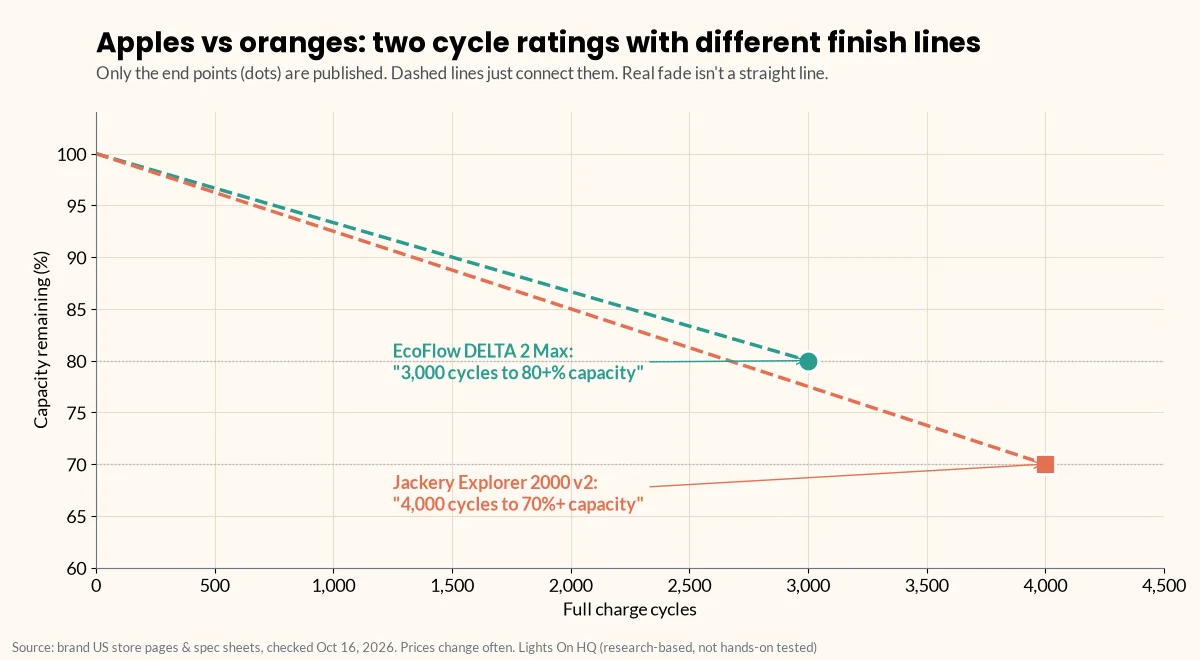
    • Jackery: “4,000 cycles to 70%+ capacity.”
    • EcoFlow: “3,000 cycles to 80+% capacity.”
    Chart of two published cycle-rating end points: EcoFlow DELTA 2 Max at 3,000 cycles to 80% capacity and Jackery Explorer 2000 v2 at 4,000 cycles to 70% capacity. Dashed lines from 100% just connect the points and are not published fade curves.
    Different finish lines: 3,000 cycles to 80% vs 4,000 cycles to 70%. Only the end points are published.

    These use different finish lines, so you can’t simply say 4,000 beats 3,000. Either way, a home-backup unit that’s used a few dozen times a year will take many years to reach these numbers. For most buyers, solar, weight and outlets matter more.

    Important caveats (the “please read this part” part)

    ⚠️ Safety notes

    • “UPS” on power stations isn’t the same as an online UPS. A switchover of 10–20 ms keeps most routers and PCs running, but not everything. For CPAP or other medical equipment, confirm with your provider and the device maker before relying on any power station. CPAP sizing guide
    • Connecting to house circuits: neither unit should be wired into your panel by a non-electrician. Use a licensed electrician and a proper transfer switch or inlet. Transfer switch explainer
    • Fridge runtime depends on your fridge’s actual energy use, not its nameplate watts. Use the runtime calculator with your EnergyGuide label figure.

    Other 2 kWh options worth a look

    From our spec database (same check date):

    • BLUETTI Elite 200 V2: 2,073.6 Wh, 2,600 W, 1,000 W solar, ≤15 ms UPS, 6,000+ cycles to 80%, 53.4 lb, $899.
    • Anker SOLIX C2000 Gen 2: 2,048 Wh, 2,400 W (4,000 W peak), 800 W solar, 10 ms UPS, 41.7 lb, $999.99.
    • DJI Power 2000: 2,048 Wh, 3,000 W, 10 ms UPS, 48.5 lb, $1,299. Solar up to 1,800 W needs DJI’s separate charger accessory.

    See the full four-brand comparison

    Related

    Last checked: October 16, 2026. Spot an error? Let us know.

  • What Size Power Station Do I Need? A Load-List Method

    What Size Power Station Do I Need? A Load-List Method

    Disclosure: Lights On HQ is reader-supported. If you buy through links on this page we may earn a commission, at no extra cost to you. Full disclosure.

    Research-based guide. This page explains the math and uses example numbers. It doesn’t report hands-on testing. Model specs are from manufacturer pages, checked October 16, 2026. See our methodology.

    📝 TL;DR

    • You need two numbers: capacity (Wh) = how long things run, and output (W) = what you can run. Plus surge watts for motors.
    • Four steps: list your devices → add up Wh per day → divide by 0.8 for real-world losses → check running and surge watts.
    • Our example household (fridge, Wi-Fi, lights, laptop, phones) uses about 2,320 Wh/day, so it needs about 2,900 Wh for one full day.
    • A 2 kWh unit covers that list for roughly 17 hours; a 3 kWh-class unit covers the whole day.

    Here’s how most of us discover we need a power station: the power goes out, the house goes quiet, and everyone gathers in the living room holding glowing phones at 14% battery like tiny campfires. Then comes the shopping, and the very reasonable question: how big do I actually need?

    Power stations are sold by two numbers, and you need both:

    1. Capacity (watt-hours, Wh): how much energy is stored. This sets how long things run. Think: the size of the gas tank.
    2. Output (watts, W): how much power it can deliver at once. This sets what you can run. Think: the size of the engine. A third number, surge watts, covers the short spike when motors start.

    Getting either one wrong is the most common sizing mistake. Here’s a four-step method you can do with a pencil, or with our runtime calculator, which uses the same math.

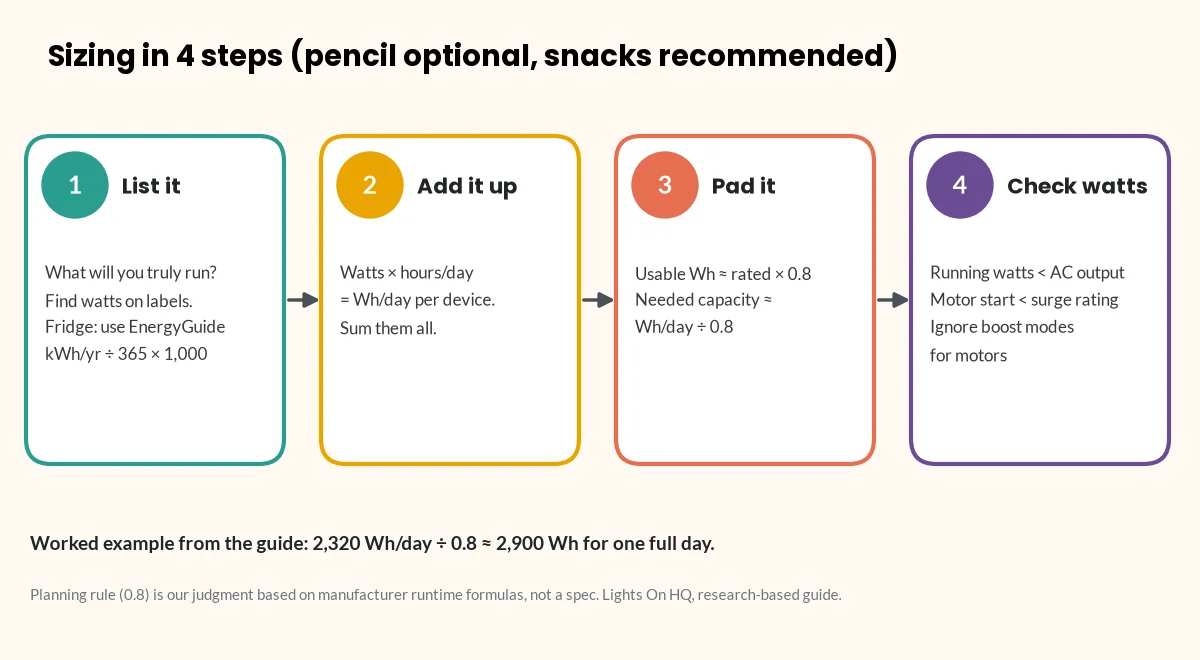
    Four-step diagram for sizing a power station: 1, list devices and their watts; 2, multiply watts by hours and add up watt-hours per day; 3, divide by 0.8 to allow for losses; 4, check that running watts are below the AC output and motor starting watts are below the surge rating.
    The whole method on one card. Worked example: 2,320 Wh/day ÷ 0.8 ≈ 2,900 Wh for one full day.

    Step 1: List what you actually need to power

    Be honest here. The espresso machine is not “essential.” (Okay, it’s a little essential.) Write down only what you’d truly run during an outage (or at camp). For each item, find its watts:

    • Label or nameplate: most devices have wattage printed on the back, the bottom or the power brick.
    • Only amps listed? Multiply amps × volts. Most US household devices are 120 V. This method is from Virginia Tech’s extension guide on estimating appliance energy use (Virginia Cooperative Extension).
    • Refrigerators and freezers: use the yearly kWh on the yellow EnergyGuide label, not nameplate watts. The compressor cycles on and off, so nameplate watts overstate daily use. Daily Wh = (kWh per year ÷ 365) × 1,000.
    • Most accurate: a plug-in watt meter shows real draw over a day.

    Step 2: Add up watt-hours per day

    For each device: watts × hours used per day = Wh per day. Add them all up. That’s it. That’s the math.

    Worked example (illustrative numbers. Use your own labels.)

    Device Watts (example) Hours/day Wh/day
    Refrigerator (EnergyGuide label says 500 kWh/yr) n/a (cycles) 24 1,370
    Modem + Wi-Fi router 20 24 480
    4 LED bulbs 4 × 10 = 40 5 200
    Laptop 60 4 240
    2 phones (about 15 Wh each per charge) n/a 1 charge each 30
    Total 2,320 Wh/day

    These are example figures to show the method. They’re not measurements. Your fridge label and device bricks will give different numbers.

    ⚡ Quick take

    Notice who’s hogging the battery? The fridge is more than half the total. If your list includes a fridge, its EnergyGuide number is the single most important figure on your worksheet.

    Step 3: Add an efficiency margin (you won’t get 100% of the rated Wh)

    Bad news: a power station’s rated capacity isn’t all usable at the outlet. The inverter loses some energy turning battery DC into AC, and the battery isn’t run all the way to zero. For example, BLUETTI’s Elite 200 V2 user manual estimates runtime as:

    Runtime = capacity × 90% (depth of discharge) × inverter efficiency (over 85%) ÷ (load + about 10 W self-consumption) (BLUETTI manual, PDF)

    That works out to roughly 75–80% of rated Wh reaching your AC devices. Our planning rule (a judgment call, not a manufacturer spec) is:

    Usable Wh ≈ rated Wh × 0.8. Use 0.75 if you want a safety margin.

    So required capacity ≈ daily Wh ÷ 0.8.

    For the example: 2,320 ÷ 0.8 = about 2,900 Wh for one full day.

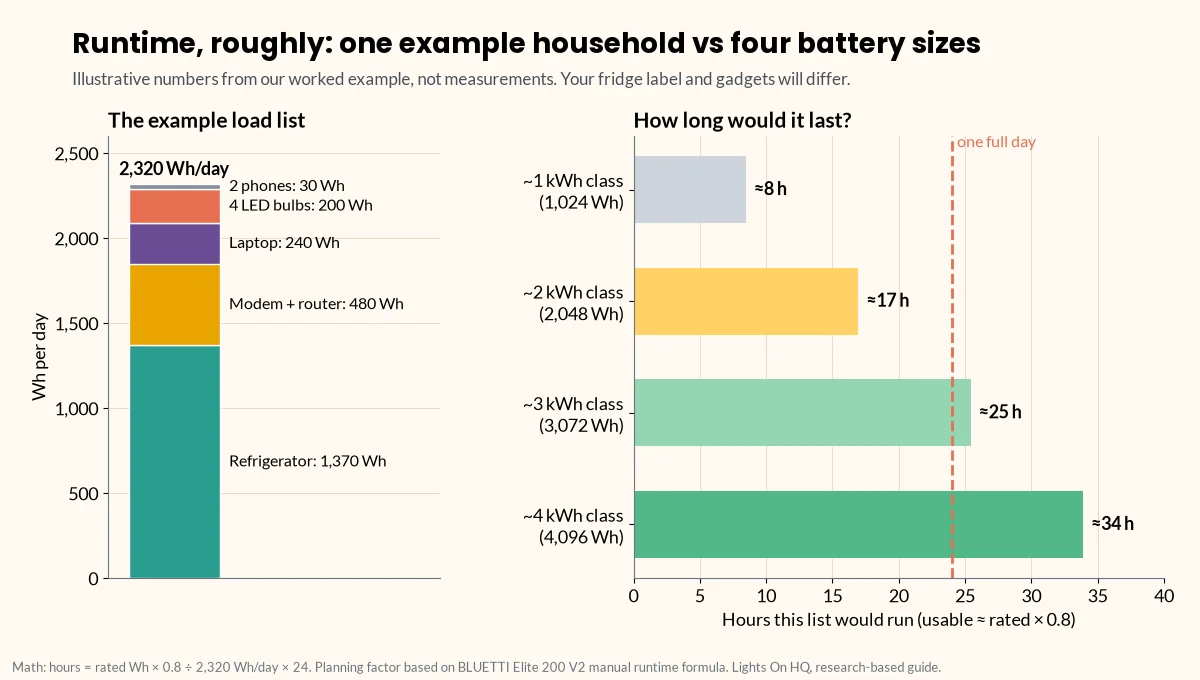
    Two-part chart. A stacked bar shows the example household's 2,320 Wh per day: refrigerator 1,370, modem and router 480, laptop 240, LED bulbs 200 and phones 30. Horizontal bars show that load lasting about 8, 17, 25 and 34 hours on 1,024, 2,048, 3,072 and 4,096 Wh units at 80% usable capacity.
    Illustrative math, not measurements: hours ≈ rated Wh × 0.8 ÷ 2,320 Wh/day × 24.

    What that means in practice:

    • A 2 kWh unit (≈1,640 usable Wh) would cover this list for about 17 hours (1,640 ÷ 2,320 × 24). You’d get a full day by dropping the laptop and cutting router hours, or by adding solar.
    • A 3 kWh-class unit (for example, Jackery’s 3,072 Wh HomePower 3000 or Anker’s 3,840 Wh F3800 Plus) would cover the whole day.
    • An expandable unit (for example, the EcoFlow DELTA 2 Max, up to 6,144 Wh with extra batteries) lets you start at 2 kWh and grow.

    Step 4: Check output watts and surge

    Capacity tells you how long. Output tells you whether it will run at all. A giant tank with a tiny engine still won’t tow the boat.

    1. Running watts: add up the watts of everything that might run at the same time. In the example, that might be fridge + router + lights + laptop. Use the fridge’s actual running draw from a watt meter or the manual. Your total must be below the station’s continuous AC output.
    2. Surge watts: motors (fridges, freezers, pumps, some power tools) pull a short spike when they start. That spike can be several times their running draw. Check the appliance manual or ask the manufacturer. The station’s surge rating has to cover it.
    3. Beware “boost” modes: “X-Boost” (EcoFlow) and “Power Lifting” (BLUETTI) let heating appliances run above the rated output at reduced power. BLUETTI’s Elite 200 V2 manual says this mode isn’t for motor or compressor loads. Don’t count boost figures when you size for motors. See surge vs running watts explained.
    4. 240 V appliances (well pumps, some central AC) need a unit with 240 V output. In our database, that’s the EcoFlow DELTA Pro 3 and Anker SOLIX F3800 Plus. These, and any connection to house circuits, require a licensed electrician and a proper transfer switch or inlet. Transfer switch explainer

    Quick size guide

    A rough starting point (our judgment, based on the method above). Your own load list matters more.

    Your goal Typical daily need Capacity class to shortlist Example models (Oct 16, 2026 store price)
    Phones, Wi-Fi and lights for an evening; small UPS for a router or PC 200–500 Wh 250–500 Wh EcoFlow RIVER 3 Plus (286 Wh, $299)
    Overnight essentials, CPAP*, laptop work 500–1,000 Wh ~1 kWh BLUETTI Elite 100 V2 ($499), Jackery Explorer 1000 v2 ($519), EcoFlow DELTA 3 ($629)
    Fridge + essentials for most of a day 1,500–2,500 Wh ~2 kWh BLUETTI Elite 200 V2 ($899), Anker SOLIX C2000 Gen 2 ($999.99), EcoFlow DELTA 2 Max ($1,049)
    Fridge + essentials for a full day or more; some bigger loads 2,500 Wh+ 3–4 kWh or expandable Jackery HomePower 3000 ($1,349), Anker SOLIX F3800 Plus ($2,599.99), EcoFlow DELTA Pro 3 ($2,799)

    ⚠️ Safety note: medical devices

    *For CPAP and other medical devices, confirm power needs and compatibility with your provider and the device manufacturer. Don’t rely on a power station as your only plan for life-sustaining equipment. CPAP sizing guide

    Prices are brand-store prices on our check date. They change often and aren’t live. Full specs and sources are in the spec database.

    Don’t forget recharging

    For outages longer than one battery’s worth, recharge speed matters as much as size:

    • Solar input ranges from 220 W (RIVER 3 Plus) to 3,200 W (F3800 Plus) in our database. More input means more energy back per sunny hour. See solar charging time calculator.
    • Gas generator or car charging options vary by brand.
    • Sometimes a smaller unit plus solar beats a bigger unit with no way to recharge.

    ⚡ Quick take

    A battery you can refill beats a bigger battery you can’t. If outages in your area tend to last days, budget for solar input, not just watt-hours.

    Printable worksheet

    Copy this into a notes app or print it and stick it on the fridge (fitting, really):

    Device | Watts | Hours/day | Wh/day | Runs at same time? (Y/N) | Motor? (Y/N) -------|-------|-----------|--------|--------------------------|------------- | | | | | | | | | | TOTAL Wh/day: ______ ÷ 0.8 = required capacity: ______ Wh Max simultaneous running watts: ______ (must be < station AC output) Largest motor starting watts: ______ (must be < station surge rating)

    Next steps

    Last checked: October 16, 2026. Found a mistake in the math? Tell us.

  • Bluetti AC200L vs EcoFlow DELTA 2 Max: Expansion, Solar Input and Weight

    Bluetti AC200L vs EcoFlow DELTA 2 Max: Expansion, Solar Input and Weight

    Disclosure: Lights On HQ is reader-supported. If you buy through links on this page we may earn a commission, at no extra cost to you. Full disclosure.

    Research-based, not hands-on tested. Specs come from BLUETTI’s and EcoFlow’s US product pages and user manuals, checked October 16, 2026 (AC200L page, AC200L manual, DELTA 2 Max). See how we research.

    📝 TL;DR

    • Same starting tank: both are 2,048 Wh LiFePO4 units with 2,400 W continuous AC output.
    • Pick the BLUETTI AC200L for more room to grow (up to 8,192 Wh vs 6,144 Wh), more solar (1,200 W vs 1,000 W), a published ≤20 ms UPS, a TT-30 RV outlet, and a lower price on our check date ($899 vs $1,049).
    • Pick the EcoFlow DELTA 2 Max if weight matters (50 lb vs 62.4 lb) and you want six standard AC outlets.
    • Fine print: BLUETTI’s 7,200 W surge figure (product page) doesn’t match the overload figures in its manual. EcoFlow doesn’t list a UPS switchover time for the DELTA 2 Max.

    Imagine two friends offering to help you move. One is a little stronger and owns a bigger truck (and charges less). The other is lighter on their feet and won’t throw their back out on the stairs. Both will get the couch moved. The question is which trade-off fits your move.

    That’s the BLUETTI AC200L vs the EcoFlow DELTA 2 Max in a nutshell. Same 2 kWh battery, same 2,400 W output, different priorities.

    Side-by-side specs

    Spec BLUETTI AC200L EcoFlow DELTA 2 Max Edge
    Capacity 2,048 Wh 2,048 Wh Tie
    Chemistry LiFePO4 LFP (LiFePO4) Tie
    Rated cycles 3,000+ to 80% 3,000 to 80% Tie
    AC continuous output 2,400 W 2,400 W Tie
    Surge 7,200 W (product page)† 4,800 W AC200L (on paper)
    Boost mode (resistive loads only) Power Lifting 3,600 W X-Boost 3,400 W Similar
    AC outlets 4 × 120 V/20 A + 1 × TT-30 (120 V/30 A) 6 Depends (RV vs household)
    Max solar input 1,200 W (12–145 VDC, 15 A) 1,000 W (2 × 500 W, 11–60 V) AC200L
    AC charging 2,400 W max; 0–80% in 45 min (manual) 1,800 W “X-Stream” AC200L
    UPS switchover ≤20 ms (manual) Not listed in spec table AC200L (published figure)
    Max expansion 8,192 Wh (2 × B300) 6,144 Wh (2 × Smart Extra Battery) AC200L
    Weight 62.4 lb (28.3 kg) 50 lb (23 kg) DELTA 2 Max
    Warranty 5 years 5 years Tie
    Store price, Oct 16, 2026* $899 (compare-at $1,599) $1,049 (list $1,299) AC200L
    Price per Wh* ~$0.44 ~$0.51 AC200L

    * Brand-store prices on our check date. They change often and aren’t live. Confirm at the retailer. † BLUETTI’s US manual lists AC overload as 3,000–3,600 W for 5 seconds and over 3,600 W for 0.5 seconds. That’s how the inverter handles brief spikes; it doesn’t obviously match “7,200 W surge.” Check with BLUETTI if you’re starting a big motor.

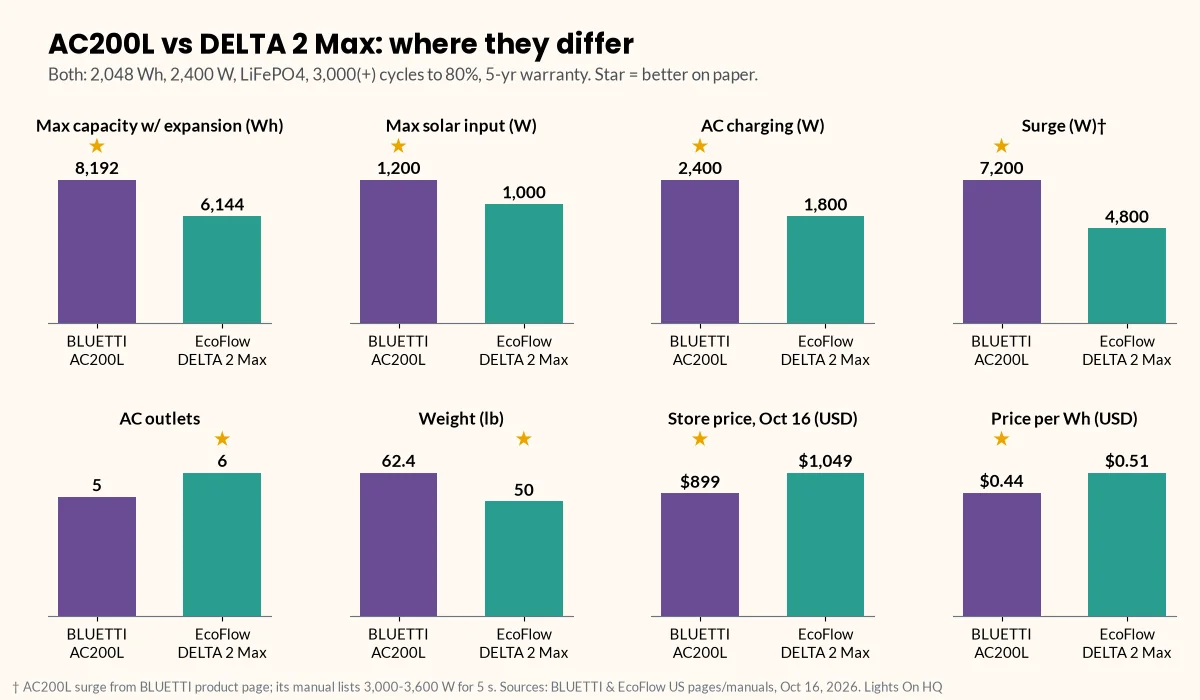
    Eight small bar charts comparing the BLUETTI AC200L and EcoFlow DELTA 2 Max: max capacity with expansion 8,192 vs 6,144 Wh, max solar input 1,200 vs 1,000 W, AC charging 2,400 vs 1,800 W, surge 7,200 vs 4,800 W, AC outlets 5 vs 6, weight 62.4 vs 50 lb, store price $899 vs $1,049, and price per Wh $0.44 vs $0.51.
    Where they differ, per BLUETTI and EcoFlow US pages and manuals (Oct 16, 2026). The AC200L surge figure is from BLUETTI’s product page; its manual lists lower overload figures.

    Check AC200L price at BLUETTI · Check DELTA 2 Max price at EcoFlow

    Round 1: Expansion (the “future you” round)

    Both let you add batteries later instead of buying a whole new unit.

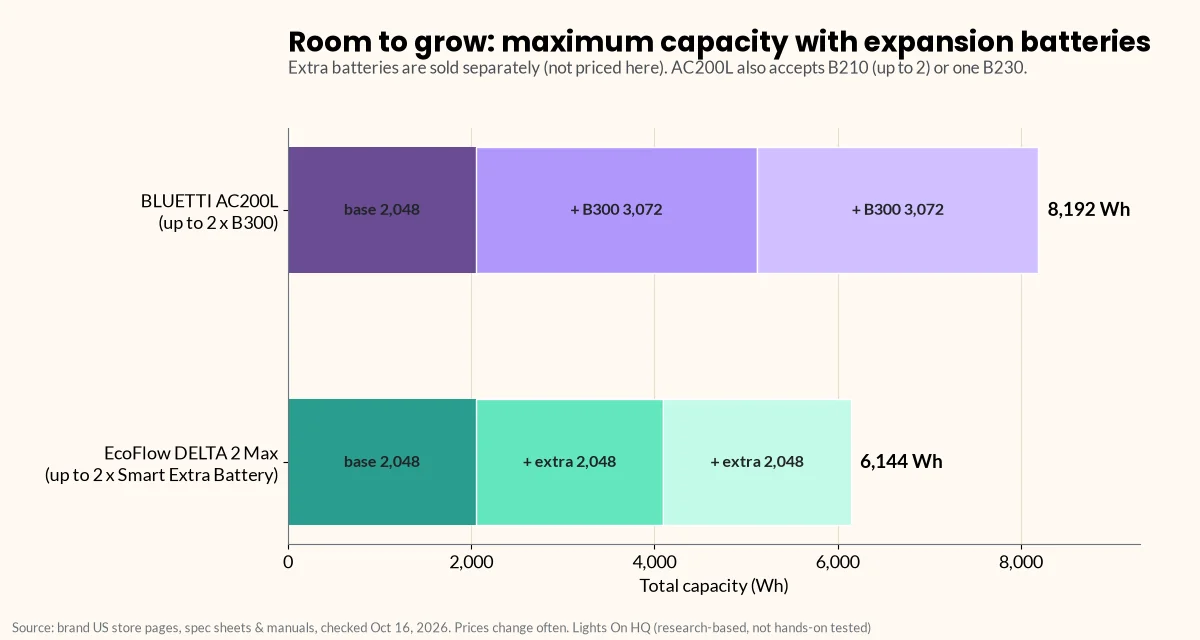
    • AC200L: BLUETTI says it works with up to two B210 or B300 batteries, or one B230. With two B300s, total capacity reaches 8,192 Wh (BLUETTI manual).
    • DELTA 2 Max: up to two DELTA 2 Max Smart Extra Batteries for 6,144 Wh (EcoFlow).
    Stacked bar chart of maximum capacity with expansion batteries: BLUETTI AC200L 2,048 Wh base plus two 3,072 Wh B300 batteries for 8,192 Wh, and EcoFlow DELTA 2 Max 2,048 Wh base plus two 2,048 Wh Smart Extra Batteries for 6,144 Wh.
    Room to grow: 8,192 Wh vs 6,144 Wh at the max. Expansion batteries are sold separately.

    ⚡ Quick take

    If “maybe I’ll want three days of fridge power someday” is a thought you’ve had, the AC200L has the higher ceiling. Just budget for the extra batteries; they aren’t free, and we haven’t priced them here. More: expansion batteries explained.

    Round 2: Solar input (the “sunny day refill” round)

    • AC200L: 1,200 W max, at 12–145 VDC and 15 A. BLUETTI quotes about 2 hours to recharge with 1,200 W of solar “with prime sunshine, ideal orientation and low temperature” (BLUETTI).
    • DELTA 2 Max: 1,000 W via two 500 W inputs (11–60 V, 15 A). EcoFlow says it can charge “in as fast as 2.3 hours” with 1,000 W of solar (EcoFlow).

    The AC200L’s wider voltage window (up to 145 VDC) means you can string more panels in series. The DELTA 2 Max splits its input across two ports. Either way, check panel voltage against the limits before you buy. Solar compatibility guide · Solar charging calculator

    Real-world harvest depends on panels, angle, weather and season. Manufacturers quote best-case numbers.

    Round 3: Weight (the “please lift with your knees” round)

    • AC200L: 62.4 lb.
    • DELTA 2 Max: 50 lb.

    That’s a 12.4 lb difference. If it lives in a utility room and rarely moves, it’s no big deal. If you’ll carry it up from the basement every storm, the DELTA 2 Max is noticeably kinder.

    ⚡ Quick take

    Weight is the DELTA 2 Max’s clearest win. If you’re buying for a cabin, RV or campsite that you’ll haul to, test-lift a 50 lb bag of something first. Seriously.

    Round 4: Outlets and UPS

    • Outlets: the AC200L has four 120 V/20 A outlets plus a TT-30 (the common RV plug). The DELTA 2 Max has six AC outlets, which is handier for a pile of household plugs.
    • UPS: BLUETTI’s manual lists ≤20 ms switching time and several UPS modes. EcoFlow’s DELTA 2 Max spec table doesn’t list a switchover time. (EcoFlow’s newer DELTA 3 series lists <10 ms.)

    Who should buy which?

    • AC200L: home backup with long-outage plans, solar-heavy setups, RV owners who want a TT-30, and anyone who wants the lower price per Wh on our check date.
    • DELTA 2 Max: people who’ll move it often, want six standard outlets, or already own EcoFlow gear.

    Important caveats

    ⚠️ Safety notes

    • UPS ≠ online UPS. A 10–20 ms switchover keeps most routers and PCs running, but not everything. BLUETTI’s AC200L manual excludes use with devices that need a high-performance UPS (including medical equipment) from warranty coverage. For CPAP or other medical equipment, confirm with your provider and the device maker. CPAP sizing guide
    • No backfeeding. Never plug either unit into a wall outlet to power house wiring; the CPSC warns this endangers utility workers and neighbors (CPSC, PDF). For house circuits, hire a licensed electrician to install a transfer switch or inlet. Transfer switch explainer
    • Boost modes are for heaters, not motors. BLUETTI’s manual says Power Lifting is only for resistive loads between 2,400 W and 3,600 W.

    Related

    Last checked: October 16, 2026. Spot an error? Let us know.

  • Best Portable Power Station for Home Backup (Research-Based Picks)

    Best Portable Power Station for Home Backup (Research-Based Picks)

    Disclosure: Lights On HQ is reader-supported. If you buy through links on this page we may earn a commission, at no extra cost to you. This doesn’t change which products we include or how we rank them. Read our full disclosure.

    Research-based, not hands-on tested. We haven’t tested these units ourselves. Specs and prices come from each manufacturer’s US product page or user manual, checked October 16, 2026, and linked below. See our methodology.

    📝 TL;DR

    • Just the essentials (Wi-Fi, phones, lights, a laptop): a ~1 kWh unit. Our spec pick: BLUETTI Elite 100 V2 ($499, ≤10 ms UPS, 1,000 W solar, 25.3 lb).
    • Fridge plus essentials: a ~2 kWh unit. Spec pick: BLUETTI Elite 200 V2 ($899, 2,073.6 Wh, ≤15 ms UPS, 6,000+ cycles to 80%). Want a published motor-surge figure? Look at the Anker SOLIX C2000 Gen 2 ($999.99, 4,000 W peak, 10 ms UPS).
    • Start small, grow later: BLUETTI AC200L (2,048 Wh, expandable to 8,192 Wh, $899) or EcoFlow DELTA 2 Max (expandable to 6,144 Wh, $1,049).
    • Big loads or 240 V (well pump, some central AC): EcoFlow DELTA Pro 3 or Anker SOLIX F3800 Plus, installed with a licensed electrician and a proper transfer switch or inlet.
    • Best value 3 kWh on our check date: Jackery HomePower 3000 ($1,349, about $0.44 per Wh).

    It’s 9:47 p.m. The wind has been showing off all evening, and then click: the house goes dark, the fridge goes quiet, and the router’s little lights fade like a sad birthday cake. Somebody yells “WHO TOUCHED THE BREAKER?” Nobody did. It’s the whole street.

    That’s the moment a home backup power station earns its keep. No fumes, no pull cord, no extension cord snaking out the window. Just plug in what matters and carry on.

    But “best” depends on what you need to keep running. So instead of one magic answer, here are research-based picks by tier, all from published specs.

    How we picked (no lab coats involved)

    We didn’t test these units by hand. We compared the spec sheets in our spec database on what matters most for home backup:

    1. Capacity (Wh): how long things run.
    2. Continuous and surge output (W): whether your fridge or pump will start at all.
    3. UPS switchover time: whether the router and PC ride through the outage without a reboot.
    4. Solar input: how fast you can refill during a multi-day outage.
    5. Expandability and 240 V: room to grow, and options for bigger home circuits.
    6. Price per Wh on our check date.

    Not sure how many watt-hours you need? Do the 10-minute sizing method first, or plug your list into the runtime calculator.

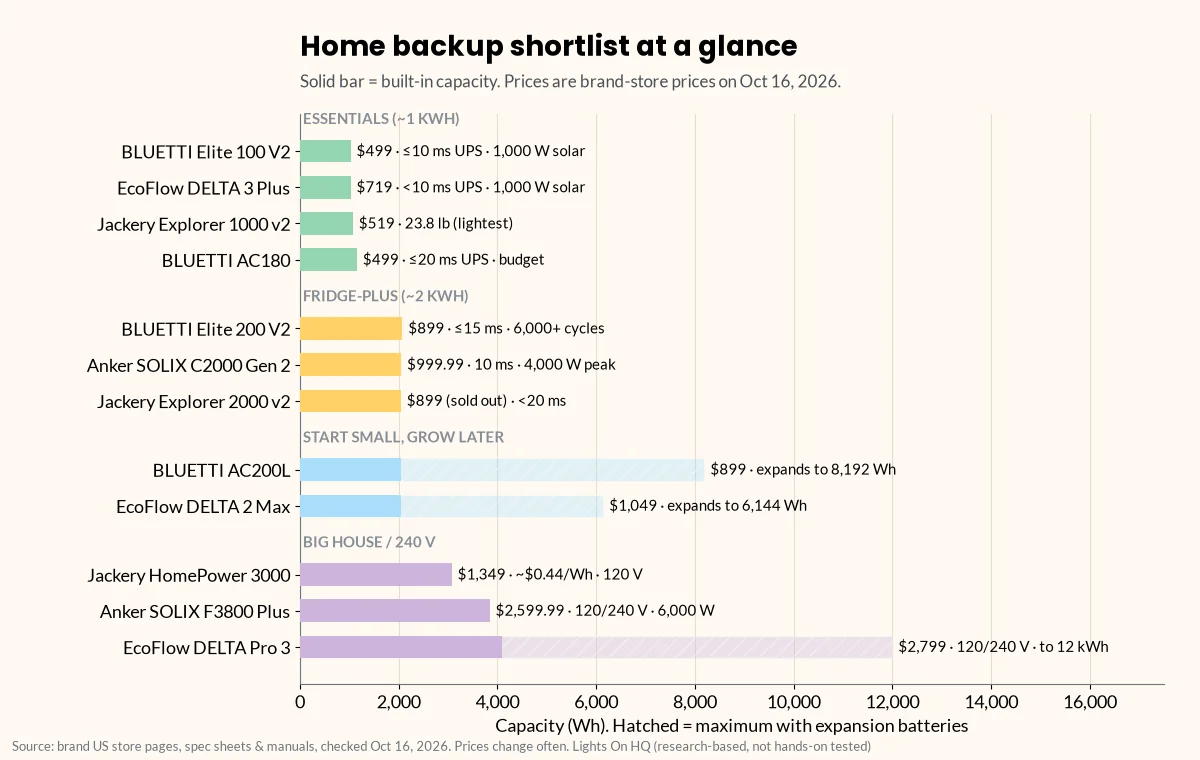
    Horizontal bar chart of the home backup shortlist grouped into four tiers: essentials around 1 kWh (BLUETTI Elite 100 V2, EcoFlow DELTA 3 Plus, Jackery Explorer 1000 v2, BLUETTI AC180), fridge-plus around 2 kWh (BLUETTI Elite 200 V2, Anker SOLIX C2000 Gen 2, Jackery Explorer 2000 v2), expandable (BLUETTI AC200L to 8,192 Wh, EcoFlow DELTA 2 Max to 6,144 Wh) and big house or 240 V (Jackery HomePower 3000, Anker SOLIX F3800 Plus, EcoFlow DELTA Pro 3 to 12 kWh), each labeled with price and key specs.
    The shortlist by tier. Solid bars are built-in capacity; hatched bars show the maximum with expansion batteries. Brand-store prices checked Oct 16, 2026.

    Tier 1: The essentials kit (~1 kWh)

    For: Wi-Fi, phones, LED lights, a laptop, maybe a CPAP*. Apartment dwellers, short outages, “I just need to work from home tomorrow.”

    Spec pick: BLUETTI Elite 100 V2

    • 1,024 Wh, 1,800 W AC output, ≤10 ms UPS, 1,000 W max solar, 25.3 lb, 4,000+ cycles to 80%.
    • $499 on BLUETTI’s US store on Oct 16, 2026 (BLUETTI).
    • Watch for: BLUETTI publishes no surge figure for it, so it’s best for electronics and lights, not motors.

    Also worth a look:

    • EcoFlow DELTA 3 Plus: 1,024 Wh, 1,800 W (3,600 W surge), <10 ms UPS, 1,000 W solar, 27.6 lb, $719. EcoFlow’s store said “ships mid-November” on our check date (EcoFlow). The DELTA 3 has the same capacity and output with 500 W solar for $629 (EcoFlow).
    • Jackery Explorer 1000 v2: the lightest 1 kWh-class unit in our database at about 23.8 lb (1,070 Wh, 1,500 W, 3,000 W surge, 400 W solar), $519. Jackery’s product page doesn’t list a UPS switchover time (Jackery).

    Check Elite 100 V2 price at BLUETTI

    ⚡ Quick take

    If you mostly care about keeping the internet and lights alive without a hiccup, a ~1 kWh unit with a ≤10 ms UPS is the sweet spot. It’s also small enough to live in a closet without becoming “that thing everyone trips over.”

    Tier 2: The fridge-plus kit (~2 kWh)

    For: a fridge plus the essentials for most of a day. The classic “save the groceries” setup. (Our worked example in the sizing guide uses about 2,320 Wh a day with a fridge, so a 2 kWh unit covers that list for roughly 17 hours.)

    Spec pick: BLUETTI Elite 200 V2

    • 2,073.6 Wh, 2,600 W, ≤15 ms UPS (per manual), 1,000 W solar, 6,000+ cycles to 80% (the longest rating we found), 53.4 lb, $899 (BLUETTI).
    • Watch for: its 3,900 W figure is “Power Lifting” for resistive loads only. BLUETTI’s manual says that mode isn’t for motor or compressor loads, and we didn’t find a separate motor-surge figure. If you’re starting a fridge or pump, check with BLUETTI.

    If a published surge figure matters to you (it should for motors):

    • Anker SOLIX C2000 Gen 2: 2,048 Wh, 2,400 W, 4,000 W peak, 10 ms UPS, 800 W solar, 41.7 lb, $999.99 (Anker).
    • Jackery Explorer 2000 v2: 2,042 Wh, 2,200 W, 4,400 W surge, <20 ms UPS, 39.5 lb, $899, but sold out on our check date (Jackery).

    Check Elite 200 V2 price at BLUETTI · Check C2000 Gen 2 price at Anker SOLIX

    More fridge detail: best power station to run a refrigerator.

    Tier 3: Start small, grow later (expandable 2 kWh)

    For: people who want a 2 kWh unit today and the option to bolt on more battery later.

    • BLUETTI AC200L: 2,048 Wh, 2,400 W, 7,200 W surge (BLUETTI’s product page), ≤20 ms UPS (user manual), 1,200 W solar, 62.4 lb, 3,000+ cycles to 80%. Expands with up to two B300 batteries to 8,192 Wh. Its outlets include a 120 V/30 A TT-30. $899 (compare-at $1,599) on Oct 16, 2026 (BLUETTI, manual PDF).
    • EcoFlow DELTA 2 Max: 2,048 Wh, 2,400 W (4,800 W surge), 1,000 W solar, 50 lb. Add up to two Smart Extra Batteries for 6,144 Wh. $1,049 (list $1,299). Its spec table doesn’t list a UPS switchover time (EcoFlow).

    Head to head: Bluetti AC200L vs EcoFlow DELTA 2 Max · expansion batteries explained

    Tier 4: The big-house kit (3–4 kWh, 240 V options)

    For: longer outages, more circuits, or 240 V appliances.

    • Jackery HomePower 3000 (best value on our check date): 3,072 Wh, 3,600 W (7,200 W surge), ~20 ms UPS, 1,000 W solar, 59.5 lb, $1,349, about $0.44 per Wh (Jackery). 120 V only.
    • EcoFlow DELTA Pro 3: 4,096 Wh, 4,000 W at 120/240 V, 8,000 W surge, 10 ms UPS, 2,600 W solar, 113.5 lb, expandable to 12 kWh as a single unit. $2,799 (EcoFlow).
    • Anker SOLIX F3800 Plus: 3,840 Wh, 6,000 W at 120/240 V, 3,200 W solar, 20 ms (grid to battery), 136.7 lb with wheels. $2,599.99 (Anker).

    ⚠️ Safety note: house circuits and 240 V

    Running a well pump or other hard-wired circuits means connecting to your home’s wiring. That job is for a licensed electrician with a proper transfer switch or power inlet. Never plug a power station (or any generator) into a wall outlet to “power the house.” That’s called backfeeding, and the CPSC warns it creates an electrocution risk for utility workers and neighbors (CPSC safety alert, PDF). Transfer switch explainer

    Budget tier: under $500-ish

    • BLUETTI AC180: 1,152 Wh, 1,800 W, about $0.43 per Wh at $499, ≤20 ms UPS per its manual. The manual says to turn off Grid Enhancement mode for UPS use (BLUETTI). Its 2,700 W figure is Power Lifting for resistive loads.
    • BLUETTI Elite 100 V2 and Jackery Explorer 1000 v2 (above) are $499 and $519.

    More: best budget power stations under $500

    The backup game plan (what to power first)

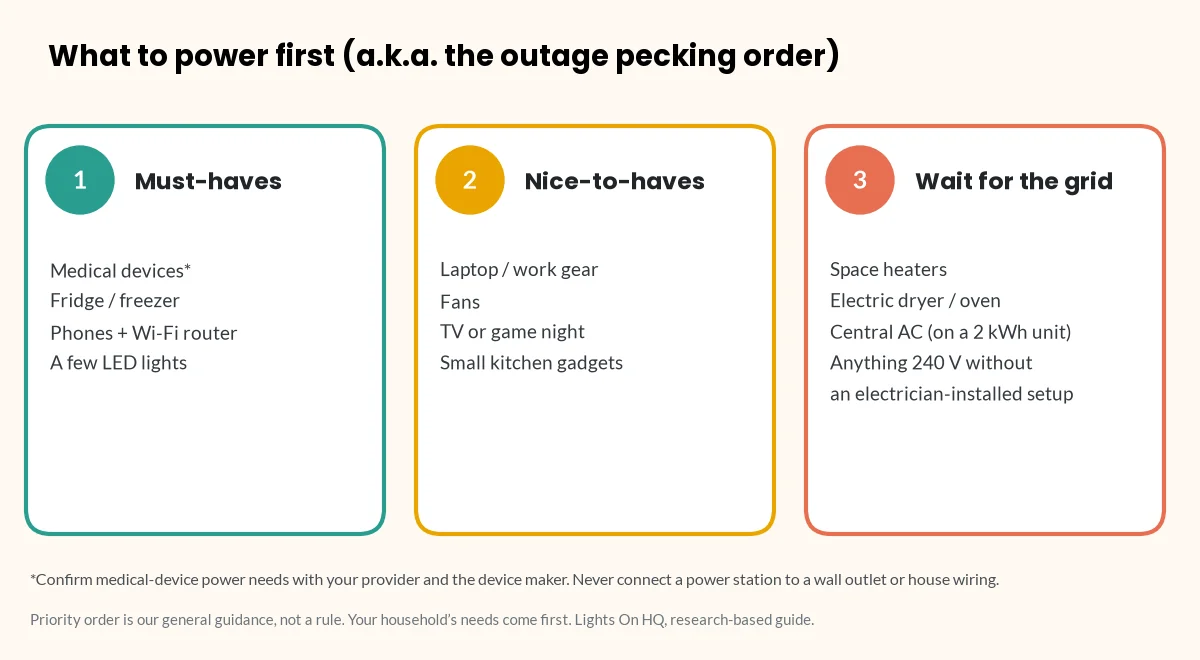
    Three-column diagram of outage priorities: 1, must-haves (medical devices, fridge or freezer, phones and Wi-Fi router, a few LED lights); 2, nice-to-haves (laptop, fans, TV, small kitchen gadgets); 3, wait for the grid (space heaters, electric dryer or oven, central AC on a 2 kWh unit, and anything 240 V without an electrician-installed setup).
    The outage pecking order: must-haves first, nice-to-haves second, big heat-makers when the grid comes back.

    ⚡ Quick take

    Power stations are batteries, not magic. Run the must-haves (medical devices, fridge, communication) first, the nice-to-haves (lights, laptop, fans) second, and save the “lol no” loads (space heaters, electric dryers, central AC on a 2 kWh unit) for when the grid comes back.

    ⚠️ Safety note: medical devices

    *For CPAP and other medical devices, confirm power needs and compatibility with your provider and the device maker. Don’t rely on a power station as your only plan for life-sustaining equipment. BLUETTI’s AC200L manual, for example, excludes use with devices that require a high-performance UPS, including medical equipment, from its warranty coverage (manual PDF). CPAP sizing guide

    What spec sheets can’t tell you

    • Real usable capacity. Expect roughly 75–80% of rated Wh at the AC outlet. Our planning rule is rated Wh × 0.8 (a judgment call based on manufacturer runtime formulas).
    • Fan noise, app quality, customer service and long-term reliability. These need hands-on use or lots of owner reports. We don’t have that data, and we won’t make it up.
    • Prices. They move constantly. Every price here is a brand-store price checked Oct 16, 2026. Confirm before you buy.

    Related

    Last checked: October 16, 2026. Found an error? Tell us and we’ll fix it and note the change.
  • Best Power Station to Run a Refrigerator During an Outage

    Best Power Station to Run a Refrigerator During an Outage

    Disclosure: Lights On HQ is reader-supported. If you buy through links on this page we may earn a commission, at no extra cost to you. Full disclosure.

    Research-based, not hands-on tested. We haven’t run these units on a fridge ourselves. Specs and prices come from manufacturer pages and manuals checked October 16, 2026; food-safety guidance is from FoodSafety.gov/USDA. See our methodology.

    📝 TL;DR

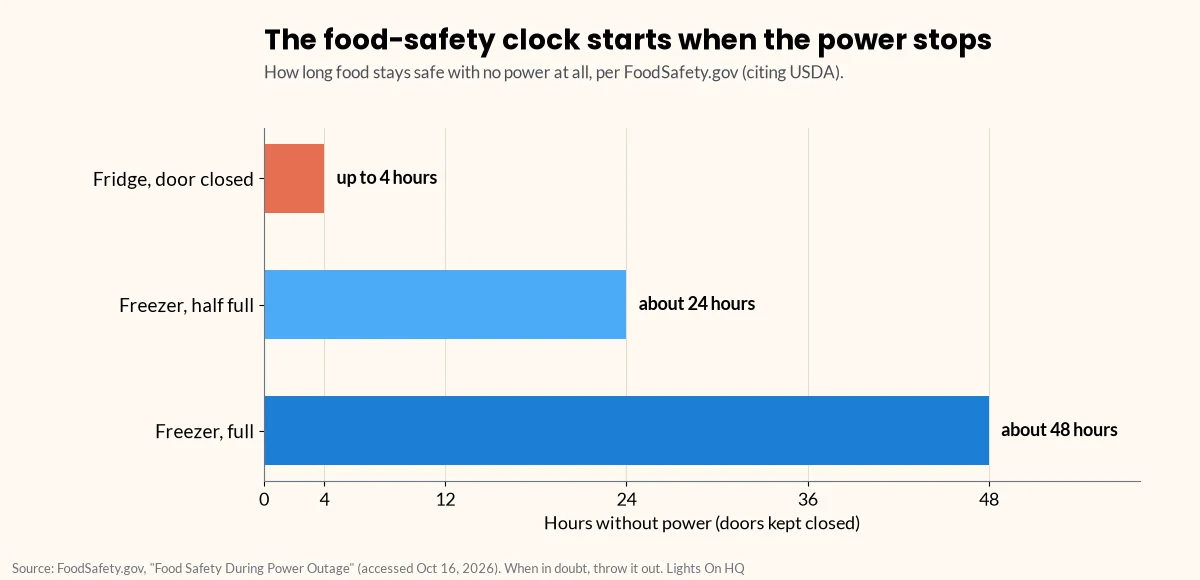
    • The clock is ticking: a closed fridge keeps food safe for up to 4 hours without power; a full freezer about 48 hours (24 if half full) (FoodSafety.gov).
    • Size by energy, not nameplate: use the kWh/year on the yellow EnergyGuide label. Example: 500 kWh/yr ≈ 1,370 Wh/day.
    • Check surge: fridge compressors need a startup spike. Pick a unit with a published surge rating, and ignore “boost” modes.
    • Our spec picks (~2 kWh): Anker SOLIX C2000 Gen 2 (4,000 W peak, 10 ms UPS), EcoFlow DELTA 2 Max (4,800 W surge, expandable), BLUETTI AC200L (7,200 W surge per BLUETTI, expandable to 8,192 Wh).
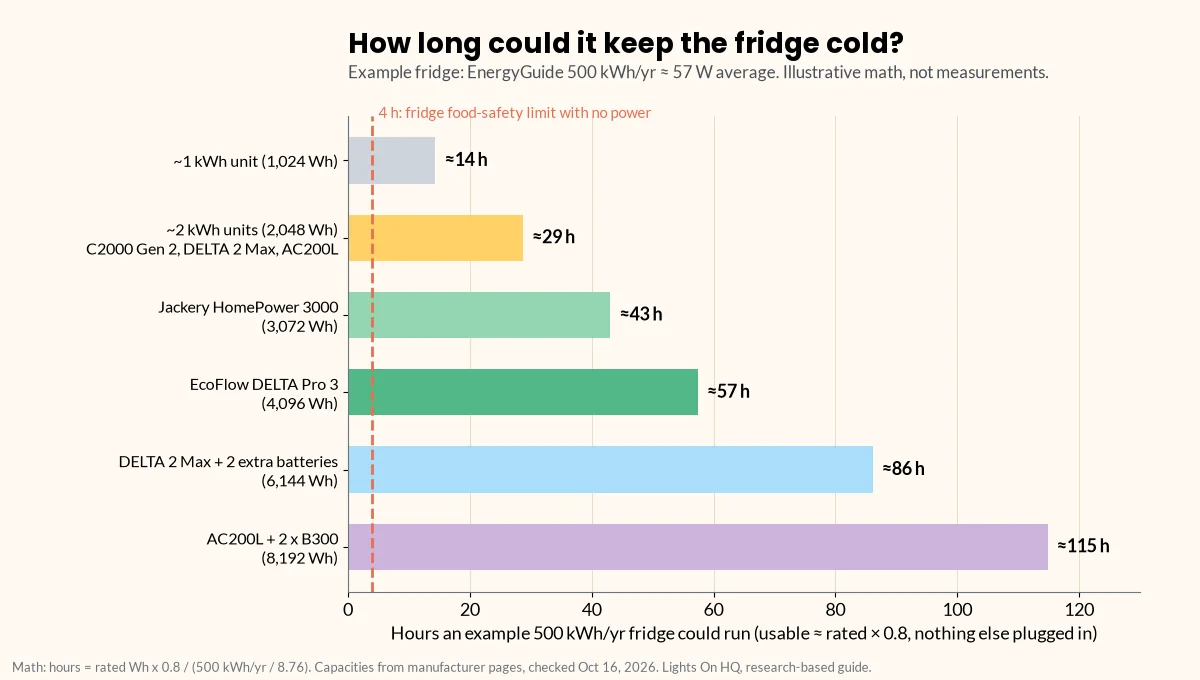
    • Example fridge (500 kWh/yr): about 29 hours on a ~2 kWh unit, 43 hours on 3 kWh (our 0.8 planning rule).

    Every outage has the same plot twist. First 10 minutes: “This is kind of cozy!” Hour two: someone opens the fridge “just to check,” and the whole family gasps like it’s a horror movie. Hour four: you’re Googling “is mayo still safe.”

    A power station that can keep your fridge humming turns that drama into a non-event. Here’s how to pick one that will actually start your fridge and keep it running long enough to matter.

    Step 1: Know your deadline

    According to FoodSafety.gov (citing USDA), your refrigerator keeps food safe for up to 4 hours during an outage if you keep the door closed. Perishables like meat, poultry, fish, eggs and leftovers should be thrown out after 4 hours without power. A full freezer holds a safe temperature for about 48 hours, or 24 hours if half full and the door stays shut (FoodSafety.gov).

    Bar chart of food-safety time limits with no power, per FoodSafety.gov citing USDA: a closed refrigerator keeps food safe for up to 4 hours, a half-full freezer about 24 hours, and a full freezer about 48 hours.
    No power at all? The clock: fridge up to 4 hours, freezer about 24 hours half full or 48 hours full (FoodSafety.gov).

    ⚡ Quick take

    Even a modest power station buys you time past that 4-hour line. The freezer is the patient one; the fridge is the drama queen. Keep both doors closed and let the battery do its thing.

    Step 2: Figure out how much energy your fridge uses

    Skip the nameplate watts. The compressor cycles on and off, so nameplate watts overstate daily use. Instead:

    • Find the yellow EnergyGuide label (or your model’s spec sheet) and read the kWh per year.
    • Daily Wh = (kWh per year ÷ 365) × 1,000. Example: 500 kWh/yr ÷ 365 × 1,000 ≈ 1,370 Wh/day, or about 57 W on average.
    • Most accurate: a plug-in watt meter for 24 hours.

    Then add a margin for losses. Our planning rule is usable Wh ≈ rated Wh × 0.8 (a judgment call based on manufacturer runtime formulas such as BLUETTI’s). Full math: how long will a 2,000 Wh power station run a fridge?

    Horizontal bar chart of how long an example refrigerator rated 500 kWh per year could run: about 14 hours on a 1,024 Wh unit, 29 hours on 2,048 Wh units, 43 hours on the 3,072 Wh Jackery HomePower 3000, 57 hours on the 4,096 Wh EcoFlow DELTA Pro 3, 86 hours on an expanded DELTA 2 Max (6,144 Wh) and 115 hours on an expanded BLUETTI AC200L (8,192 Wh), with a dashed line at the 4-hour food-safety limit.
    Illustrative math for a 500 kWh/yr fridge with nothing else plugged in: hours ≈ rated Wh × 0.8 ÷ 57 W.

    Step 3: Make sure it can start the compressor

    Fridges and freezers pull a short startup spike when the compressor kicks on, and that spike can be several times the running draw. Check your fridge’s manual or ask the manufacturer. Then:

    • The station’s continuous AC output must exceed everything running at once.
    • The station’s surge rating must cover the startup spike.
    • Ignore “boost” figures. EcoFlow’s “X-Boost” and BLUETTI’s “Power Lifting” are for heating appliances. BLUETTI’s manuals say Power Lifting isn’t for motor or compressor loads. More: surge vs running watts.

    The picks (by published specs)

    All prices are brand-store prices on Oct 16, 2026. “Example fridge hours” uses a 500 kWh/yr fridge and our 0.8 rule. It’s illustrative, not a measurement.

    Model Capacity AC out / surge UPS Solar in Weight Price Example fridge hours
    Anker SOLIX C2000 Gen 2 2,048 Wh 2,400 W / 4,000 W peak 10 ms 800 W 41.7 lb $999.99 ~29 h
    EcoFlow DELTA 2 Max 2,048 Wh (to 6,144) 2,400 W / 4,800 W not listed 1,000 W 50 lb $1,049 ~29 h (~86 h max expanded)
    BLUETTI AC200L 2,048 Wh (to 8,192) 2,400 W / 7,200 W† ≤20 ms 1,200 W 62.4 lb $899 ~29 h (~115 h max expanded)
    Jackery Explorer 2000 v2 2,042 Wh 2,200 W / 4,400 W <20 ms 400 W 39.5 lb $899 (sold out) ~29 h
    BLUETTI Elite 200 V2 2,073.6 Wh 2,600 W / not published for motors‡ ≤15 ms 1,000 W 53.4 lb $899 ~29 h
    Jackery HomePower 3000 3,072 Wh 3,600 W / 7,200 W ~20 ms 1,000 W 59.5 lb $1,349 ~43 h

    † BLUETTI’s AC200L product page lists 7,200 W surge; its user manual lists overload of 3,000–3,600 W for 5 seconds and over 3,600 W for 0.5 s. The two don’t match. Until BLUETTI clarifies, treat 7,200 W as the brand’s headline figure, not a guaranteed compressor-start rating. ‡ BLUETTI’s 3,900 W figure for the Elite 200 V2 is Power Lifting for resistive loads only. We didn’t find a separate motor-surge rating. Ask BLUETTI before relying on it for a fridge.

    Sources: Anker C2000 Gen 2, EcoFlow DELTA 2 Max, BLUETTI AC200L and manual, Jackery Explorer 2000 v2, BLUETTI Elite 200 V2, Jackery HomePower 3000.

    Best all-rounder for a fridge: Anker SOLIX C2000 Gen 2

    A published 4,000 W peak figure, a 10 ms UPS (so the fridge just keeps going when the grid drops) and a manageable 41.7 lb. Its 800 W solar input is mid-pack. Check C2000 Gen 2 price at Anker SOLIX

    Best for long outages with solar: EcoFlow DELTA 2 Max or BLUETTI AC200L

    Both start at 2,048 Wh and expand: the DELTA 2 Max to 6,144 Wh, the AC200L to 8,192 Wh. The AC200L takes 1,200 W of solar; the DELTA 2 Max takes 1,000 W. Downsides: the AC200L is the heaviest here at 62.4 lb, and EcoFlow doesn’t list a UPS switchover time for the DELTA 2 Max. Check DELTA 2 Max price at EcoFlow · Check AC200L price at BLUETTI

    Best value for a fridge and more: Jackery HomePower 3000

    About $0.44 per Wh on our check date, with 3,072 Wh and a 7,200 W surge rating. It’s 120 V only and 59.5 lb. Check HomePower 3000 price at Jackery

    ⚡ Quick take

    For a fridge, surge rating + UPS matter as much as capacity. A unit that can’t start the compressor is just a very expensive doorstop.

    Fridge outage tips that don’t need a battery

    • Keep the doors closed. That’s the single biggest thing FoodSafety.gov recommends.
    • When in doubt, throw it out, and never taste food to check if it’s safe (FoodSafety.gov).
    • Plug the fridge straight into the power station with the fridge’s own cord (or a properly rated cord). Don’t connect the station to a wall outlet or your home wiring.

    ⚠️ Safety notes

    • No backfeeding. Never plug a power station into a wall outlet to feed your house circuits; the CPSC warns this endangers utility workers and neighbors (CPSC, PDF). For hard-wired circuits, hire a licensed electrician to install a transfer switch or inlet. Transfer switch explainer
    • Food safety beats battery math. If the fridge was above 40°F for more than 2 hours, follow FoodSafety.gov’s chart, whatever the battery says.

    Related

    Last checked: October 16, 2026. Found an error? Tell us.